

cleanvideoaudio.com
CleanVideoAudio wipes out fan hum and room tone from your clips so you actually sound crisp without paying for a subscription.
About cleanvideoaudio.com
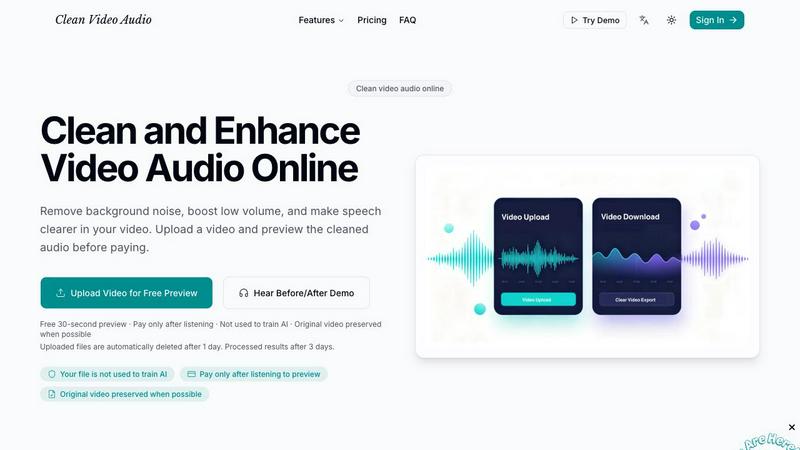
Alright, let's be real for a second. You've probably spent way too much time trying to make your video sound decent when you're not recording in a pro studio. Maybe it's the fan noise from your laptop, that annoying room hum, or your voice sounding like you're talking from inside a pillow. That's where cleanvideoaudio.com slides in to save the day. It's a browser-based AI tool that's built specifically for anyone who records speech-focused videos outside a professional setup. No fancy editing software, no audio plugins, and definitely no technical degree required. You just upload your video file (MP4, MOV, or WebM up to 500 MB), pick a cleanup mode, and listen to a free 30-second preview of the cleaned audio. If it sounds good, you pay a small fee to get the full cleaned MP4 export. The best part? Your original video track stays intact whenever possible, so you're not losing any quality. This tool is perfect for YouTube creators, online course instructors, screencasters, webinar presenters, interviewers, and UGC content creators who need clearer audio fast. It handles light noise, volume correction, and mild muffling like a champ, but it's not a miracle worker for heavy distortion, loud music, or clipped recordings. The transparent preview-before-paying model means you can test the results risk-free before committing any cash. Plus, your files get automatically deleted after a day, and processed results after three days, so privacy is solid.
Features of cleanvideoaudio.com
Free 30-Second Preview Before You Pay
This is the real MVP feature. You don't have to blindly pay for audio cleanup and hope for the best. Instead, you upload your video, choose a cleanup mode, and get a free 30-second preview of the cleaned audio. You can hear exactly how your video will sound after processing without spending a dime. If the result is fire, you pay for the full export. If it's not quite there, you walk away with zero regrets. It's like a test drive for your audio, and honestly, every tool should work this way.
Browser-Based with Zero Installation
No downloads, no installations, no messing around with plugins or software updates. Everything happens right in your browser. You just drag and drop your video file, pick your cleanup mode, and let the AI do its thing. This is huge for people who don't want to deal with complicated editing suites or who are working on a shared or restricted computer. It's also perfect for quick fixes when you're in a hurry and just need your audio cleaned up without the headache.
Preserves Original Video Track
Here's the thing: most audio cleanup tools either mess with your video quality or force you to re-encode everything. CleanVideoAudio.com is smarter than that. It processes only the audio track and preserves your original video track whenever possible. This means you get cleaner sound without losing any of the visual quality you worked hard to capture. No weird compression artifacts, no resolution drops, just better audio layered on top of your original footage.
Multiple Targeted Cleanup Modes
This isn't a one-size-fits-all situation. The tool offers specific cleanup paths for different audio problems. You can remove background noise like fan hum and room tone, fix low volume that makes your voice sound distant, enhance muffled speech that sounds dull or covered, reduce echo from hollow rooms, remove wind noise from outdoor recordings, and even clean up interview audio with uneven speaker levels. Each mode is tuned to handle that specific problem, so you get better results than a generic "make it sound better" button.
Use Cases of cleanvideoaudio.com
YouTube Creators Dealing with Background Noise
You're recording a talking-head video for your channel, and your laptop fan is ruining every take. Or maybe you're in a room with a noisy AC unit that you can't turn off. Instead of reshooting or spending hours in a DAX, you just upload your video to CleanVideoAudio.com and let it strip out that background noise. The preview lets you hear if it worked before you commit, and the final export keeps your video looking crisp. It's a lifesaver for creators who don't have a soundproof studio but still want professional-sounding content.
Online Course Instructors with Low Volume Issues
You've recorded a whole course module, but when you play it back, your voice sounds like a whisper. Maybe your mic was too far away or your recording levels were off. Instead of re-recording everything (which nobody has time for), you use the Fix Low Volume mode. The AI boosts your speech and makes it more even, so your students can actually hear what you're saying without cranking their volume to max. It's perfect for course creators who record in untreated rooms or with basic equipment.
Screencasters and Webinar Presenters
You're doing a screen recording or hosting a webinar, and your voiceover sounds muffled or distant. Maybe you're using a cheap headset mic or recording in a room with bad acoustics. The Enhance Voice mode brings your speech forward and makes it clearer without changing your natural tone. This is huge for tutorials, demos, and presentations where your voice is the main focus. Your viewers will actually understand what you're saying without straining to hear.
Interviewers with Uneven Speaker Volume
You recorded an interview, but one person is loud and clear while the other sounds like they're in another room. Or maybe there's background noise on one side that's distracting. CleanVideoAudio.com can balance out the volume levels and reduce the noise, making both speakers sound more consistent. The preview feature lets you check if the cleanup works for both voices before you export. This is perfect for podcasters, journalists, and content creators who conduct remote or in-person interviews.
Frequently Asked Questions
What file formats and sizes does CleanVideoAudio.com support?
You can upload MP4, MOV, and WebM video files up to 500 MB in size. That covers pretty much all the common formats you'd be using for talking-head videos, screen recordings, webinars, and interviews. If your file is larger than 500 MB, you might need to compress it first or trim it down. The tool is designed for speech-focused videos, so it works best with files that are primarily voice content rather than music or heavy action footage.
How does the free preview work and what happens if I don't like the result?
When you upload your video, the tool processes a short 30-second segment and gives you a cleaned preview to listen to. You can hear the before and after difference right in your browser. If you like what you hear, you pay for the full export. If not, you don't pay anything at all. It's completely risk-free. The preview uses a segment from your actual video, so you're getting a real sample of the cleanup quality, not some generic demo. Your uploaded files are automatically deleted after one day, and processed results after three days.
What types of audio problems can CleanVideoAudio.com fix versus what it can't handle?
This tool works best for speech-focused videos with light background noise (like fan hum, room tone, or laptop noise), low volume, mild muffling, and slight echo. It's great for fixing common issues in talking-head videos, courses, screen recordings, and interviews. However, it may not fully fix heavy wind noise from outdoor recordings, loud background music mixed with speech, overlapping speakers talking at the same time, or audio that's already clipped or distorted. If your audio is severely damaged, this might not be the right tool for the job.
Is my data private and is my video used to train AI models?
Nope, your files are not used to train AI models at all. CleanVideoAudio.com explicitly states that your uploaded content is not used for training purposes. Your privacy is taken seriously. Uploaded files are automatically deleted after one day, and processed results are deleted after three days. This means your video content doesn't stick around on their servers longer than necessary. The tool only processes the audio track whenever possible, preserving your original video track without re-encoding the whole file.
Pricing of cleanvideoaudio.com
Pricing starts at $3 for videos up to 5 minutes long and $5 for videos up to 20 minutes. You only pay after you've listened to the free 30-second preview and decided the cleaned audio sounds good. There's no subscription model here, so you're not locked into any monthly payments. You just pay per video when you need it. This pay-per-export model is perfect for creators who only need occasional audio cleanup and don't want to commit to a monthly fee for a service they might not use every week.
Explore more in this category:
Similar to cleanvideoaudio.com

airapvideo
AI rap video generator that turns two portraits into a vertical, lip-synced rap music video. Pick framing and length, get a shareable MP4.

Rhinobird
AI video ads, UGC-style videos, and product visuals for cross-border sellers and e-commerce brands.

GenX
All-in-one AI workspace to generate images, videos, and audio with multiple leading AI models.


Nano AI
Create and edit AI images, generate videos, and compare models in one creative workbench.

Tesla Roadster AI
Make a 15-second Roadster ramp-flip video from one photo of any vehicle.

