

Cosy
Cosy automates Slack intros and onboarding so your community vibes while you chill.
About Cosy
Alright, community heroes, listen up. You're out here trying to build an actual vibe in your Slack workspace, but between the endless "hellos," the awkward intros, and trying to figure out who knows what, you're burning the candle at both ends. Enter Cosy. Think of it as your ultimate Slack sidekick, a native bot designed to automate all the tedious stuff so you can focus on the magic. Built specifically for community managers, Cosy turns your standard Slack into a buzzing, connected community hub without you needing to be online 24/7. It handles the grunt work: automating personalized welcome DMs for new joiners, making cool intros between members, and even surfacing the most fire content so nothing gets lost. It gives your community a searchable directory right inside Slack, so people can actually find each other. The best part? It works while you sleep. Whether you're running a tight-knit crew of 50 or a massive server with hundreds, Cosy is here to take the manual labor off your plate, boost engagement on autopilot, and finally give you back those precious hours every week. It's like having a super-organized, never-tired co-manager that lives in your Slack.
Features of Cosy
Automated Onboarding Sequences
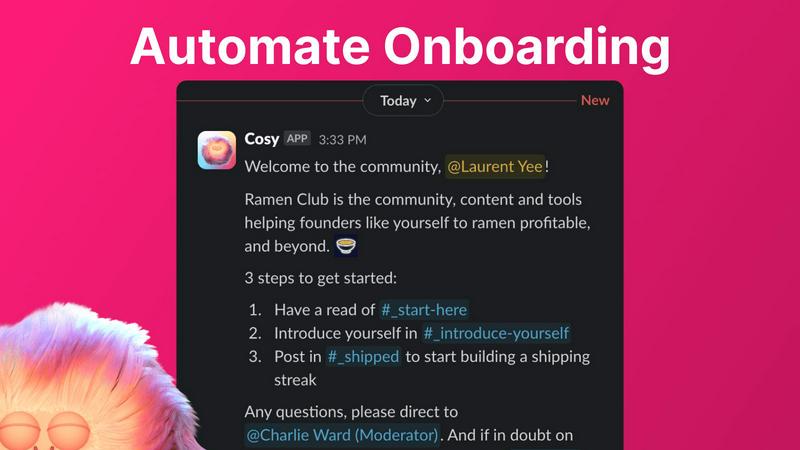
Stop manually DM'ing every new face that pops in. Cosy lets you set up to 10 different welcome DM sequences that fire off automatically when someone joins. You can make them come from you, a team member, or the Cosy bot itself. Fully customize the messages with their name, links, emojis—the whole shebang—and schedule them to send immediately or on a delay (think hours, days, or even months later). New member joins at 3 AM? They still get a warm welcome. It's the set-it-and-forget-it magic that saves you hours.
Member Introductions (The Connector)
Wanna spark those random, cool connections that make a community pop? Cosy's intro feature is your wingman. It automatically pairs up opted-in members in a 3-person DM (the two members and the Cosy bot) on a schedule you choose—every week, every month, you name it. It randomizes the matches to keep things fresh and avoids repeating recent intros. You get to customize the intro message template, pick the day and time, and then watch as your members start networking without you lifting a finger.
Searchable Member Directory
Forget clunky external databases or spreadsheets. Cosy builds a slick, searchable member directory right inside Slack. You create custom profile fields (up to 10 of them, with text or multiple-choice options), then nudge all your members to fill them out with one click. Members can use a slash command or the Cosy app to search for people by keywords or skills. It’s the easiest way to help your community members find the right person to ask for help, collaborate with, or just chat with.
Content Highlights & Moderation Alerts
Never let a banger post go unnoticed again. Cosy gives you instant slash-command superpowers to surface the good stuff. Use /most-engaged-messages to find the top 10 posts in a channel, or /most-engaged-messages-all to see what's trending across the whole workspace. You can also find /unreplied-messages to spot questions that got missed. Plus, it helps you keep the space safe by instantly flagging abusive or spammy messages, so you can moderate without constantly scrolling.
Use Cases of Cosy
For the Solopreneur Building a Tribe
You're running the show alone, trying to grow a community around your brand or product. Cosy is your force multiplier. It automates the welcoming committee and facilitates member connections, making your small group feel large, active, and tightly-knit from day one, all while you focus on creating content and strategy instead of admin work.
For Scaling Startup Communities
Your user base is exploding, and your community Slack is getting hectic. Manual onboarding is impossible, and new members get lost. Cosy scales with you, ensuring every single new user gets a personalized onboarding journey and can easily find experts and allies through the member directory, maintaining that early-vibe feeling even as you grow into the hundreds.
For Professional Network & Mastermind Groups
Your community's value is in high-quality connections and knowledge sharing. Cosy’s automated, randomized introductions are perfect for fostering serendipitous 1:1 conversations between professionals. The searchable directory lets members quickly find peers with specific skills or experience, turning your Slack into a powerful networking engine.
For Content-Driven & Educational Communities
Your community thrives on discussions and shared resources. Cosy’s content highlight features ensure the most valuable insights and answered questions don't get buried. Community managers can easily spotlight top contributions and identify unanswered threads, boosting the overall quality and engagement of conversations.
Frequently Asked Questions
How does the onboarding automation work?
When a new member joins your Slack, Cosy can automatically send them a sequence of welcome DMs. You create up to 10 different message sequences that can come from you, a teammate, or the Cosy bot. You control the timing (send now or delay it), personalize the messages, and add emojis or links. It runs completely on autopilot, so you save time and no one gets a cold shoulder.
Are the member introductions random?
Yes, but smart-random! Cosy randomly pairs up community members who have opted into the introductions feature. The cool part is it also avoids matching the same people together again if they've been recently introduced. You set the frequency (like every week or month) and the time, and Cosy handles the matchmaking to create fresh, serendipitous connections.
Do people have to leave Slack to use the Member Directory?
Nope, that's the beauty of it! The entire member directory lives natively inside Slack. Members can fill out their profile via a DM from the Cosy bot and search for others using a simple slash command (/member-directory) right from any channel. No extra apps, no new tabs, no context switching.
Is there a free plan?
Absolutely! You can get started with Cosy for free for communities with up to 250 members. If you need more, there's a full 30-day free trial for the unlimited members plan so you can test drive all the premium features with your whole crew before committing.
Pricing of Cosy
Cosy offers a free plan that supports communities with up to 250 members. For larger communities needing unlimited members and full access to all features, they provide a paid plan. You can try the unlimited plan with a 30-day free trial to see if it's the right fit for your thriving community hub.
Explore more in this category:
Similar to Cosy

@fuck.it - email with attitude
Private email. Pure. Secure. Exclusive. No ads, no tracking, no data selling. GDPR compliant, EU-hosted.

FreeVideoGenerator
Free AI video generator: turn text prompts and photos into video clips with Sora 2, Veo 3.1, Wan and more. Free starter credits, no watermark download


Novastart
Apps and files on an infinite canvas where people and AI agents work together.

Panzoe
Panzoe is an all-in-one AI platform for personal productivity, business automation, AI assistants, content creation, and custom AI solutions.

AUTOMATER.ai
A tray helper for every AI coding tool: one searchable library of past sessions, waiting alerts and usage across 9 providers.


AI Email Filter
AI Email Filter sorts incoming mail into folders using plain-language prompts you write. Works with any IMAP mailbox; bring your own LLM if you want.