

DeepFake
DeepFake is your all-in-one studio for making consent-based AI deepfake videos, face swaps, and music, no cap.
About DeepFake
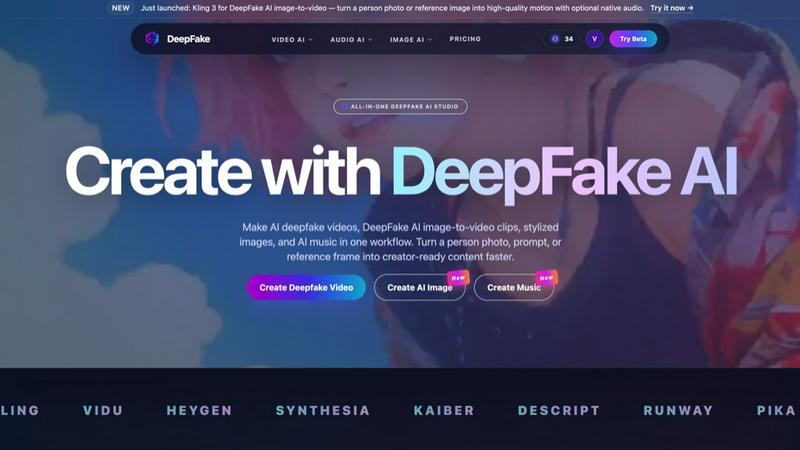
DeepFake is the ultimate all-in-one AI studio that lets you create consent-based deepfake videos, face swaps, image-to-video clips, AI images, and even AI music all in one place. Think of it as your whole creative stack smashed into a single, brain-meltingly powerful platform. No more jumping between Runway, Pika, Luma, Kling, and a dozen other tabs just to get a single project done. DeepFake brings everything under one roof, so you can turn a simple photo of a person, a text prompt, or a reference frame into creator-ready video, image, and audio content faster than you can say "viral." It is built for creators who want to go viral without the headache of stitching together separate apps. Whether you are making short-form edits, avatar content, stylized image sets, or music-backed reels, DeepFake has you covered. The platform just dropped Kling 3 for AI image-to-video, letting you take a person photo or reference image and turn it into high-quality motion with optional native audio. Plus, you get face exchange tools, 60+ video effects, and AI music generation all baked in. The vibe is all about speed, simplicity, and safety, with strict guardrails against non-consensual content. If you are tired of juggling tools and want one studio that does video AI, audio AI, and image AI without the drama, DeepFake is your new best friend. It is the deepfake maker AI that Reddit users keep comparing, and for good reason.
Features of DeepFake
AI Deepfake Video Maker with Face Exchange
This feature lets you create AI deepfake videos from a single prompt or a reference photo. You can swap faces, animate portraits, and build share-ready clips in seconds. It uses consent-based workflows, so you need permission for any face you upload, but the results are wild. Turn a person photo into a talking avatar or a full motion video with face consistency controls. It is perfect for character-led campaigns, short-form content, or just flexing your creative muscles without needing a Hollywood budget.
Image-to-Video with Kling 3
Just launched, Kling 3 for DeepFake AI image-to-video is a game-changer. Upload a person photo or reference image, and the AI turns it into high-quality motion with optional native audio. You get smooth, realistic movement that feels like actual video footage, not some janky slideshow. This feature is ideal for breathing life into static images, whether it is a portrait, a product shot, or a storyboard frame. It is fast, intuitive, and makes you look like a pro editor even if you have no clue what you are doing.
AI Image Generator
DeepFake includes a full-blown AI image generator for creating portraits, reference frames, thumbnails, and storyboards. These images feed directly into your deepfake and video workflows, so you can maintain a consistent style across your whole project. Need a character for your next viral clip? Generate it here. Want a custom thumbnail that pops? Done. The image generator is tightly integrated, meaning you can go from a prompt to a video without ever leaving the platform. It is all about keeping your creative flow intact.
AI Audio Generator
This feature lets you generate music, voiceovers, and cloned dialogue to finish off your deepfakes, avatar videos, and short-form edits. No more hunting for royalty-free tracks or recording crappy voiceovers on your phone. DeepFake handles audio AI natively, so you can add a beat, a narration, or even a cloned voice that matches your character. It is all designed to make your content feel complete and polished, whether it is a music-backed reel or a talking avatar video. Audio, video, and image all in one workflow.
Use Cases of DeepFake
Social Media Content Creation
Creators on TikTok, Instagram, and YouTube can use DeepFake to pump out high-quality deepfake videos, face swaps, and image-to-video clips in minutes. Turn a single photo of yourself or a character into a full motion video with AI music in the background. It is perfect for keeping up with trends, making reaction content, or building a consistent posting schedule without burning out. The all-in-one workflow means you can go from idea to upload faster than your competition.
Character-Led Campaigns for Brands
Brands and marketers can leverage DeepFake to create avatar-based campaigns where a single character appears across multiple videos, images, and audio clips. Use face exchange to swap in a brand ambassador or a fictional mascot, then animate them with image-to-video. Add AI-generated voiceovers and music to tie it all together. This is huge for running consistent, engaging ads or social media pushes that feel personal and polished without needing a full production crew.
Storyboarding and Pre-Visualization
Filmmakers and video producers can use DeepFake to quickly turn storyboard sketches or reference photos into motion clips. This helps visualize scenes before committing to a full shoot. You can experiment with different faces, styles, and audio tracks to see what works. It saves time and money, letting you iterate fast and lock down creative decisions early. The AI image generator also helps you create custom reference frames on the fly.
Personal Projects and Meme Culture
For the internet culture crowd, DeepFake is a goldmine for making funny face swap videos, deepfake memes, or music-backed reels that go viral. You can take a photo of a friend (with their permission, obviously) and turn it into a dancing avatar or a talking clip. The 60+ video effects let you add wild transitions and filters. It is all about having fun, going viral, and flexing your creative skills without needing a degree in video editing.
Frequently Asked Questions
What is DeepFake?
DeepFake is an all-in-one AI platform for creating consent-based deepfake videos, face exchanges, image-to-video clips, AI images, and AI music. It is built for creators who need video, image, and audio generation in one place, so you can stop juggling separate apps and focus on making content that pops. It supports tools like Runway, Pika, Luma, Kling, and more, all integrated into a single workflow.
Is DeepFake free to try?
Yes. If you are looking for a free option, the starter tier includes credits for face exchange, image-to-video, AI images, and music. You can test the waters without spending a dime. Paid plans unlock higher resolutions, longer generations, batch runs, and priority queues, so you can scale up when you are ready to go hard.
Can I make AI deepfake videos from one photo?
Absolutely. You can upload a single consented photo of a person and create AI deepfake videos, talking avatars, and image-to-video workflows with motion, style, and face consistency controls. The AI handles the heavy lifting, turning a static pic into a full-blown video clip in seconds.
How does content safety work?
DeepFake blocks non-consensual sexual content, impersonation fraud, misinformation campaigns, and other harmful deepfakes. You must have rights and permission for any face, voice, or media you upload. The platform is built with safety guardrails to prevent abuse, so you can create with confidence and keep things ethical.
Similar to DeepFake

Crazy Frog AI
Turn 1–2 photos into the viral Crazy Frog invisible-moped chase video in seconds.

AIVideoAgent
Turn text ideas or reference images into videos through conversation, with agent-assisted prompts and a choice of video models.

airapvideo
AI rap video generator that turns two portraits into a vertical, lip-synced rap music video. Pick framing and length, get a shareable MP4.

Rhinobird
AI video ads, UGC-style videos, and product visuals for cross-border sellers and e-commerce brands.

GenX
All-in-one AI workspace to generate images, videos, and audio with multiple leading AI models.


Nano AI
Create and edit AI images, generate videos, and compare models in one creative workbench.

Tesla Roadster AI
Make a 15-second Roadster ramp-flip video from one photo of any vehicle.