

Easymotion - AI Motion Graphic Generator
Easymotion lets you create pro motion graphics, map animations, and social videos by just chatting with AI in minutes.
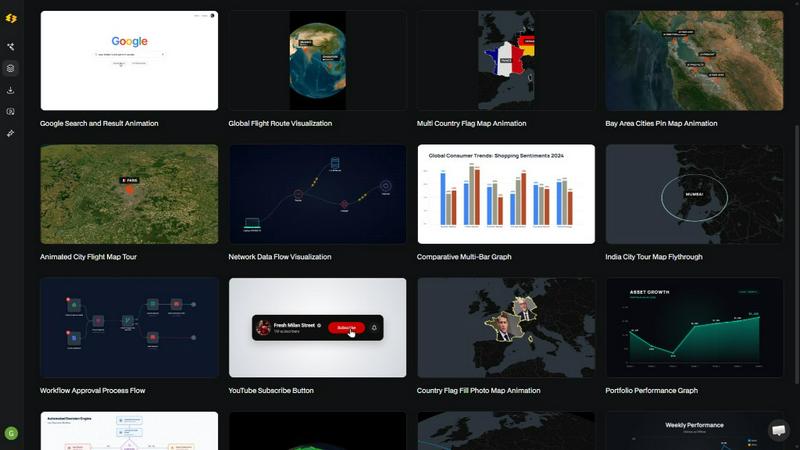
About Easymotion - AI Motion Graphic Generator
Alright, let's cut the fluff. Easymotion is basically your new secret weapon for making dope motion graphics without selling your soul to After Effects. It's an AI-powered motion graphics generator and map animation platform that's built for creators, editors, founders, and marketers who are tired of spending hours on complex timeline editing. You know that feeling when you have a killer idea but the thought of keyframing makes you want to scream? Easymotion fixes that.
Here's the deal: you can turn literally anything into an animated video. Got a static image? Upload it and watch AI bring it to life. Have a boring spreadsheet or CSV file? Drop it in and get animated charts that actually look professional. Need a map animation for your travel vlog or business presentation? Done in minutes, not hours. The platform supports all kinds of motion graphics like SaaS product promos, flowcharts, UI explainers, quizzes, and even geographic storytelling with flight routes and location pins.
The wild part? You don't need any design skills. Just describe what you want in plain English, and the AI handles all the keyframes and animation curves. After generating your animation, you can tweak everything by chatting with AI to adjust colors, pacing, labels, layout, and visual style. It's like having a motion designer on speed dial. Plus, there's a premium template library so you can start from proven layouts and make them your own. Export as MP4 or MOV with transparent backgrounds for editing workflows, social content, product marketing, presentations, and client deliverables. It supports 16:9 for YouTube, 9:16 for TikTok and Reels, 1:1 for square posts, and 4:5 for feed-friendly vertical formats. Over 10,000 creators are already using it, and most videos take under 5 minutes to make. That's insane.
Features of Easymotion - AI Motion Graphic Generator
Static Design into Animation
Upload any image and let AI turn it into a stunning animated video. Like, you have a flat logo or a boring screenshot? Drop it in, and Easymotion adds smooth motion, transitions, and visual flair that makes it look like you spent hours in a professional editing suite. Perfect for breathing life into old assets without starting from scratch.
Map Animations Made Easy
Create map animations faster than you ever thought possible. Whether you need flight routes, location pins, flag fill highlights, or full geographic storytelling visuals, Easymotion handles it all. Just describe your route or drop in coordinates, and the AI generates a cinematic map animation that's perfect for travel content, business presentations, or data visualization.
Boring Sheets into Visuals
Upload a CSV or XLSX file and watch AI transform your data into beautiful animated charts and graphs. No more staring at spreadsheets trying to figure out how to present your numbers. Easymotion automatically creates bar charts, line graphs, and other visualizations that actually stop the scroll. Data storytelling just got a major upgrade.
Transparent Export
Export your videos with an alpha channel, meaning you get a transparent background that you can drop directly into any editing software like Premiere Pro or Final Cut. This is huge for editors who need to layer motion graphics over existing footage. No more messing with green screens or complex masking. Just export and drag.
Use Cases of Easymotion - AI Motion Graphic Generator
Social Media Content Creators
YouTubers, TikTokers, and Instagram creators can pump out professional motion graphics in minutes instead of hours. Need a travel reel with animated flight routes? Done. Want a promo video for your coffee shop that looks like it cost thousands? Easy. Creators are racking up views with map animations and data visualizations that make their content stand out in crowded feeds.
Video Editors and Production Teams
Motion graphics can eat your entire day, and templates never quite work for what you need. Easymotion lets editors create exactly what they need in minutes and move on to the next project. Editors are skipping After Effects entirely and using Easymotion to work 3x faster on client projects, social content, and internal videos.
Marketing Teams and Campaign Managers
No more waiting on designers or going through endless back-and-forth emails. Marketing teams can create and iterate on videos themselves, keeping everything on brand. Campaigns that used to take weeks can now ship the same day. Whether it's product demos, explainer videos, or social ads, Easymotion makes it happen fast.
Founders and Startups
Freelancers are expensive and editing software has a steep learning curve. Startups are using Easymotion to build their social presence without hiring freelancers. Create professional videos for LinkedIn, Twitter, and Instagram that actually drive engagement. Founders report 5x more engagement on video posts compared to static images.
Frequently Asked Questions
What is Easymotion?
Easymotion is an AI-powered motion graphics generator that lets you create professional videos simply by chatting. You can instantly generate map animations, animate static images, turn spreadsheets into data visualizations, and create social media videos without needing complex software like After Effects. It's built for creators, marketers, and businesses who need to move fast.
How does AI motion graphics generation work?
It works in three simple steps. First, describe the animation you want in plain English. Second, refine the result using chat commands to adjust colors, timing, map styles, or assets. Finally, export your completed video as an MP4 or with transparent background. The AI handles all the keyframes and animation curves so you don't have to.
What types of videos can I create?
You can create a wide variety of motion graphics including SaaS product promos, flowcharts, animated charts, UI explainers, quizzes, map animations with flight routes and location pins, social media videos for TikTok, Instagram, and YouTube, data visualizations from spreadsheets, and even transparent background videos for editing workflows. The template library covers maps, charts, interfaces, social media, and more.
Do I need design skills to use Easymotion?
Nope, that's the whole point. You don't need After Effects experience or any design skills. Just describe what you want in plain English, and the AI does all the heavy lifting. You can customize colors, text, logos, and assets by chatting with AI. It's designed for people who need professional results without the learning curve.
Pricing of Easymotion - AI Motion Graphic Generator
The context provided does not include specific pricing information for Easymotion. The website mentions "Free to explore - No credit card required" and invites users to start creating, but no detailed pricing plans or tiers are listed. For accurate and up-to-date pricing, you should visit the Easymotion website directly.
Explore more in this category:
Similar to Easymotion - AI Motion Graphic Generator

Crazy Frog AI
Turn 1–2 photos into the viral Crazy Frog invisible-moped chase video in seconds.

AIVideoAgent
Turn text ideas or reference images into videos through conversation, with agent-assisted prompts and a choice of video models.

Easemic
Open-source Android comic & manga reader with encrypted cloud streaming and AI ad-page stripping.

LaunchIntel
Your AI agent picks relevant directories, submits your product in your browser and tracks every step. One-time purchase.

airapvideo
AI rap video generator that turns two portraits into a vertical, lip-synced rap music video. Pick framing and length, get a shareable MP4.

ImageAgent
Create and edit AI images through conversation, using text or reference images and refining results in chat.

CloneWebsite
Clone any webpage pixel-perfect, export HTML/CSS/ZIP or React/Vue components.

ToolVerified
Real people test every tool before it goes live. Real users vote to build the daily charts. No auto-approved links, no broken demos.