

EditTextImage
EditTextImage swaps text in your pics instantly no design skills needed just upload and let it handle the rest.
About EditTextImage
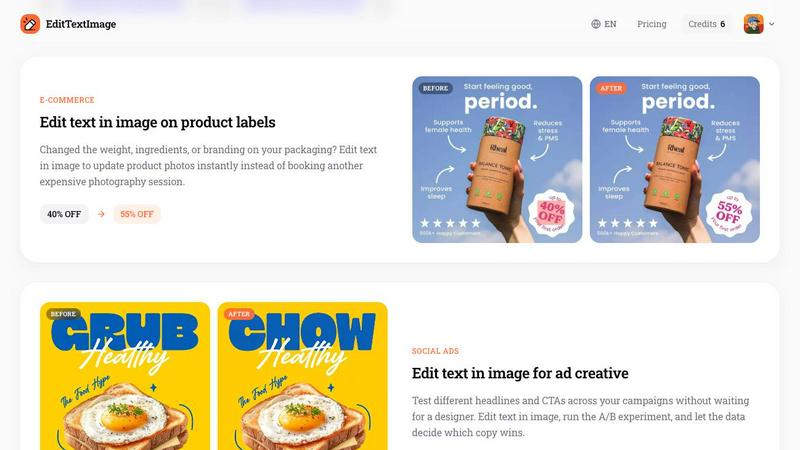
Alright, let's be real for a second. You know that gut-wrenching feeling when you need to change one single word on a finished poster, screenshot, or product photo, but the original design file has vanished into the digital abyss? Yeah, we've all been there. That's where EditTextImage comes in to save your bacon. This is an online AI tool that lets you edit text in any image file without needing Photoshop skills, expensive subscriptions, or even having the actual font file installed on your computer. You just upload the image, type in the original text and what you want to replace it with, and the AI does its magic by sampling the typography straight from the pixels. It keeps the font, color, drop shadow, perspective, and background all perfectly intact. The whole process takes about 10 seconds and spits out a crisp 2K resolution result. Whether you're a marketer trying to A/B test headlines, a small business owner updating product labels, or just someone who made a typo on a flyer, this tool is for you. First edit is completely free with no credit card required, and after that it's a one-time payment of $9.90 for 30 edits. No monthly subscriptions, no hidden fees, just pure pixel-perfect text replacement that actually works.
Features of EditTextImage
Pixel-Perfect Font Matching
This is the secret sauce right here. Most basic image editors will just slap a generic font on top of your text and call it a day, completely ignoring the vibe of the original design. EditTextImage doesn't play that game. The AI actually samples the typeface directly from the pixels of your image, analyzing every curve, serif, and weight detail. This means even those fancy paid fonts you never bought or hand-lettered calligraphy styles get matched perfectly. The result looks like you still have the original design file and edited it natively, not like someone used MS Paint on a Tuesday afternoon.
Complete Style Preservation
Changing text isn't just about swapping words, it's about making sure everything around that text still looks right. This tool preserves the color, size, drop shadow, lighting, and even perspective of the original text. So if your text was angled at 45 degrees with a soft shadow behind it, the replacement text will sit at that exact angle with the exact same shadow. No weird smearing of the background, no awkward warping of the surrounding pixels. Everything stays exactly where it should be, like you never even touched the image.
Blazing Fast Processing
Time is money, and nobody wants to wait around for a design tool to render. EditTextImage averages about 12 seconds to complete an edit. You upload your image, type in the text change, and boom, you've got your result before you even finish grabbing a coffee. This speed makes it perfect for those urgent last-minute fixes when your designer is offline or you're on a tight deadline. No more opening heavy software, creating layers, or messing with complex tools. Just upload, type, and download.
No Subscription Model
Let's be honest, subscription fatigue is real. Everyone wants to charge you monthly for basic features you barely use. EditTextImage keeps it simple with a pay-as-you-go credit system. You get one free credit just for signing up with Google, no credit card needed. After that, it's a flat one-time payment of $9.90 for 30 credits, and those credits never expire. You can use them whenever you want, whether that's all in one day or spread out over a year. Plus, commercial use is included, so you can use the edited images for your business without worrying about licensing issues.
Use Cases of EditTextImage
Fixing Typos in Documents
We've all been there. You finalize a contract, invoice, or official document, send it off, and then spot a typo in the company name or a wrong date. Normally, you'd have to track down the original file, open the software, make the fix, and re-export. With EditTextImage, you just take the finished PDF screenshot or scan, upload it, and fix the text directly. Update invoice numbers, correct dates on certificates, or fix spelling errors in legal documents without needing the source file. It's a lifesaver for admin teams and small business owners who don't have a full design department on speed dial.
Updating Event Posters and Flyers
Event planning is chaotic, and details change constantly. The date moves, the venue changes, a speaker drops out, or the time shifts. Your beautiful finished poster is now outdated, and your designer is probably asleep or busy with other clients. Instead of paying for a full redesign or trying to recreate the file from scratch, just use EditTextImage to update the text on the existing poster. Change "This Sunday" to "Next Sunday" or swap out a speaker's name in seconds. You save hundreds of dollars every season on redesign costs and keep your marketing materials consistent.
App Localization for Screenshots
If you've ever had to submit an app to the App Store or Google Play, you know the pain of creating screenshots in multiple languages. You need to show the UI in English, Spanish, French, German, and like ten other languages. Instead of rebuilding every single UI mockup from scratch for each language, you can use EditTextImage to swap the text on your existing screenshots. The AI preserves the exact pixel layout, so your buttons, menus, and interface elements stay perfectly aligned. It's a massive time saver for developers and product managers who need to localize their app for global audiences fast.
A/B Testing Ad Creative
Digital marketing is all about testing what works. You want to try different headlines, calls to action, and promotional text across your ad campaigns. But waiting for a designer to create multiple versions of the same ad is slow and expensive. With EditTextImage, you can take your base ad creative, swap out the headline or CTA text, and generate multiple variations in minutes. Run your A/B experiments, let the data tell you which copy converts better, and scale the winner. No design bottleneck, no back-and-forth emails, just rapid iteration on your ad creative.
Frequently Asked Questions
Is there a limit on image size or file type?
Yes, you can upload images in PNG, JPEG, or WebP format, and the maximum file size is 10 MB. If your image is larger than that, you might need to compress it first or use a smaller resolution version. The output is delivered at 2K resolution, which is plenty sharp for most use cases like social media, web use, and print materials up to a decent size.
Do I need to have the original font file installed on my computer?
Nope, that's the whole point of this tool. You don't need the original font file at all. The AI samples the typography directly from the pixels of your image. It analyzes the shape, weight, and style of the existing text and recreates the replacement text to match. This means even rare, custom, or paid fonts that you don't own will be preserved perfectly in the edited image.
What happens if I use this for fraudulent or deceptive purposes?
Don't do that. The tool has an Acceptable Use Policy that explicitly prohibits using it to deceive third parties. This includes things like fake visa or immigration submissions, false refund or transaction proofs, and altered email or chat screenshots meant to falsify sender, content, or timestamps. The platform does not process IDs, passports, visa letters, official seals, bank statements, or tampered receipts. Violations result in account termination without refund, and request logs may be shared with law enforcement. Use it for legitimate purposes only.
Can I use the edited images for commercial projects?
Absolutely, commercial use is included with your credits. Whether you're updating product labels, creating ad creative for your business, or fixing marketing materials, you have full rights to use the output images. There are no additional licensing fees or restrictions beyond the Acceptable Use Policy. Just make sure you own or are licensed to edit the original image you upload.
Pricing of EditTextImage
EditTextImage keeps things simple and budget-friendly. You get one free credit just for signing in with Google, no credit card required. Use it to test the tool and see the magic for yourself. After that, it's a one-time payment of $9.90 for 30 credits. That's it. No monthly subscriptions, no recurring charges, no hidden fees. Your credits never expire, so you can use them whenever you need them, whether that's all at once or spread out over months. Commercial use is included in every credit, so you can use the edited images for your business without worrying about extra costs. Compared to paying for Photoshop or a Canva subscription just to change one word in an image, this is an absolute steal.
Similar to EditTextImage

ImageAgent
Create and edit AI images through conversation, using text or reference images and refining results in chat.

GenX
All-in-one AI workspace to generate images, videos, and audio with multiple leading AI models.

AppIconGenerator
Generate iOS and Android app icons from any image and export all platform sizes for free.

picttool
Create and edit images with a collection of easy-to-use AI tools


Design.com AI Image Generator
Turn text prompts into polished, copyright-safe visuals that plug directly into branded templates

Nano AI
Create and edit AI images, generate videos, and compare models in one creative workbench.

Ozil AI
Ozil AI turns one photo into the famous Ozil goal video. You chip the keeper and score in a 15 second vertical clip with sound and no watermark.