

OmniGemini
OmniGemini lets you remix text, images, and video into pro-level AI clips just by chatting about edits.
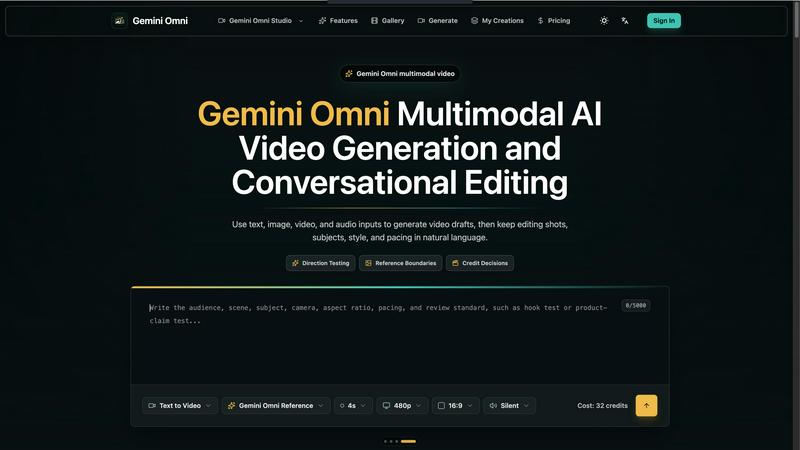
About OmniGemini
OmniGemini is basically the Swiss Army knife you didn't know you needed for AI video and image creation. It's a multimodal tool that lets you generate, remix, and edit videos and images all in one place, so you can stop juggling a million different apps and actually get stuff done. Think of it as your creative copilot that turns text prompts, reference images, and wild visual ideas into polished, ready-to-post content for social media, marketing campaigns, product showcases, and any other creative project you can dream up.
The whole vibe here is about speed and flow. Instead of hopping between a separate video generator, an image editor, and a timeline tool, OmniGemini keeps everything integrated. You start with an idea, throw in some text, an image, or even a video clip, and the AI whips up a draft. But it doesn't stop there. You can keep editing shots, subjects, style, and pacing using natural language. Yeah, you read that right. Just type something like "make the lighting warmer" or "zoom in on the product," and it just happens. No more digging through menus or watching tutorials.
Who is this for? Honestly, anyone who makes visual content. Social media managers tired of churning out the same old Reels, marketers testing ad concepts, product designers prototyping before a full shoot, or just creators who want to iterate fast without burning credits on lucky first renders. OmniGemini is built to make every test explainable. Every input, reference, generation, and edit is tied to a reason, so you're not just gambling. You're making smart, informed decisions about your content. It's the difference between guessing and knowing.
Features of OmniGemini
Multimodal Video Generation and Conversational Editing
This is the core magic. You can feed OmniGemini text, images, video clips, or even audio, and it will generate a video draft that actually makes sense. But the real flex is the conversational editing. Once you have that draft, you can tweak shots, subjects, style, and pacing using plain old natural language. Want to change the camera distance? Just say it. Need to swap the background? Type it. It's like having a video editor that actually listens to you and doesn't complain about the late-night revisions.
Direction Testing with Intent Start
Before you even touch the settings, OmniGemini forces you to think like a pro. You start by writing the shot question: are you testing a scene, a subject, motion, caption treatment, or channel fit? This "Intent Start" feature keeps you focused and stops you from just mashing the generate button. It's all about making AI video generation explainable across each test. The goal isn't a lucky first render; it's a deliberate, informed decision that saves you time and credits in the long run.
Reference Boundaries for Consistent Output
Ever had an AI tool just go rogue and ignore your reference image? OmniGemini fixes that with Reference Boundaries. Before you add motion or start editing, you lock down which person, product, layout, or style must remain recognizable. This means your brand assets, product packaging, or that specific creator's face stay consistent across every remix. No more random new images that look nothing like what you asked for. It's like putting a leash on the AI so it doesn't run wild.
Workflow Control with Credit Decisions
OmniGemini splits every video test into three clear entry points: state the shot question, lock the reference boundaries, then decide whether the run is worth submitting. This "Workflow Control" system keeps your prompts, references, and credits from living in three different places. You can see exactly how many credits a generation will cost based on your settings (resolution, duration, etc.), and you can prototype with shorter, lower-risk runs before spending big on longer or higher-quality variants. It's all about being smart with your budget.
Use Cases of OmniGemini
Social Media Content Creation
You've got a hot take for TikTok or a product drop for Instagram Reels, but you need a video that actually hooks people in the first three seconds. OmniGemini lets you turn your audience, claim, and visual hook into a first shot instantly. You can test different expressions, camera distances, and identity stability using a portrait or selfie as the visual anchor. It's perfect for creators who need to pump out consistent, high-quality content without burning out on manual editing.
Marketing Ad Layout Testing
Running paid social ads is expensive, so you can't afford to guess what works. With OmniGemini, you can run a fixed structure first to see whether captions, pacing, and visual hierarchy actually fit the channel spec. Test different layouts, see if the product detail is clear, and check if the key benefit pops once the image moves. It's like having a focus group in your pocket that gives you instant feedback on what's gonna convert.
Product Showcase and Prototyping
Before you spend a ton of money on a full explainer video or a professional product shoot, prototype the key moments with OmniGemini. Check whether packaging, material, scale, and the key benefit still work once the image moves. You can even test one step or a before/after moment to see if the concept has legs. It's a low-risk way to validate your visual direction and make sure you're not wasting resources on a dud.
Creative Direction and Mood Testing
Sometimes you just need to see if a vibe works. OmniGemini lets you test light, motion speed, material behavior, and available audio cues against a scene. Turn script tone into a visible reference for performance, mood, and camera framing. You can even record why a draft works or fails so the next generation isn't a total guess. It's the ultimate tool for directors, designers, and anyone who needs to communicate a visual idea before committing to a full production.
Frequently Asked Questions
What exactly is a multimodal AI creation tool?
A multimodal AI creation tool means it can understand and work with different types of input all at once. With OmniGemini, you can feed it text, images, video clips, and audio, and it will use all that info to generate a new video or image. It's not just a text-to-video generator. It's way smarter. It can take a reference photo of a product, a text description of the scene, and an audio track, then blend them into a cohesive video draft that actually respects your original inputs.
How does the conversational editing work?
Conversational editing is exactly what it sounds like. You talk to the AI in natural language, and it makes the changes. After your initial video is generated, you can type things like "make the lighting warmer," "zoom in on the subject," "change the background to a beach," or "speed up the pacing." The AI interprets your command and edits the video accordingly. No timeline, no keyframes, no complex software. Just you and the AI having a chat about what the final video should look like.
What are Reference Boundaries and why should I use them?
Reference Boundaries are constraints you set before generating or editing a video. They tell the AI which elements must stay the same, like a specific person's face, a product's packaging, a logo, or a particular layout. This is huge for brand consistency. Without them, the AI might randomly change your product's color or swap out your logo for something generic. By locking these boundaries, you ensure every remix and edit stays true to your original vision and brand guidelines.
How does the credit system work for video generation?
OmniGemini uses a credit system to manage your usage. The cost of a video generation is based on the settings you choose, like resolution (720p, 1080p, 4K) and duration (4s, 6s, 8s, 10s). You can see the exact cost before you hit generate. The smart move is to use shorter, lower-resolution runs for testing and prototyping. Once you've validated your direction, you can spend more credits on the final, high-quality version. It's a built-in system to help you be efficient and not waste resources on bad ideas.
Explore more in this category:
Similar to OmniGemini

ImageGPT
ImageGPT is an all-in-one AI creative platform for generating, editing and transforming images and videos using AI.

hotel-lobby
Two-person AI video concepts with warm, natural call-and-response scenes.

AI Album Cover Maker
Create release-ready album covers from a prompt or photo. Generate, refine, and export art for singles, EPs, mixtapes, and playlists.

Reelslaunch
AI video platform for faceless Reels: cinematic clips with native audio and auto-posting

Sprite Sheet Maker
A free browser-based toolkit for creating, cutting, converting, and previewing sprite sheet animations.

AIEnhancer
Enhance photos, create images, and generate videos with an all-in-one AI enhancer.


LTX 2.3 Free
LTX 2.3 prompts, workflows, demos, and practical AI video guidance.