

OmniVideo
OmniVideo turns your text prompts, product photos, and reference images into short motion drafts fast for real launch decisions.
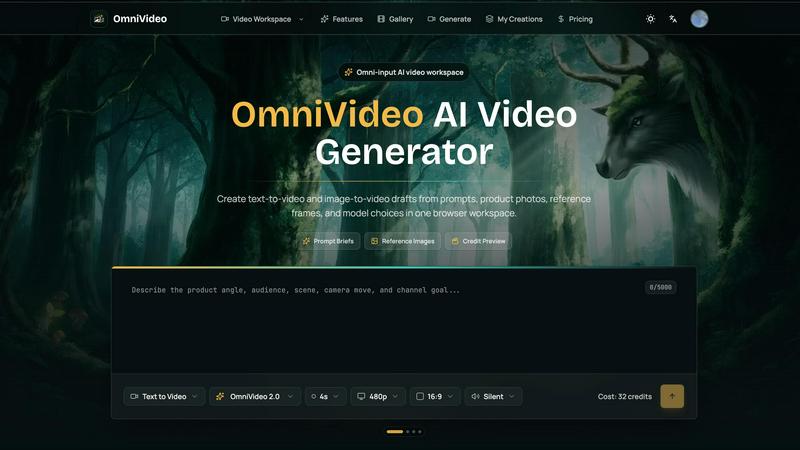
About OmniVideo
Alright, let's break it down. OmniVideo is basically your new best friend if you are tired of burning hours and cash on video ideas that might totally flop. It is an AI video generator that lives right in your browser, and its whole vibe is turning your messy thoughts, product photos, random reference frames, and campaign scribbles into short motion drafts. Think of it as a fast, low-stakes test kitchen for your video concepts. You can throw in a text prompt, upload a product shot, or even just a style frame, and it spits out a rough cut so you can see if the idea actually works before you dive into a full edit, hire a crew, or drop money on paid media. It is built for creators, marketers, ecommerce teams, and founders who need to move fast and make smart calls. The main value prop here is speed and clarity. You get to test the pacing, the hook, the product visibility, and the overall vibe without committing to a full production. You can choose different AI models, pick your aspect ratio, set the duration and quality, and even see the credit cost upfront so you never get surprised. It is all about making sure your video direction is solid before you spend real resources. In short, OmniVideo helps you fail fast, learn faster, and only invest in the winners.
Features of OmniVideo
Omni-Input Workspace
This is the core of the whole operation. Instead of jumping between a dozen different apps to write a prompt, find a reference, and check a model, OmniVideo keeps everything in one unified board. You can start with a text prompt, an image upload, or even a previous draft. The workspace is built to hold your entire brief: the audience, the scene, the camera movement, and the specific decision you are trying to make. It is like having a whiteboard for your video ideas that also happens to be an AI engine. You can mix and match inputs, see your credit preview, and plan your format all in the same view. No more losing your train of thought or having to rebuild a brief from scratch.
Model Choice and Comparison
Not all AI video models are created equal, and OmniVideo gets that. Instead of locking you into one engine, it lets you compare different available models from the same workspace. This is huge because you can see how a prompt looks in a more cinematic model versus one that is better for fast, social-style clips. You don't have to rebuild your brief in a separate tool or guess which model will give you the vibe you want. You just pick, generate, and compare. It gives you total control over the motion language, style, and quality without the hassle of managing multiple subscriptions or tabs.
Credit Preview and Budget Control
Nobody likes getting hit with surprise costs, especially when you are just exploring ideas. OmniVideo shows you the estimated credit cost right before you hit generate. This means you can play around with different durations, resolutions, and model choices while keeping your budget in check. You can test a quick 4-second 480p clip for a social hook, or go for a higher quality render for a product reveal, and you will always know exactly how many credits it will cost. It makes exploration feel safe and strategic, not like a gamble.
Iteration Memory
This feature is a total game changer for the creative process. When you refine a prompt or tweak the camera movement, OmniVideo remembers your previous attempts. You don't have to start from a blank box every single time. You can build on the motion language, adjust the framing, and tighten the constraints based on what you learned from the last draft. It creates a natural flow from "let's see what this looks like" to "okay, now let's make it better." It saves you from the frustration of losing your progress and helps you iterate faster toward a winning concept.
Use Cases of OmniVideo
Product Reveal and Pulse Check
You have a new product and a killer benefit, but you are not sure if it will actually read on screen in a few seconds. Use OmniVideo to generate a short product reveal draft. You can see if the lighting, the camera movement, and the product placement actually communicate the value. It is the perfect way to check your "product pulse" before you shoot a full commercial or even a paid social spot. You can test different angles and hooks to see what sticks.
Social Hook and Channel Testing
Every social media manager knows the first two seconds are everything. OmniVideo lets you quickly generate a "social hook" draft to test if your idea has that instant grab factor. You can plug in your prompt, choose a vertical 9:16 format, and see if the motion and text work together to stop the scroll. It is a fast, cheap way to validate your creative direction for TikTok, Reels, or YouTube Shorts before you put any serious production money behind it.
Marketplace Motion for Ecommerce
Ecommerce is all about showing the product in action. Use OmniVideo to create a motion pass from a simple product photo. You can turn a static image into a short, looping video that shows the product from different angles or in a lifestyle context. This is gold for Amazon listings, comparison grids, or any product page where a little motion can boost conversions. You can test the visual flow and see if the product stands out.
Creator Brief and Agency Workflow
If you are a brand manager or an agency creative, you know the pain of trying to explain a video idea to a creator or a production team. OmniVideo lets you generate a "storyboard bridge" draft. You can take that scene nobody can picture from the brief alone and turn it into a concrete visual. This aligns everyone on the vision, saves back-and-forth emails, and makes sure the final production matches your original intent. It is the ultimate communication tool for video projects.
Frequently Asked Questions
What exactly is OmniVideo and who is it for?
OmniVideo is a browser-based AI video generator that lets you create short motion drafts from text prompts, images, and reference frames. It is for anyone who needs to test video ideas fast before committing to a full production. This includes creators, marketers, ecommerce teams, and startup founders who want to validate concepts for product reveals, social media hooks, marketplace listings, and explainers. It is not a full video editor; it is a rapid prototyping tool for motion.
How does the credit preview system work?
Before you generate any video, OmniVideo shows you an estimated credit cost based on your selected settings. Factors like video duration, resolution (480p, 720p, etc.), and the chosen AI model all affect the credit cost. This lets you plan your exploration and stay within your budget. You can test a low-cost, low-resolution draft to check the idea, and then invest more credits for a higher-quality version once you are confident in the direction.
Can I use my own product photos and images as a starting point?
Absolutely. That is one of the core features. You can upload a product photo, a portrait, a style frame, or even a storyboard still to guide the AI. This is called "Image-to-Video" and it ensures the visual identity of your brand or product stays recognizable in the motion draft. It is perfect for ecommerce teams who want to see a static product shot come to life or for agencies testing a specific visual style.
What kind of video formats and durations can I create?
OmniVideo supports a variety of aspect ratios including vertical (9:16 for social), square (1:1 for some platforms), and horizontal (16:9 for YouTube or widescreen). You can also set the duration of your clip, typically starting at around 4 seconds for quick tests. The quality can be adjusted from lower resolutions like 480p for fast, cheap drafts, up to higher quality for a more polished look. You have full control to match the format to where the clip will be used.
Explore more in this category:
Similar to OmniVideo

CleanSmart
CleanSmart removes duplicates, fixes formatting, fills gaps, and flags anomalies in one automated pass. No code. No data engineers.

hotel-lobby
Two-person AI video concepts with warm, natural call-and-response scenes.

TrackMedia
Your Social Media Content Engine That Drives Revenue. Distribute your content to every social media platform and track it in real time. Use Ai agents

Reelslaunch
AI video platform for faceless Reels: cinematic clips with native audio and auto-posting

Forms Plugin
The #1 Native Form Builder Plugin for Framer - No Code, No Embeds, No External Platforms.

AIEnhancer
Enhance photos, create images, and generate videos with an all-in-one AI enhancer.


LTX 2.3 Free
LTX 2.3 prompts, workflows, demos, and practical AI video guidance.