

QuickTextTools
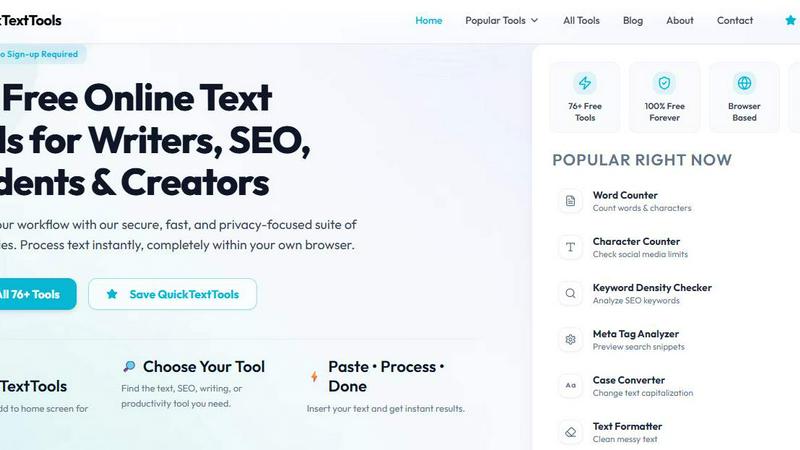
QuickTextTools gives you 76 free browser tools to instantly count, convert, clean, and optimize any text with zero sign-up required.
About QuickTextTools
Yo, meet QuickTextTools, your new secret weapon for getting stuff done without all the hassle. This is a totally free, no-strings-attached online platform packing over 76 browser-based tools that are built for writers, marketers, developers, students, SEO pros, and basically anyone who creates content for a living. The whole vibe here is simple: you don't need to download anything, sign up for some sketchy account, or deal with complicated setups. Just open your browser, pick a tool, paste your text, and boom, you get instant results. It's all about speed, privacy, and being super easy to use.
So what makes this thing special? First off, every single tool runs directly in your browser, which means your data never leaves your device. No one's snooping on your work or selling your info, which is a huge win in this creepy online world. The toolkit covers everything from text formatting and SEO analysis to writing assistants and keyword management. Whether you're trying to clean up a messy keyword list that looks like a toddler typed it, analyze meta tags for your site, convert text case formatting on the fly, or just improve your overall writing flow, QuickTextTools has your back. It's designed to help you work smarter, not harder, while keeping things secure and totally hassle-free. Basically, it's the Swiss Army knife of online text tools, and it's 100% free forever.
Features of QuickTextTools
Massive Tool Library with 76+ Utilities
This isn't some basic toolset with just a word counter and a case converter. QuickTextTools comes loaded with over 76 different utilities that cover every possible text-related task you can think of. From writing tools like word and character counters to SEO powerhouses like keyword density checkers and meta tag analyzers, plus developer goodies like JSON formatters and QR code generators, there's literally something for everyone. The best part is they keep adding new tools regularly, so you're always getting fresh functionality without paying a dime.
100% Browser-Based and Privacy Focused
Here's the real kicker: every single tool runs entirely within your browser using client-side processing. That means your text, your data, and your sensitive information never get uploaded to any server or stored anywhere. This is huge for privacy-conscious folks who don't want their work floating around the internet. No downloads, no installations, no sign-ups, no nonsense. Just open the site, use the tool, and your data stays right where it belongs on your own machine. It's fast, secure, and gives you total peace of mind.
No Sign-Up Required and Completely Free
Forget about creating yet another account with a password you'll forget in five minutes. QuickTextTools doesn't ask for your email, your name, or any personal info whatsoever. You just show up, use the tools, and leave. There are no hidden paywalls, no premium tiers, and no "try before you buy" nonsense. Every single one of those 76+ tools is available to you right now for absolutely nothing. It's rare to find something this useful that's genuinely free with zero catches.
Organized by Category for Easy Navigation
Nobody wants to scroll through a massive list of tools trying to find what they need. QuickTextTools has everything sorted into clean categories like Writing Tools, SEO Tools, Text Cleaning Tools, Developer Tools, and Productivity Tools. Each category groups related utilities together, so you can quickly find the exact tool for your specific task. Plus, there's a "Popular Right Now" section that shows what everyone else is using, and a "Recently Added" section for the newest goodies. Navigation is smooth and intuitive, making your workflow way faster.
Use Cases of QuickTextTools
SEO Content Optimization and Keyword Analysis
If you're trying to rank your content on Google, this platform is a lifesaver. Use the Keyword Density Checker to see how often your target keywords appear in your text, making sure you're not overstuffing or underusing them. The Meta Tag Analyzer lets you preview how your page will look in search results, so you can tweak titles and descriptions for maximum clicks. The SEO Title Generator helps you craft killer headlines that actually get people to click through. You can clean up messy keyword lists, check character limits for meta descriptions, and ensure your content is perfectly optimized without needing expensive SEO software.
Content Creation and Writing Improvement
Writers, listen up. QuickTextTools has everything you need to polish your content and make it shine. Use the Word Counter and Character Counter to hit those strict limits for social media posts, blog articles, or ad copy. The Reading Time Calculator tells you how long it'll take someone to read your piece, which is clutch for planning content length. The Text Cleaner removes weird formatting, extra spaces, and hidden HTML tags when you copy-paste from other sources. The Case Converter lets you switch between uppercase, lowercase, title case, and more in seconds. It's like having an editorial assistant right in your browser.
Developer and Data Processing Tasks
Developers, don't sleep on this toolkit. The JSON Formatter makes messy JSON data readable and organized, saving you from staring at jumbled code. The Base64 Encoder and URL Encoder handle encoding tasks quickly without needing to fire up a terminal. The QR Code Generator lets you create QR codes instantly for sharing links or data. The Text Compare Tool highlights differences between two texts, perfect for debugging or checking changes. And the Duplicate Line Remover cleans up repetitive data in seconds. These tools are lightweight, fast, and perfect for quick tasks during your coding workflow.
Productivity and Time Management Hacks
QuickTextTools isn't just about text; it also helps you manage your time and stay productive. The Pomodoro Timer and Countdown Timer are built right in, so you can use the Pomodoro technique for focused work sessions without installing another app. The Text Sorter organizes your lists alphabetically or in reverse order. The Random Word Generator is great for brainstorming or creative writing prompts. The Random Password Generator creates secure passwords instantly. These productivity boosters are perfect for students, freelancers, or anyone trying to get more done in less time.
Frequently Asked Questions
Is QuickTextTools really free forever?
Yes, 100% free forever with no hidden costs, premium tiers, or paywalls. Every single tool in the collection of over 76 utilities is available to you right now without paying a cent. There's no trial period, no credit card required, and no "upgrade to unlock" nonsense. The platform is supported through recommended tools and resources on the site, but using the tools themselves will never cost you anything.
Do I need to create an account or sign up?
Nope, not at all. QuickTextTools requires zero sign-up, zero registration, and zero personal information. You don't need to provide an email address, create a username, or remember another password. Just visit the website, find the tool you need, paste your text, and get your results instantly. It's designed to be as frictionless as possible.
How does the privacy and data security work?
Every tool on QuickTextTools runs entirely within your browser using client-side processing. This means your text, data, and any information you input never leave your device or get uploaded to any server. There's no data collection, no tracking, and no storage of your content. Your work stays private and secure at all times, which is especially important if you're dealing with sensitive or proprietary information.
Can I use these tools on my phone or tablet?
Absolutely. QuickTextTools is fully responsive and works perfectly on any device with a modern web browser, including smartphones, tablets, laptops, and desktops. The interface adapts to your screen size, so you can use the tools on the go without any issues. Just bookmark the site or add it to your home screen for instant access whenever you need it.
How often are new tools added?
The team behind QuickTextTools regularly adds new utilities to the platform. You can check the "Recently Added Tools" section on the homepage to see the latest additions. Recent new tools include a QR Code Generator, Random Password Generator, Pomodoro Timer, YouTube Title Generator, Instagram Caption Generator, and Hashtag Generator. They're always expanding the toolkit based on user needs and trends.
Explore more in this category:
Similar to QuickTextTools

@fuck.it - email with attitude
Private email. Pure. Secure. Exclusive. No ads, no tracking, no data selling. GDPR compliant, EU-hosted.

FreeVideoGenerator
Free AI video generator: turn text prompts and photos into video clips with Sora 2, Veo 3.1, Wan and more. Free starter credits, no watermark download

Novastart
Apps and files on an infinite canvas where people and AI agents work together.

Panzoe
Panzoe is an all-in-one AI platform for personal productivity, business automation, AI assistants, content creation, and custom AI solutions.

AUTOMATER.ai
A tray helper for every AI coding tool: one searchable library of past sessions, waiting alerts and usage across 9 providers.


AI Email Filter
AI Email Filter sorts incoming mail into folders using plain-language prompts you write. Works with any IMAP mailbox; bring your own LLM if you want.
