
Alternatives to QuickTextTools
Explore the best alternatives and competitors to QuickTextTools.
Explore 20 alternatives to QuickTextTools. Compare features, pricing, and find the best fit for your needs.

@fuck.it - email with attitude
Private email. Pure. Secure. Exclusive. No ads, no tracking, no data selling. GDPR compliant, EU-hosted.

FreeVideoGenerator
Free AI video generator: turn text prompts and photos into video clips with Sora 2, Veo 3.1, Wan and more. Free starter credits, no watermark download

Panzoe
Panzoe is an all-in-one AI platform for personal productivity, business automation, AI assistants, content creation, and custom AI solutions.

AUTOMATER.ai
A tray helper for every AI coding tool: one searchable library of past sessions, waiting alerts and usage across 9 providers.


AI Email Filter
AI Email Filter sorts incoming mail into folders using plain-language prompts you write. Works with any IMAP mailbox; bring your own LLM if you want.


Kody Tools
Free collection of online developer utilities, code formatters, and digital converters designed to streamline your daily workflow.
Forms Plugin
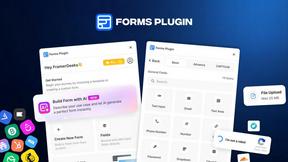
The #1 Native Form Builder Plugin for Framer - No Code, No Embeds, No External Platforms.

Product Launch Checklist
A free launch checklist for SaaS, apps, AI tools and more. Every step says why it matters and when you can skip it.

HomeAnswerBook
Practical, independent guides to home repairs, maintenance, costs, troubleshooting, and everyday fixes.

BlazePDF
Highlight faster. Study in flow with custom shortcuts and a workflow built around you. Print smarter, or turn any page into a tiled poster.


Build Mode for Mac
Build Mode is a Mac app that turns focused sessions into visible progress, so you can see the work adding up before the results arrive.



MySOP.guru
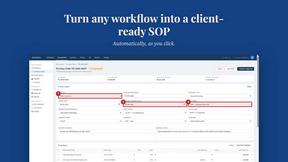
Capture any workflow in your browser and export a branded, step-by-step SOP with screenshots. €5 per document, no subscription.

PerPageFax
PerPageFax lets you send a fax online from any browser for a flat $0.50 per page — no account, no subscription, no fax machine.
About QuickTextTools Alternatives
Alright, so you’ve been vibing with QuickTextTools for a minute. It’s basically that free, no-drama browser toolbox that gives writers, SEO nerds, and devs over 76 utilities to clean up text, analyze meta tags, or just format stuff without needing to download sketchy software. It’s parked squarely in the Productivity & Management lane, and honestly, it slaps for quick fixes. But sometimes you hit a wall—maybe you need a feature it doesn’t have, or the UI isn’t clicking with your workflow, or you’re just looking for something that vibes differently with your specific grind. That’s totally normal. When you’re hunting for a replacement, don’t just grab the first shiny tool you see. You gotta think about what actually matters to you. Are you looking for more advanced features like bulk processing or AI integration? Maybe you need something that plays nicer with a specific platform or offers better privacy controls. The key is to find a tool that feels like it was built for your brain—something that doesn’t lag, respects your data, and doesn’t hit you with a paywall the second you try to do something cool. Keep it simple, keep it fast, and make sure it actually solves the problem you have, not the one the devs thought you had.
FAQs about QuickTextTools Alternatives
What is QuickTextTools?
QuickTextTools is a free, browser-based online platform that packs over 76 utilities designed to boost productivity for writers, marketers, and developers. It lives entirely in your web browser, meaning there's zero software to download or install. The toolkit covers everything from text formatting and case conversion to SEO analysis and keyword management, all aimed at making your workflow smoother and faster.
Who is QuickTextTools for?
QuickTextTools is built for a wide range of digital pros including writers, SEO specialists, content creators, students, and developers. If you regularly find yourself needing to clean up messy text, analyze meta tags, convert case formats, or manage keyword lists, this toolkit is tailored for you. It's especially handy for anyone who wants quick, no-fuss utilities without the overhead of complex software or subscriptions.
Is QuickTextTools free?
Yes, QuickTextTools is completely free to use with no hidden costs or subscription fees. All 76+ utilities are accessible right in your browser without requiring any payment or account sign-up. This makes it a solid choice for freelancers, students, or anyone on a budget who still needs powerful text and SEO tools at their fingertips.
What are the main features of QuickTextTools?
QuickTextTools offers a broad set of features including text formatting tools, SEO analysis utilities, writing assistants, keyword management tools, and developer utilities. You can do things like convert text case, analyze SEO meta tags, clean up keyword lists, and more. Everything runs directly in your browser, ensuring fast performance and privacy since your data never leaves your device.