

QUVIAI
QUVIAI lets you generate photorealistic renders, 3D scenes, videos, and music from text or images, no sweat.
About QUVIAI
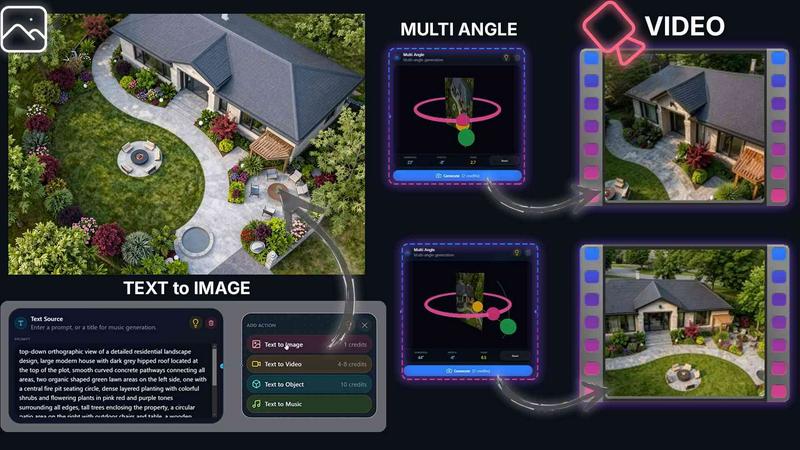
Alright, let's cut the fluff. QUVIAI is basically the Swiss Army knife for anyone who builds stuff visually. We're talking architects, interior designers, 3D artists, and even those random creators who just want to make something cool without needing a degree in Blender or a mortgage payment for a rendering farm. This platform is an all-in-one, AI-powered creative hub that lets you take a rough sketch, a random photo, or a full 3D model and instantly turn it into photorealistic renders, cinematic walkthrough videos, floor plans, and even original music. Yeah, you heard that right. It does the whole vibe.
The main value prop here is that you don't have to jump between five different apps to get a final product. You can go from a napkin doodle to a fully staged, multi-angle, music-synced video tour without ever leaving your browser or your phone. It's built for speed and iteration. The built-in 3D workspace is the secret sauce. You can model, tweak materials, and render all in one place. You can literally type a text prompt like "make this wall concrete with warm lighting" and it just happens. Plus, you can generate furniture and decor objects from scratch, stage them exactly where you want, and then create a cinematic walkthrough by just setting a start and end frame. It's wild. QUVIAI is available on web, iOS, and Android, so you can work from your desk or while waiting for your coffee. Try it free at quvi.ai and stop wasting time on clunky workflows.
Features of QUVIAI
AI Image Generation
This isn't your basic text-to-image toy. The Image Generation suite is built specifically for architectural and product visuals. You can feed it a text prompt, a reference image, or a rough sketch, and it spits out stunning photorealistic renders in seconds. It understands architectural language too, so you can ask for "brutalist concrete with floor-to-ceiling glass" and it won't give you some weird abstract painting. Perfect for concept development or client presentations when you need that "wow" factor fast.
AI Video Creation
Want to animate your still renders? The Video Creation tool lets you generate cinematic walkthroughs and sequences from a single prompt or image. No need for keyframes or complex timeline editing. You just set a starting frame and an ending frame, and the AI fills in the movement, creating smooth, camera-ready flythroughs. It's basically magic for real estate marketing or architectural pitches where a static image just doesn't cut it anymore.
Multi Angle Suite
One render is cool, but a full set of perspectives is how you win projects. The Multi Angle tool takes a single source image and automatically generates multiple architectural viewpoints. You get front, side, top, and isometric views without having to manually reposition your camera. It's a massive time-saver for creating presentation boards, brochures, or just exploring different ways to look at your design. Consistent lighting and materials across all angles, too.
Object Staging
This feature is a game-changer for interior shots. The Object Staging suite lets you generate 3D furniture, decor, and props directly inside your scene. You can then place them exactly where you want, and the AI automatically adjusts the lighting and shadows to match the background. No more hunting for the perfect 3D model online or dealing with mismatched textures. Just type "mid-century sofa" and drop it in. It makes staging a living room or office feel like a video game.
Use Cases of QUVIAI
Rapid Concept Visualization for Architects
Architects can use QUVIAI to quickly turn early-stage sketches or massing models into photorealistic renders for client pitches. Instead of spending days on manual rendering, you can upload a simple 3D blockout, add a text prompt for materials and lighting, and get a high-quality visual in minutes. This lets you iterate on design ideas faster and show clients multiple options without blowing your budget or timeline.
Real Estate Marketing and Virtual Tours
Real estate agents and developers can leverage the AI Video Creation and Multi Angle tools to produce stunning marketing materials. Take a single photo of a property and generate a cinematic walkthrough video with music, or create multiple camera angles for a listing website. It makes a standard apartment look like a luxury penthouse, and you can do it all from your phone. Perfect for social media ads and open house flyers.
Interior Design and Furniture Staging
Interior designers can use the Object Staging feature to visualize furniture layouts and decor schemes before buying anything. Upload a photo of an empty room, generate a custom sofa or coffee table, and place it in the scene. You can test different color palettes and furniture styles instantly. It's like having a full showroom in your pocket, and it helps clients make decisions faster because they can actually see the final look.
Game Environment and Concept Art
Game designers and concept artists aren't left out. You can use the Text to Image and 3D Editor tools to rapidly prototype environments, characters, or props. The AI can generate a fantasy sci-fi interior or a post-apocalyptic landscape from a simple prompt, and the 3D workspace lets you tweak the geometry and materials. It's a fantastic tool for pre-visualization and mood boarding before moving to more complex game engines.
Frequently Asked Questions
Do I need any 3D modeling experience to use QUVIAI?
Nope, not really. While the platform has a built-in 3D workspace for advanced users, most of the core workflows are driven by text prompts and image uploads. You can generate photorealistic renders, videos, and objects just by typing what you want. If you know how to describe a room or a building, you can use QUVIAI. The 3D editor is there if you want to get hands-on, but it's totally optional.
Can I use my own 3D models or images as a starting point?
Absolutely. QUVIAI is designed to work with whatever you throw at it. You can upload a sketch, a photo, a 3D model (like an OBJ or FBX file), or even a simple floor plan. The AI will analyze your input and use it as a base for generation. This is super handy if you have existing work you want to enhance or iterate on without starting from scratch.
What kind of outputs can I get from QUVIAI?
You can get a whole bunch of stuff. Photorealistic images, cinematic videos, multi-angle perspective sets, floor plan renders, 3D objects (like furniture or decor), and even original music tracks. The platform is built to be a one-stop shop for visual and audio content creation. All outputs are high-resolution and ready for presentation or social media use.
Is QUVIAI free to use?
You can try it for free right now at quvi.ai. They give you free credits when you sign up so you can test out the image generation, video creation, and other features without paying a dime. If you need more credits or access to higher resolution outputs, they have paid plans. But the free tier is solid for exploring what the platform can do.
Pricing of QUVIAI
QUVIAI offers a free tier that includes credits to get you started with image and video generation. For users who need more power, there are paid subscription plans available that provide additional credits, higher resolution outputs, and priority processing. Specific pricing details for the paid plans are available on their website under the "Pricing" section. It's best to check quvi.ai for the most current rates and plan options.
Similar to QUVIAI

ImageGenerator
Create and edit AI images online with multiple models, text-to-image, image-to-image, background removal, and upscaling.

Ideogram 4.5
AI image generation and editing with precise typography, native 2K output, and localized edits.

nanobanana 21
Fast, simple AI image studio for creating and editing high-quality images with readable text, consistent characters, and up to 14 reference images.

AIPetGen
AIPetGen turns a photo of your dog, cat, or other pet, or a written description, into a new picture or a short animation.

Genjutsu AI
Genjutsu AI turns your ideas into cinematic videos, product ads, social media shorts, and high-quality images in minutes.

ImageGPT
ImageGPT is an all-in-one AI creative platform for generating, editing and transforming images and videos using AI.

AI Album Cover Maker
Create release-ready album covers from a prompt or photo. Generate, refine, and export art for singles, EPs, mixtapes, and playlists.

Sprite Sheet Maker
A free browser-based toolkit for creating, cutting, converting, and previewing sprite sheet animations.