

Spark Robin
Spark Robin turns your text or images into short, shareable videos for social clips, ads, and cinematic shots.
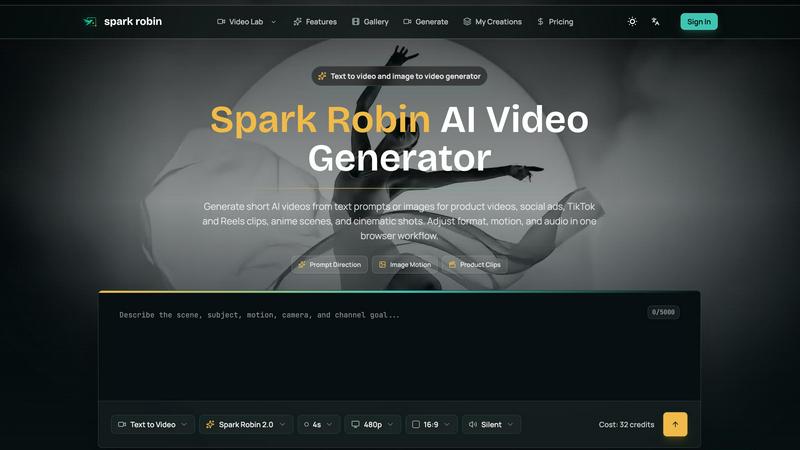
About Spark Robin
Alright, let's cut the corporate jargon. Spark Robin is basically your new bestie for making short, fire videos without needing to know a single thing about editing. You know how you have a cool idea for a TikTok, a product clip for your shop, or a sick anime scene in your head, but actually making it look good feels impossible? Yeah, that's where Spark Robin slides in. It's an AI-powered video generator that takes your text prompts or images and turns them into short, engaging videos that actually slap. We're talking product showcases, social media bangers, TikTok clips, Reels, the whole vibe. You just type what you want, or throw in a pic, and it handles the rest. You can tweak the format, the motion, and the audio to make it look cinematic or ready for the 'gram in minutes. No experience needed, no timeline anxiety. It's like having a mini video production studio in your browser that doesn't judge you for your first draft. Whether you're a small business owner trying to sell stuff, a content creator testing hooks, or just someone who wants to see their weird idea come to life, Spark Robin is your creative playground. It's all about low-friction first passes, so you can test a bunch of directions before you waste time on a full edit. Think of it as a creative bench for your brain.
Features of Spark Robin
Text to Video and Image to Video
This is the main event. You can either write a prompt describing a scene, a product, or a vibe, or you can upload a reference image like a product photo or a character portrait. Spark Robin then generates a short video clip based on that input. It's perfect for when you have a rough idea but need to see it move. You can describe camera movement, lighting, mood, and even the channel goal, and the AI will whip up a draft you can judge in seconds. No more staring at a blank timeline.
Prompt Direction and Motion Tests
Spark Robin isn't just a one-shot wonder. It lets you explore different directions for the same idea. You can test a "Launch Angle" for a product reveal, a "Social Hook" for short-form content, an "Anime Scene" for character mood, or a "Camera Move" for a cinematic test. This feature is basically a decision-making tool. You can compare multiple motion styles from the same brief, so you don't lock yourself into one vibe too early. It's all about finding the strongest visual direction fast.
Format, Motion, and Audio Controls
You're not stuck with whatever the AI spits out. Spark Robin gives you the knobs to tweak the output. You can adjust the aspect ratio (16:9 for widescreen, 9:16 for vertical social stuff), the duration (like 4 seconds for a quick hook), and the audio (silent or with a beat). This means you can tailor the clip for a specific platform or vibe. Want a cinematic widescreen shot for a product ad? Done. Need a quick, silent vertical clip for a TikTok hook? Easy. It's all in one browser workflow.
Low-Friction Creative Bench
This is the secret sauce. Spark Robin is designed to be a testing ground, not a final edit suite. It's for "low-friction first passes." You can test a bunch of different hooks, product angles, and visual rhythms without committing to a full production. It's like sketching with video. You can iterate fast, compare styles, and tighten up the best direction before you ever open a real editing app. It saves you time, credits, and a whole lot of headache.
Use Cases of Spark Robin
Social Hook Tests for TikTok and Reels
You know that feeling when you have a product but can't figure out the first three seconds of the video? Use Spark Robin to draft short, scroll-stopping directions. Test different openings, product angles, and visual rhythms for TikTok, Reels, and YouTube Shorts. Compare a "Launch Angle" vs. a "Social Hook" from the same brief. It's the fastest way to see which clip idea actually stops the scroll before you waste hours editing.
Product Showcases and Ecommerce Clips
If you're selling stuff online, you need video. Spark Robin lets you sketch ecommerce clips, launch teasers, Amazon listing visuals, and Shopify assets without starting from scratch. Upload a product photo and see how it could move in a short clip. Test a "Product Reveal" motion or a "Camera Move" to make your item look premium. It's perfect for small business owners who need professional-looking product videos but don't have a film crew.
Anime Scene and Character Mood Tests
Got a character in your head but can't animate? Spark Robin can help you visualize an "Anime Scene" or a "Character Mood." Describe the scene, the lighting, and the vibe, and the AI will generate a short clip. It's great for writers, artists, or anyone who needs a quick motion reference for a character or a story beat. You can test different styles like "Cinematic" or "Artistic" to see what fits the mood.
Ad Concept and Explainer Drafting
Before you pay for a full ad production, test your concept with Spark Robin. Draft a "Paid Social" ad concept or a "Clearer Story" explainer clip. You can compare different "Hook Variants" and see which one communicates the idea best. It's a low-cost way to validate your creative direction. If the clip doesn't work in 4 seconds, it probably won't work as a 30-second ad either.
Frequently Asked Questions
Do I need any video editing experience to use Spark Robin?
Nope, not at all. That's literally the whole point. Spark Robin is built for people who have zero editing skills. You just type a prompt or upload an image, pick a direction, and let the AI do the heavy lifting. It handles the motion, the format, and the audio. You don't need to know anything about timelines, keyframes, or color grading. Just input your content and let it cook.
What kind of videos can I make with Spark Robin?
You can make a ton of different short videos. Think product showcases, social media clips for TikTok and Reels, anime scenes, cinematic shots, explainers, and ad concepts. Basically, any short video idea you have that needs a quick motion test. It's not for long-form content, but it's perfect for testing hooks, product angles, and visual directions before you go into a full edit.
How does the image-to-video feature work?
It's simple. You upload a reference image, like a product photo, a character portrait, or a piece of artwork. Then, you choose a "Motion Direction" like a product demo or a camera move. Spark Robin will then generate a short video clip that brings that still image to life. It's perfect for exploring how a static asset could move on screen without having to animate it yourself.
Can I control the format and audio of the video?
Absolutely. Spark Robin gives you controls to adjust the aspect ratio (like 16:9 for widescreen or 9:16 for vertical social videos), the duration (like 4 seconds), and the audio (you can choose silent or add a beat). This lets you tailor the clip for the specific platform or vibe you're going for. You're not stuck with a default output.
Explore more in this category:
Similar to Spark Robin

Crazy Frog AI
Turn 1–2 photos into the viral Crazy Frog invisible-moped chase video in seconds.

AIVideoAgent
Turn text ideas or reference images into videos through conversation, with agent-assisted prompts and a choice of video models.

RestoreOldPhoto
Restore old photos with RestoreOldPhoto.ai: repair scratches, creases and fading, sharpen faces and details, and optionally colorize family memories.

airapvideo
AI rap video generator that turns two portraits into a vertical, lip-synced rap music video. Pick framing and length, get a shareable MP4.

ImageAgent
Create and edit AI images through conversation, using text or reference images and refining results in chat.

Rhinobird
AI video ads, UGC-style videos, and product visuals for cross-border sellers and e-commerce brands.

GenX
All-in-one AI workspace to generate images, videos, and audio with multiple leading AI models.

AppIconGenerator
Generate iOS and Android app icons from any image and export all platform sizes for free.