
Adswize vs Master Metrics
Side-by-side comparison to help you choose the right AI tool.

Adswize
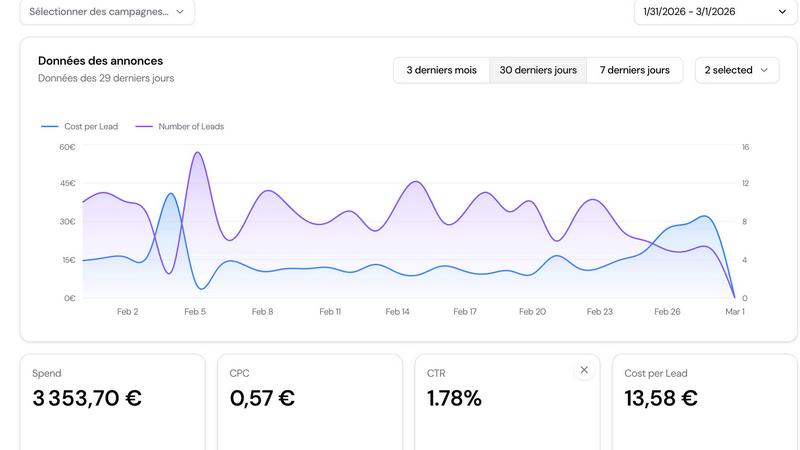
Stop guessing on Meta Ads and let our AI tell you exactly what to optimize daily.
Last updated: March 4, 2026

Master Metrics
Stop drowning in data and start crushing goals with AI-powered dashboards and alerts.
Last updated: February 28, 2026
Visual Comparison
Adswize
Master Metrics
Feature Comparison
Adswize
Daily AI Optimization Recommendations
Wake up to a crystal-clear list of actions, not just more data. Every morning, Adswize's AI scans your campaigns and serves up specific, prioritized tasks like "Pause Ad Set 'Summer Sale' (CPA +52%)" or "Scale budget for 'Lookalike FR' (ROAS 4.2x)." It's your daily to-do list for Meta Ads, telling you exactly where to click to make an impact, so you can optimize in minutes, not hours.
Clear, At-a-Glance Performance Dashboard
Ditch the spreadsheet paralysis. Adswize's dashboard cuts out the noise and shows you only what matters. See your daily progress, what's working, and what's burning budget in a single, intuitive view. No more digging through a dozen tabs—get the full story on your ad health instantly, so you can make smart decisions fast.
Deep-Dive AI Insights on Any Ad
Ever see a metric spike or drop and wonder "why?" Just ask. Click on any ad, campaign, or ad set, and Adswize's AI explains the performance changes in plain English. Understand trends, pinpoint what's driving results (or losses), and get the "why" behind the numbers in seconds, no data science degree required.
Your Personal AI Ad Assistant
Stuck? Just ask. This isn't a dumb chatbot. Ask your burning questions like "Which audience converts best?" or "Why did my ROAS drop yesterday?" and get instant, data-backed answers pulled directly from your account. It's like having an expert on call 24/7 to help you stop guessing and make confident moves.
Master Metrics
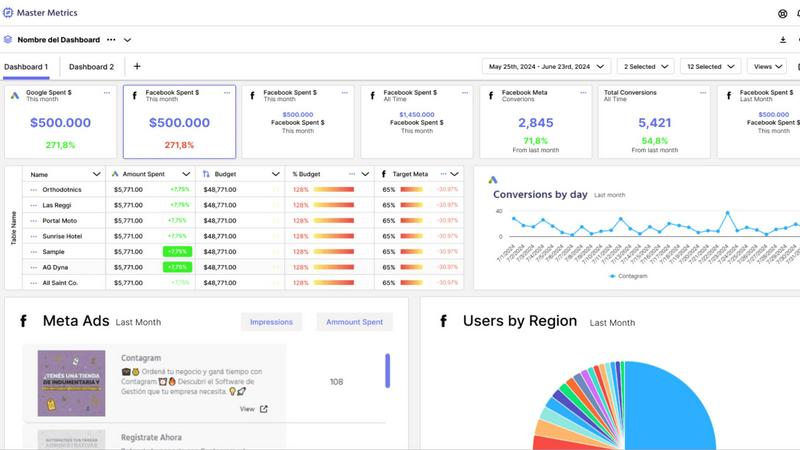
All-in-One Mission Control Dashboard
Forget juggling ten different tabs. Master Metrics is your single source of truth, pulling data from all your ads, social platforms, e-commerce stores, and more into one unified, clean dashboard. See everything that matters at a glance, customize your view, and finally understand what's actually working without the mental gymnastics. It's like having a 24/7 command center for your marketing performance.
AI-Powered Google Slides & Sheets Magic
Stop manually building reports and presentations. This feature is a total game-changer. Choose your data, pick a slick template, and let Master Metrics' AI generate a fully editable, client-ready Google Slides presentation in just a few clicks. Plus, it automatically pushes fresh, live data directly into your Google Sheets and Looker Studio. Your data is always current, and you never have to copy-paste again. Pure wizardry.
Smart, Proactive Alerts on Your Terms
Don't just watch your metrics; make them work for you. Set up custom alerts for anything: a campaign tanking, sales dipping, or a goal being smashed. Get notified via email, Slack, or WhatsApp the moment something important happens. You can even control your ad spend automatically with budget alerts. It's like having a hyper-vigilant guard dog for your KPIs, so you can focus on strategy, not spreadsheets.
Custom Metrics & Formula Builder
Got a unique business question that standard metrics can't answer? No problem. Master Metrics lets you build your own custom metrics and formulas by blending data from different sources. Want to see your cost-per-lead from Facebook Ads combined with close rates from your CRM? You can build that. It gives you the power to answer any "what if" and get insights tailored exactly to your business.
Use Cases
Adswize
The Overwhelmed Solo Entrepreneur
You're wearing all the hats—founder, marketer, customer service. You don't have 3 hours a day to analyze ad performance. Adswize automates that daily grind, giving you a simple, 5-minute morning routine to manage your ads. Get clear actions, cut wasted spend, and focus on growing your business, not getting lost in analytics.
The Scaling E-commerce Brand
You're running multiple campaigns, testing tons of creatives and audiences. Manually tracking what's winning is a nightmare. Adswize automatically identifies your top-performing assets and underperforming duds, giving you the confidence to double down on what's profitable and kill what's not, so you can scale your winners efficiently.
The Performance-Driven Marketing Agency
You need to report clear value and results to clients, fast. Adswize gives you a client-friendly dashboard and undeniable AI insights to back up your strategies. Slash the time spent on manual reporting and campaign analysis, impress clients with data-driven reasoning, and manage more accounts without the burnout.
The Media Buyer Tired of Guesswork
You live in the Meta Ads Manager, but audience targeting and budget shifts still feel like a gamble. Adswize removes the gut-feeling decisions. Its AI analyzes historical performance to recommend which audiences to scale, which to pause, and exactly where to move your budget for the best possible return, turning your workflow from chaotic to clinical.
Master Metrics
For Agencies Managing Multiple Clients
Juggling data for 10, 20, or 50 different clients is a nightmare. Master Metrics lets you clone dashboard templates with one click for new accounts, keep everything in a centralized Overview Control Panel, and automate reporting for each client. You look incredibly organized and data-driven, while saving hours of manual work. It's the secret weapon for scaling your agency without losing your mind.
For Marketing Teams Needing Real-Time Insights
When you need to know now if a campaign is flopping or a viral post is blowing up, waiting for a weekly report is useless. With live dashboards and instant alerts sent to your team's Slack channel, everyone stays in the loop in real-time. Make pivots faster, double down on what's working, and keep the entire team aligned with up-to-the-minute data.
For Automating Client Reporting & Presentations
The dreaded monthly report grind is over. Use Master Metrics to automatically pull the latest data, generate a beautiful Google Slides deck with AI, and schedule it to be emailed directly to your clients. You deliver consistent, professional, and insightful presentations every time, freeing up your evenings and impressing your clients with your efficiency.
For Controlling Ad Spend & Campaign Budgets
Worried about blowing your monthly ad budget in the first week? Set up daily budget alerts in Master Metrics. It will calculate the daily spend needed to hit your target and notify you instantly if you're over or under. This gives you proactive control, prevents costly overspends, and ensures you're pacing perfectly toward your goals all month long.
Overview
About Adswize
Alright, let's cut through the BS. You're running Meta Ads, right? And you're probably drowning in a sea of numbers, graphs, and dashboards that make your brain hurt. You know you should be optimizing daily, but who has the time to play detective with your own ad spend every single morning? Enter Adswize. Think of it as your AI-powered hype-man and strategist for Meta Ads, rolled into one. It's built for the real ones—the solo advertisers, media buyers, agencies, and e-commerce brands who are tired of the guesswork and just want clear, actionable steps to win.
Here's the deal: Adswize plugs directly into your Meta ad accounts and does the heavy lifting for you. Instead of you staring at raw data, its AI analyzes your campaign performance over the last 7, 14, or 30 days and serves you a daily summary that's actually understandable. It tells you exactly what's popping, what's flopping, and where your money is quietly vanishing. Then, it gives you specific recs: pause this ad set, scale that budget, refresh this creative. It transforms the overwhelming mental load of daily optimization into a simple checklist. In short, it's like having a pro media buyer review your account with a fresh coffee every morning, saving you hours, cutting wasted spend, and giving you the confidence to scale what actually works. Stop guessing and start winning.
About Master Metrics
Alright, let's get real. If you're running an agency or a marketing team, you're probably drowning in a sea of tabs, spreadsheets, and data points from a zillion different places. It's chaos, and trying to make sense of it all is a full-time job that nobody signed up for. Enter Master Metrics, your new analytics sidekick built by marketers who've been in the trenches and know the daily grind. This ain't just another dashboard tool; it's your mission control for all things marketing data. It pulls everything from your ad campaigns and social stats to e-commerce and CRM data into one gloriously clean spot. The main vibe? Simplifying the absolute chaos. You get smart dashboards, killer alerts that ping you on Slack or WhatsApp the second something goes sideways (or when you're absolutely crushing it), and it automates all that tedious reporting nonsense. The real big-brain move? Its AI can whip up client-ready Google Slides presentations and push live data straight into your Google Sheets. No more 2 AM copy-paste marathons. It's for teams who want to look like absolute data wizards without needing a PhD in spreadsheet sorcery. Maximize your results, minimize your headaches.
Frequently Asked Questions
Adswize FAQ
How does Adswize connect to my Meta Ads account?
It's super simple and secure. You just click "Login with Meta," grant the necessary permissions (read-only access to your ad data), and you're in. We use official Meta APIs, so your login info is never stored with us. It's a one-click setup that gets your AI analysis rolling instantly.
What kind of recommendations does the AI make?
The AI gets specific. It'll tell you to pause ad sets or creatives that are underperforming (like high CPA), increase budget for your top ROAS winners, shift budget between campaigns, and refresh creatives with dropping CTR. It breaks down the "what" and the "why" for each action, so you're never left confused.
Is there a free trial?
Absolutely! You can start a full 3-Day Free Trial with no credit card required. Connect your account and get access to all the core features—daily recommendations, the dashboard, insights, and the AI assistant. It's the perfect way to see the value before you commit a single dollar.
How is Adswize different from Meta's own Analytics?
Meta gives you the raw data (a firehose of numbers). Adswize gives you the intelligence and the game plan. We analyze that data across your entire account, spot the patterns and problems you might miss, and translate it all into plain-English summaries and specific actions to take. We don't just show you the stats; we tell you what to do about them.
Master Metrics FAQ
What data sources can I connect to Master Metrics?
You can connect all the major players you're already using! This includes platforms like Google Ads, Meta Ads, various social media channels, e-commerce platforms (like Shopify), and CRM systems. They're also constantly adding new integrations (with several "coming soon" on the list), so your toolkit keeps growing. It brings all that scattered data into one unified dashboard.
How does the AI presentation creator actually work?
It's shockingly simple. You just select the client account, choose the key metrics and goals you want to highlight, and pick a design template you like. Then, Master Metrics' AI does its thing: it analyzes the data, writes the insights in plain English, and builds a fully formatted, editable presentation in Google Slides for you. You get a professional deck in minutes, not hours.
Can I really get alerts on WhatsApp or Slack?
Absolutely, yes! This isn't just email alerts. You can configure your alerts to ping you directly in the tools your team lives in. Set a threshold for a metric (like "cost per conversion over $50"), and get an instant message in your Slack channel or a WhatsApp notification when it's triggered. It's perfect for staying on top of critical issues without constantly checking a dashboard.
Is there a limit to how many dashboards or alerts I can create?
This depends on your pricing plan. The entry-level "Freelancer" plan has limits on dashboards and doesn't include the Overview feature or AI Slides. As you move up through the "Basic," "Pro," and "Pro Plus" plans, you get access to more accounts, unlimited dashboards, alerts, and all the premium features. Check the pricing table to see which plan fits your scale.
Alternatives
Adswize Alternatives
Adswize is your AI hype-man for Meta Ads, cutting through the data chaos to give you clear daily actions. It lives in the ad optimization and AI analytics space, basically your smartest friend for managing Facebook and Instagram campaigns. People hunt for alternatives for all sorts of reasons. Maybe the price tag doesn't vibe with their current budget, or they need a tool that works with more ad platforms beyond Meta. Sometimes it's about specific features, like wanting deeper creative reports or a different kind of automation. It's all about finding the right fit for your stack and your wallet. When you're shopping around, keep your non-negotiables front of mind. Think about your must-have platforms, the kind of automated insights that would actually save you brain cells, and how much you're willing to invest. The goal is to find a tool that makes you feel like a marketing genius, not one that adds to your daily scroll of doom.
Master Metrics Alternatives
So you've heard the buzz about Master Metrics, the AI-powered dashboard tool that's basically a cheat code for marketing agencies drowning in data. It's the all-in-one analytics sidekick designed to pull your client data from ads, social, and e-commerce into one clean mission control center, automating reports and sending smart alerts so you can stop the 2 AM spreadsheet grind. But let's be real, sometimes the perfect tool for one squad isn't the right fit for yours. Maybe the pricing feels a bit steep for a bootstrapped team, or you're locked into a specific tech stack it doesn't play nice with. Perhaps you need a feature it just doesn't have yet, or your workflow is so unique you need something hyper-customizable. It's all good—the hunt for the right tool is part of the game. When you're scoping out other options, keep your non-negotiables front and center. Think about your budget, the specific platforms you must connect to, and how your team actually works day-to-day. Do you need insane customization, or just something that works out of the box? Nail down what "simplifying the chaos" really means for your crew before you dive into the endless list of contenders.