
Blueberry vs Fallom
Side-by-side comparison to help you choose the right AI tool.

Blueberry
Blueberry is your AI-native Mac workspace that merges your editor, terminal, and browser so your AI sees everything.
Last updated: February 28, 2026

Fallom is your AI's sidekick, giving you real-time visibility into every LLM call and cost.
Last updated: February 28, 2026
Visual Comparison
Blueberry

Fallom
Feature Comparison
Blueberry
The All-in-One Focused Workspace
This is the main event. Blueberry kills app-switching fatigue by giving you a legit code editor, a fully functional terminal, and a live preview browser all in one tidy, draggable window. It's not just them slapped together; they're designed to feel like they were always meant to be one tool. You get full syntax highlighting, multi-cursor editing, find/replace, and Git integration in the editor—no compromises. The terminal runs your models and commands, and the browser shows a real-time preview of your app. It's your entire dev loop, unified.
Blueberry MCP (Full Context for Your AI)
This is the secret sauce that makes the AI in Blueberry actually useful. The built-in MCP (Model Context Protocol) server is a game-changer. It lets your connected AI (Claude, Codex, etc.) see and interact with your entire workspace context live. We're talking the code you have open, the output in your terminal, what's currently rendering in the preview browser, and even your pinned apps. Your AI assistant finally has the full picture, so you can ask "how does this route work?" or "why is this button broken?" without manually feeding it a million snippets.
Pinned Apps for Constant Context
Why stop at just dev tools? Blueberry lets you dock your other essential apps—like GitHub, Linear, Figma, or PostHog—right inside your workspace. They load up with your project and, crucially, share their context with your AI via MCP. Need your AI to reference a specific Linear ticket or a Figma frame? It's already there, in the loop. It turns your workspace into the central hub for everything related to your product, not just the code.
Visual Context with Screenshot & Element Select
Sometimes you need to show, not tell. Blueberry's preview browser comes with built-in tools to give your AI visual context. You can capture screenshots of your app or, even cooler, directly select specific HTML elements from the preview. This means you can point at a busted component and ask your AI to fix it, and it knows exactly what you're talking about. It bridges the gap between the visual front-end and the code in a way that feels like magic.
Fallom
End-to-End LLM Call Tracing
Get the full, unedited story of every interaction. Fallom captures the complete lifecycle of each LLM call, showing you the exact prompt that went in, the response that came out, any tool or function calls the agent made (with arguments and results), token counts, latency at every step, and the calculated cost. It's like having a DVR for your AI, so you can replay any moment to see what really happened when that customer got a bizarre answer.
Real-Time Cost Attribution & Dashboards
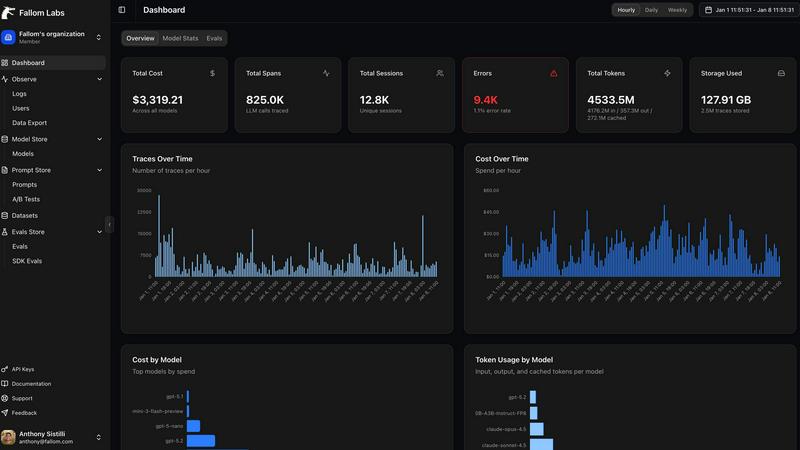
Stop the budget panic. Fallom breaks down your AI spending in real-time, showing you costs per model, per user, per team, or per customer. The live dashboard gives you an at-a-glance view of usage and spend, so you can spot a runaway agent or an unexpectedly expensive model before your CFO spots it on the bill. Allocate costs, set up chargebacks, and optimize for efficiency without the spreadsheet nightmares.
Enterprise Compliance & Privacy Controls
Built for the real world where rules matter. Fallom comes packed with features to keep you compliant and secure. That includes full, immutable audit trails for every LLM interaction, detailed input/output logging, model version tracking, and user consent records. Need to handle sensitive data? Flip on Privacy Mode to redact content or log only metadata, keeping your telemetry without capturing confidential info.
Session & User-Level Context Grouping
Debug with the full picture, not just isolated errors. Fallom automatically groups traces by user, session, or customer. This means you can see everything a specific user did in one flow—from their initial question through all the agent's tool calls and LLM hops—making it infinitely easier to understand complex issues and reproduce bugs. It turns a pile of random traces into a coherent user story.
Use Cases
Blueberry
Rapid Prototyping & Iteration
You're building an MVP and need to move at light speed. With Blueberry, you can write a component in the editor, see it update live in the preview browser, debug an error in the terminal, and ask your AI to refactor the logic—all without leaving the window. The tight feedback loop and constant AI context turn hours of work into minutes, letting you experiment and iterate on ideas before your coffee gets cold.
AI-Powered Debugging & Pair Programming
Hit a gnarly bug or a confusing error message? Instead of scouring Stack Overflow alone, you can have your AI model, armed with the full context of your running app, terminal logs, and relevant code files, help you diagnose it in real-time. It's like having a senior engineer looking over your shoulder who never gets tired and has perfect memory of your entire codebase.
Streamlined Full-Stack Development
Working on a full-stack web app means constantly context-switching between server code, client code, and the database. Blueberry simplifies this by keeping your API route code, your frontend component, and the resulting web page preview visible simultaneously. You can run your backend server in one terminal tab, your frontend dev server in another, and see how they interact live, making API integrations and data flow way easier to reason about.
Cross-Device Preview & Responsive Design
Building a modern app means it has to look good on every screen. Blueberry's preview browser has desktop, tablet, and mobile viewports built right in. You can instantly see what your users will see on different devices without needing to grab your phone or open a separate emulator. It makes responsive design checks a seamless part of your regular coding flow.
Fallom
Debugging Complex AI Agent Workflows
When your multi-step agent gets stuck or gives a nonsense answer, finding the root cause is a needle-in-a-haystack problem. With Fallom's timing waterfall and tool call visibility, you can instantly see which step in the chain (e.g., an LLM call, a database query, a function) failed or was too slow. You get the full context to squash bugs fast and keep your users happy.
Controlling and Optimizing AI Spend
AI costs can spiral faster than a meme coin. Teams use Fallom to get crystal-clear visibility into which features, models, or customers are driving their API bills. By tracking cost per model and per team, you can make data-driven decisions to optimize prompts, switch models for certain tasks, or implement usage quotas, directly protecting your bottom line.
Ensuring Compliance for Regulated Industries
If you're in finance, healthcare, or any field with strict regulations, deploying AI can be scary. Fallom acts as your compliance co-pilot, automatically generating the detailed audit trails, consent records, and model lineage reports you need to prove adherence to standards like SOC 2, GDPR, or the EU AI Act during audits.
Monitoring Production Performance & Reliability
You can't improve what you can't measure. Fallom's real-time dashboard and live tracing let you monitor the health and performance of your AI features in production. Spot latency spikes, track accuracy metrics with built-in evals, and perform safe A/B tests on new models or prompts—all to ensure a smooth, reliable experience for your end-users.
Overview
About Blueberry
Alright, let's break it down. Blueberry is that one app you didn't know you needed until you try it and then you can't imagine your workflow without it. It's basically a super-powered, AI-native workspace built specifically for macOS that smashes your code editor, terminal, and live preview browser into one single, focused window. No more frantic Alt-Tabbing between a dozen different apps, losing your train of thought, or wasting brain cycles on window management. It's built for the modern product builder—the devs, founders, and indie hackers who are shipping web apps and need to move fast without the tooling friction. The core vibe? Stop copy-pasting context for your AI. Blueberry connects to your favorite models (Claude, Gemini, Codex, you name it) via MCP and gives them a live feed of your entire project: your open files, your terminal output, and even what's rendering in the browser preview. It's like giving your AI pair programmer a super-high-resolution screen share of your mind. And the best part? It's 100% free during the beta. So if you're tired of the juggle, this is your invite to a smoother, more integrated way to build.
About Fallom
Alright, let's break it down. Fallom is like the ultimate control room for your AI chaos. If you're building with LLMs or AI agents, you know the vibe: stuff works in dev, then you ship to production and suddenly it's a black box of mystery calls, weird latencies, and surprise bills from OpenAI. Fallom fixes that. It's an AI-native observability platform built from the ground up to give you X-ray vision into every single LLM call happening in your apps. We're talking full end-to-end tracing that shows you the prompts, the outputs, the tool calls, the tokens, the latency, and even the exact per-call cost. It's designed for devs, product managers, and data science teams who are tired of flying blind and need a single source of truth for their AI ops. With a slick dashboard that serves up context by session, user, or customer, you can debug weird agent behavior in seconds, monitor live usage, and see exactly who or what is burning through your API budget. Plus, it's built on OpenTelemetry, so you can instrument your stack in, like, five minutes flat. And for the enterprise crowd sweating compliance? Fallom's got your back with audit trails, logging, model versioning, and consent tracking to keep you chill with regulations like GDPR and the EU AI Act. In short, it's your wingman for building reliable, cost-controlled, and high-performance AI applications.
Frequently Asked Questions
Blueberry FAQ
Is Blueberry really free?
Heck yes! Blueberry is 100% free during its beta period. The team is focused on building an amazing tool and getting it into the hands of builders. There's no credit card required to download and use it. Just grab it and start building.
What AI models does Blueberry work with?
Blueberry is super flexible. It can connect to any AI model that supports the Model Context Protocol (MCP). This includes popular ones like Anthropic's Claude, Google's Gemini, and OpenAI's Codex. You're not locked into one ecosystem; you can use the model that works best for you and your project.
Is Blueberry only for web development?
While it's optimized for building web applications (thanks to the integrated live preview browser), the core workflow of an editor, terminal, and AI with full context is useful for many types of software development. However, its sweet spot is definitely developers and product builders working on web-based projects.
Is it available for Windows or Linux?
Not yet, fam. Currently, Blueberry is a macOS-only application. It's built as a native Mac app to deliver the best possible performance and integration. The team might consider other platforms in the future, but for now, you'll need a Mac to join the party.
Fallom FAQ
How difficult is it to integrate Fallom into my existing app?
It's stupid easy. Fallom is built on the OpenTelemetry standard, so you just install one lightweight SDK. The website boasts you can get "OTEL Tracing in Under 5 Minutes." You add a few lines of code, and it automatically starts capturing traces from your LLM calls, regardless of whether you use OpenAI, Anthropic, Google, or others. No major refactoring needed.
Does Fallom store all my prompt and response data?
You have control. Fallom is designed to capture the full telemetry for observability. However, for sensitive applications, you can enable "Privacy Mode." This lets you redact specific data or run in a metadata-only logging configuration, where you still get all the timing, cost, and structural info without storing the actual content of prompts and responses.
Can I use Fallom to compare different LLM models?
Absolutely! Fallom is built for this. The platform lets you run A/B tests by splitting traffic between different models (like GPT-4o and Claude 3.5). You can then compare their performance side-by-side in the dashboard—looking at cost, latency, and even custom evaluation scores—to make informed decisions about which model to use for each task.
What if my team is small and just starting with AI?
Fallom is for you, too. The platform offers a free tier to get started, which is perfect for small teams or projects. You can start tracing your agents, see costs, and debug issues without an upfront commitment. It scales with you, so as your AI usage grows into enterprise-level, the compliance and advanced features are already there.
Alternatives
Blueberry Alternatives
So you've heard the buzz about Blueberry, the slick Mac app that smashes your editor, terminal, and browser into one hyper-focused workspace. It's basically the ultimate power-up for devs and AI tinkerers, letting you connect models like Claude or Codex so they can see your entire workflow at a glance. No more frantic alt-tabbing or copy-pasting context—just pure, unadulterated flow. But let's be real, the hunt for the perfect tool is a whole vibe. Maybe you're not on macOS and need something that plays nice with your Windows or Linux setup. Perhaps the feature set doesn't quite match your specific grind, or you're just curious what else is cooking in this space. It's all good—exploring your options is how you find your perfect match. When you're scouting for something similar, keep your eyes peeled for a few key things. First, check what platforms it runs on. Then, dig into how it handles AI integration—can you plug in your favorite model? Finally, scope out the workflow: does it genuinely unify your tools, or is it just another window manager in a fancy jacket? Your stack deserves the best fit.
Fallom Alternatives
So you're vibing with Fallom, the AI observability platform that's basically a crystal ball for your LLMs and agents. It's the go-to dev tool for teams who need to track every API call, debug weird outputs, and stop their cloud bill from going absolutely viral. It's a whole mood for managing AI ops. But let's keep it a buck, sometimes the fit isn't perfect. Maybe the pricing feels a bit extra for your startup grind, or you're locked into a specific cloud ecosystem and need a native tool. Other times, you might just crave a different UI flavor or need a hyper-specific feature that's not in the current stack. It's all about finding your app's soulmate. When you're scrolling through options, don't just look at the shiny features. Peep the integration game—how easy is it to actually plug and play? Check the transparency on pricing (no one likes surprise invoices). And most importantly, see if it scales with your vibe, from your solo developer era to a full enterprise glow-up. The goal is to keep your AI smooth, monitored, and budget-friendly.