
Cosy vs Never Drop
Side-by-side comparison to help you choose the right AI tool.

Cosy automates Slack intros and onboarding so your community vibes while you chill.
Last updated: February 28, 2026

Never Drop
NeverDrop transforms handshakes into deals by capturing contacts and auto-drafting follow-ups in under 2 minutes.
Last updated: February 28, 2026
Visual Comparison
Cosy
Never Drop

Feature Comparison
Cosy
Automated Onboarding Sequences
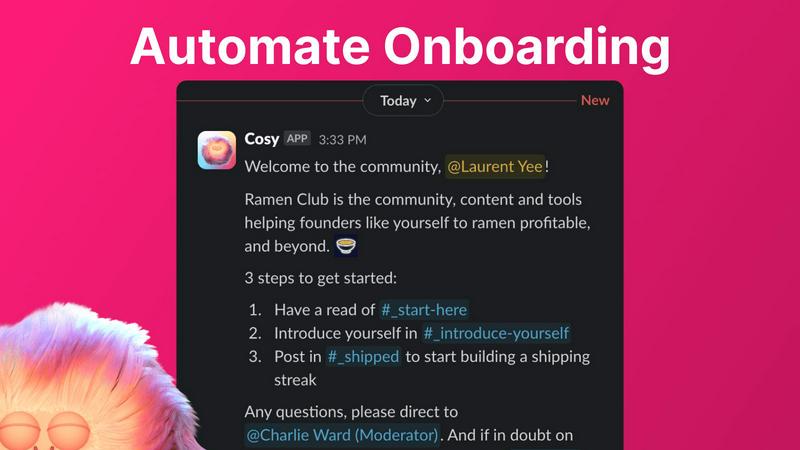
Stop manually DM'ing every new face that pops in. Cosy lets you set up to 10 different welcome DM sequences that fire off automatically when someone joins. You can make them come from you, a team member, or the Cosy bot itself. Fully customize the messages with their name, links, emojis—the whole shebang—and schedule them to send immediately or on a delay (think hours, days, or even months later). New member joins at 3 AM? They still get a warm welcome. It's the set-it-and-forget-it magic that saves you hours.
Member Introductions (The Connector)
Wanna spark those random, cool connections that make a community pop? Cosy's intro feature is your wingman. It automatically pairs up opted-in members in a 3-person DM (the two members and the Cosy bot) on a schedule you choose—every week, every month, you name it. It randomizes the matches to keep things fresh and avoids repeating recent intros. You get to customize the intro message template, pick the day and time, and then watch as your members start networking without you lifting a finger.
Searchable Member Directory
Forget clunky external databases or spreadsheets. Cosy builds a slick, searchable member directory right inside Slack. You create custom profile fields (up to 10 of them, with text or multiple-choice options), then nudge all your members to fill them out with one click. Members can use a slash command or the Cosy app to search for people by keywords or skills. It’s the easiest way to help your community members find the right person to ask for help, collaborate with, or just chat with.
Content Highlights & Moderation Alerts
Never let a banger post go unnoticed again. Cosy gives you instant slash-command superpowers to surface the good stuff. Use /most-engaged-messages to find the top 10 posts in a channel, or /most-engaged-messages-all to see what's trending across the whole workspace. You can also find /unreplied-messages to spot questions that got missed. Plus, it helps you keep the space safe by instantly flagging abusive or spammy messages, so you can moderate without constantly scrolling.
Never Drop
Seamless Business Card Scanning
Snap a photo of any business card, and watch as Never Drop's AI-powered OCR does its magic, extracting all the important info like name, company, title, phone, and email in mere seconds. Forget squinting at tiny text or fumbling with manual entries—it's all done for you!
Automatic Email Enrichment
No more generic emails! If a business card is missing that critical email info, Never Drop automatically scours the web to find verified work emails based on the name and company. It’s like having your own personal detective for contact info!
Personalized AI Drafts
Forget about boring follow-up templates! With Never Drop, the AI drafts a personalized email based on your conversation context and voice notes. Review it, make tweaks if you want, and hit send—all in under two minutes. Talk about efficiency!
Team Collaboration Dashboard
Never Drop isn’t just for solo hustlers; it’s built for teams too! Organize your scans by event, reassign leads between team members, and track your crew’s activity on the dashboard. Keeping everyone aligned means nothing falls through the cracks.
Use Cases
Cosy
For the Solopreneur Building a Tribe
You're running the show alone, trying to grow a community around your brand or product. Cosy is your force multiplier. It automates the welcoming committee and facilitates member connections, making your small group feel large, active, and tightly-knit from day one, all while you focus on creating content and strategy instead of admin work.
For Scaling Startup Communities
Your user base is exploding, and your community Slack is getting hectic. Manual onboarding is impossible, and new members get lost. Cosy scales with you, ensuring every single new user gets a personalized onboarding journey and can easily find experts and allies through the member directory, maintaining that early-vibe feeling even as you grow into the hundreds.
For Professional Network & Mastermind Groups
Your community's value is in high-quality connections and knowledge sharing. Cosy’s automated, randomized introductions are perfect for fostering serendipitous 1:1 conversations between professionals. The searchable directory lets members quickly find peers with specific skills or experience, turning your Slack into a powerful networking engine.
For Content-Driven & Educational Communities
Your community thrives on discussions and shared resources. Cosy’s content highlight features ensure the most valuable insights and answered questions don't get buried. Community managers can easily spotlight top contributions and identify unanswered threads, boosting the overall quality and engagement of conversations.
Never Drop
Networking Events
Imagine you’re at a buzzing networking event, collecting business cards left and right. With Never Drop, you can scan, add your thoughts, and send follow-ups before you even grab that next drink. It’s the ultimate game changer!
Trade Shows
Trade shows are fast-paced and packed with potential clients. Use Never Drop to capture leads while you’re on the move, ensuring that every conversation is followed up promptly, keeping the momentum alive.
Conferences
Conferences are all about making connections. With Never Drop, you can effortlessly scan attendee business cards, enrich their profiles, and send personalized follow-ups, ensuring you stand out in the crowd.
Business Dinners
Networking doesn’t stop at events. Whether it’s a casual business dinner or an important meeting, Never Drop allows you to capture leads and follow up without missing a beat. Keep those connections strong!
Overview
About Cosy
Alright, community heroes, listen up. You're out here trying to build an actual vibe in your Slack workspace, but between the endless "hellos," the awkward intros, and trying to figure out who knows what, you're burning the candle at both ends. Enter Cosy. Think of it as your ultimate Slack sidekick, a native bot designed to automate all the tedious stuff so you can focus on the magic. Built specifically for community managers, Cosy turns your standard Slack into a buzzing, connected community hub without you needing to be online 24/7. It handles the grunt work: automating personalized welcome DMs for new joiners, making cool intros between members, and even surfacing the most fire content so nothing gets lost. It gives your community a searchable directory right inside Slack, so people can actually find each other. The best part? It works while you sleep. Whether you're running a tight-knit crew of 50 or a massive server with hundreds, Cosy is here to take the manual labor off your plate, boost engagement on autopilot, and finally give you back those precious hours every week. It's like having a super-organized, never-tired co-manager that lives in your Slack.
About Never Drop
Never Drop is your new best friend when it comes to snagging leads at those bustling trade shows, conferences, and networking events where the vibe is high but the chaos is real. Designed with hardcore sales teams in mind, this nifty lead-capture app makes the tedious task of collecting and organizing leads feel like a walk in the park. Picture this: you whip out your smartphone, snap a pic of a business card, and voilà! The app instantly extracts all the essential deets like name, company, title, phone number, and email. But wait, there's more! You can add your own voice notes or text to capture the essence of your convo. Plus, the app's advanced AI kicks in to whip up a personalized follow-up email in under two minutes. This means no more missed opportunities or forgotten leads. With easy peasy integration into popular CRMs like HubSpot, Never Drop keeps your pipeline slick, organized, and ready to roll. Say goodbye to the stress of losing contact info and hello to turning connections into closed deals!
Frequently Asked Questions
Cosy FAQ
How does the onboarding automation work?
When a new member joins your Slack, Cosy can automatically send them a sequence of welcome DMs. You create up to 10 different message sequences that can come from you, a teammate, or the Cosy bot. You control the timing (send now or delay it), personalize the messages, and add emojis or links. It runs completely on autopilot, so you save time and no one gets a cold shoulder.
Are the member introductions random?
Yes, but smart-random! Cosy randomly pairs up community members who have opted into the introductions feature. The cool part is it also avoids matching the same people together again if they've been recently introduced. You set the frequency (like every week or month) and the time, and Cosy handles the matchmaking to create fresh, serendipitous connections.
Do people have to leave Slack to use the Member Directory?
Nope, that's the beauty of it! The entire member directory lives natively inside Slack. Members can fill out their profile via a DM from the Cosy bot and search for others using a simple slash command (/member-directory) right from any channel. No extra apps, no new tabs, no context switching.
Is there a free plan?
Absolutely! You can get started with Cosy for free for communities with up to 250 members. If you need more, there's a full 30-day free trial for the unlimited members plan so you can test drive all the premium features with your whole crew before committing.
Never Drop FAQ
What is Never Drop?
Never Drop is a lead-capture app designed for sales teams at events. It lets you scan business cards, add voice or text context about your conversations, and generates personalized follow-up emails in under two minutes. Plus, it enriches contacts with verified emails and syncs to your CRM.
How does business card scanning work?
Just snap a photo of a business card using the Never Drop app. The AI-powered OCR technology quickly extracts contact details like name, company, title, phone number, and email. If you prefer, you can also enter contact details manually.
What types of events is Never Drop for?
Never Drop is perfect for trade shows, conferences, networking events, meetups, and even business dinners. It allows you to organize all your scans by event, making it easier to track leads based on where you met them.
Do I need the mobile app?
Absolutely! The mobile app is essential for scanning business cards, recording voice context, and triggering follow-ups while you're on the go. There’s also a web dashboard where you can manage your team, review scans, and handle billing seamlessly.
Alternatives
Cosy Alternatives
So, you've heard about Cosy, the Slack bot that's basically a community manager's hype person on autopilot. It lives in that sweet spot of productivity and community management tools, taking the manual grind out of welcoming newbies and sparking connections in your Slack workspace. But let's be real, the quest for the "perfect" tool is never-ending. Maybe your budget's tighter than a new pair of jeans, or you need features that play nice outside of Slack. Perhaps you're just doing your due diligence before committing. It's all good—shopping around is smart. When you're scouting other options, keep your non-negotiables front of mind. Think about your must-have automations, how deep you need those integrations to go, and what your wallet can handle. The goal is to find something that vibes with your community's specific rhythm, not just what's trending.
Never Drop Alternatives
Never Drop is that slick lead-capture app you didn’t know you needed, perfect for sales teams hustling at trade shows, conferences, and all those networking shindigs. It’s all about turning those casual handshakes into legit deals by scanning business cards and capturing contacts like a boss. But, as with any tool, users often find themselves hunting for alternatives. Maybe it’s about the pricing, or perhaps they’re after unique features that suit their specific needs. When choosing an alternative, consider what matters most to you—be it budget, user experience, or integrations with other platforms. Finding an alternative that vibes with your workflow can make all the difference. Look for options that offer seamless lead management, intuitive design, and those extra features that just click with your style. After all, you want something that not only captures leads but also enhances your follow-up game, turning those initial connections into solid relationships.