
Cosy vs Outbid
Side-by-side comparison to help you choose the right AI tool.

Cosy automates Slack intros and onboarding so your community vibes while you chill.
Last updated: February 28, 2026

Outbid sends you Upwork jobs in under 60 seconds with AI proposals so you can apply first and win more gigs.
Last updated: March 19, 2026
Visual Comparison
Cosy
Outbid

Feature Comparison
Cosy
Automated Onboarding Sequences
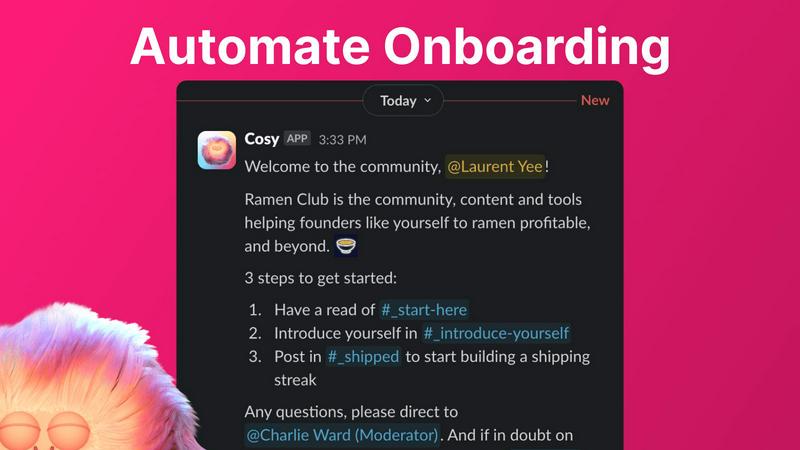
Stop manually DM'ing every new face that pops in. Cosy lets you set up to 10 different welcome DM sequences that fire off automatically when someone joins. You can make them come from you, a team member, or the Cosy bot itself. Fully customize the messages with their name, links, emojis—the whole shebang—and schedule them to send immediately or on a delay (think hours, days, or even months later). New member joins at 3 AM? They still get a warm welcome. It's the set-it-and-forget-it magic that saves you hours.
Member Introductions (The Connector)
Wanna spark those random, cool connections that make a community pop? Cosy's intro feature is your wingman. It automatically pairs up opted-in members in a 3-person DM (the two members and the Cosy bot) on a schedule you choose—every week, every month, you name it. It randomizes the matches to keep things fresh and avoids repeating recent intros. You get to customize the intro message template, pick the day and time, and then watch as your members start networking without you lifting a finger.
Searchable Member Directory
Forget clunky external databases or spreadsheets. Cosy builds a slick, searchable member directory right inside Slack. You create custom profile fields (up to 10 of them, with text or multiple-choice options), then nudge all your members to fill them out with one click. Members can use a slash command or the Cosy app to search for people by keywords or skills. It’s the easiest way to help your community members find the right person to ask for help, collaborate with, or just chat with.
Content Highlights & Moderation Alerts
Never let a banger post go unnoticed again. Cosy gives you instant slash-command superpowers to surface the good stuff. Use /most-engaged-messages to find the top 10 posts in a channel, or /most-engaged-messages-all to see what's trending across the whole workspace. You can also find /unreplied-messages to spot questions that got missed. Plus, it helps you keep the space safe by instantly flagging abusive or spammy messages, so you can moderate without constantly scrolling.
Outbid
Lightning-Fast Telegram Alerts
This is the core magic. Outbid's bots are glued to Upwork, scanning for new gigs every 60 seconds. The moment a job that fits your filters goes live, you get a direct message in your Telegram app. No email to check, no app to open. It's in your pocket, instantly. While everyone else is waiting for their hourly email digest, you're already pasting your proposal. It's the ultimate speed hack for a platform where being early is half the battle won.
AI-Powered Proposal Drafts
No more staring at a blank screen trying to sound clever. For every single job alert, Outbid's AI cooks up a personalized proposal draft on the spot. It reads the job description, checks out your skills and bio, and writes a relevant intro that actually makes sense. It's not some generic copy-paste trash. You get a solid starting point that you can copy, add your personal flair to, and submit in like one minute flat. It turns proposal writing from a chore into a quick edit.
Smart & Sassy Job Filtering
You won't get spammed with garbage. Outbid lets you set up smart filters so you only see the jobs that are actually worth your time. Filter by your specific skills, minimum budget you'll accept, client history, and even experience level required. The best part? You can set "Quiet Hours" so you don't get pinged at 3 AM. It's like having a super-efficient assistant who only bothers you with the premium opportunities.
War Room Strategy Mode
For the high-stakes, super-competitive gigs where you need to bring your A-game, activate War Room mode. This lets you give the AI custom instructions, like "sound more authoritative" or "highlight my Shopify experience," and regenerate the proposal until it's perfect. It's your tactical advantage for standing out in a sea of 50+ applications. Think of it as your secret strategy session before you launch your winning pitch.
Use Cases
Cosy
For the Solopreneur Building a Tribe
You're running the show alone, trying to grow a community around your brand or product. Cosy is your force multiplier. It automates the welcoming committee and facilitates member connections, making your small group feel large, active, and tightly-knit from day one, all while you focus on creating content and strategy instead of admin work.
For Scaling Startup Communities
Your user base is exploding, and your community Slack is getting hectic. Manual onboarding is impossible, and new members get lost. Cosy scales with you, ensuring every single new user gets a personalized onboarding journey and can easily find experts and allies through the member directory, maintaining that early-vibe feeling even as you grow into the hundreds.
For Professional Network & Mastermind Groups
Your community's value is in high-quality connections and knowledge sharing. Cosy’s automated, randomized introductions are perfect for fostering serendipitous 1:1 conversations between professionals. The searchable directory lets members quickly find peers with specific skills or experience, turning your Slack into a powerful networking engine.
For Content-Driven & Educational Communities
Your community thrives on discussions and shared resources. Cosy’s content highlight features ensure the most valuable insights and answered questions don't get buried. Community managers can easily spotlight top contributions and identify unanswered threads, boosting the overall quality and engagement of conversations.
Outbid
The Busy Pro Who Can't Babysit Job Feeds
You're already killing it with current clients, but you want to line up your next project smoothly. You don't have hours to spend scrolling and refreshing. Set up Outbid, forget about it, and let it DM you only when a high-value, perfectly-matched job appears. You can apply between meetings without ever disrupting your deep work flow. It's proactive business development on autopilot.
The Upwork Newbie Struggling to Get That First Client
Starting out is tough. You might have the skills, but writing proposals that convert is a whole other skill. Outbid solves that. It gets you in front of clients first, which massively boosts your visibility, and hands you a well-written draft that shows you understand the job. It removes the two biggest barriers for newcomers: speed and knowing what to say.
The Freelancer in a Super-Competitive Niche
If you're in web dev, design, or writing, you know the pain. Good jobs get 50+ proposals in the first hour. Your amazing proposal gets buried. Outbid ensures you're in that first batch of applicants, dramatically increasing your chance of being seen and read. Combine that with the strategic War Room proposals, and you've got a legit edge over the competition.
The Global Freelancer Chasing the Best Opportunities
Jobs get posted around the clock across different timezones. That perfect US-based client might post while you're sleeping. Outbid doesn't sleep. It monitors 24/7 and will wake you up (figuratively, via Telegram) if a dream job lands, ensuring you never miss a golden opportunity because of your location or timezone. The playing field is finally level.
Pricing Comparison
Cosy
Cosy offers a free plan that supports communities with up to 250 members. For larger communities needing unlimited members and full access to all features, they provide a paid plan. You can try the unlimited plan with a 30-day free trial to see if it's the right fit for your thriving community hub.
Outbid
Outbid keeps it simple with a freemium model. You can start for free to test the waters, then upgrade for the full power when you're ready to crush it.
Free Access ($0): Dip your toes in. Get unlimited job alerts, but proposals are blurred, and you only get 3 lifetime credits to "reveal" the full AI draft and direct job link. Perfect for trying the speed.
Monthly Pro ($9.99/month): This is the go-to for serious freelancers. Unlimited reveals, so you get the full AI proposal and direct link for every single alert. Unlock the War Room strategy mode and priority support. This is where you start winning consistently.
Elite ($19.99/month): For the absolute hustlers who want every possible advantage. Includes everything in Pro, plus advanced AI job matching that only sends you alerts for jobs that are an 80%+ fit ("Sniper Mode"). Maximizes your efficiency so you only see the cream of the crop.
Overview
About Cosy
Alright, community heroes, listen up. You're out here trying to build an actual vibe in your Slack workspace, but between the endless "hellos," the awkward intros, and trying to figure out who knows what, you're burning the candle at both ends. Enter Cosy. Think of it as your ultimate Slack sidekick, a native bot designed to automate all the tedious stuff so you can focus on the magic. Built specifically for community managers, Cosy turns your standard Slack into a buzzing, connected community hub without you needing to be online 24/7. It handles the grunt work: automating personalized welcome DMs for new joiners, making cool intros between members, and even surfacing the most fire content so nothing gets lost. It gives your community a searchable directory right inside Slack, so people can actually find each other. The best part? It works while you sleep. Whether you're running a tight-knit crew of 50 or a massive server with hundreds, Cosy is here to take the manual labor off your plate, boost engagement on autopilot, and finally give you back those precious hours every week. It's like having a super-organized, never-tired co-manager that lives in your Slack.
About Outbid
Alright, freelancers, listen up. Tired of refreshing Upwork like it's your day job, only to apply to a gig and see 50+ proposals already there? Yeah, we feel you. That's the grind, and it's brutal. Enter Outbid – your secret weapon to absolutely dominate the Upwork hustle. Think of it as your 24/7 robotic sidekick that never sleeps, eats, or takes a coffee break. It's built by freelancers who got sick of losing jobs to people who were just... faster. Outbid's whole vibe is about speed and smarts. It scans Upwork every single minute, day and night, and the second a job matching your skills pops up, it DMs you on Telegram with the deets. We're talking under 60 seconds. But it doesn't just throw a link at you and dip. Each alert comes with a fire, AI-written proposal draft tailored to THAT specific job and YOUR profile. So you're not just first, you're first with a banger of an application ready to copy, tweak, and send. Whether you're a newbie struggling with what to say or a seasoned pro who's too busy doing actual client work to babysit job feeds, Outbid is your cheat code to win more jobs, save a stupid amount of time, and finally get that bag.
Frequently Asked Questions
Cosy FAQ
How does the onboarding automation work?
When a new member joins your Slack, Cosy can automatically send them a sequence of welcome DMs. You create up to 10 different message sequences that can come from you, a teammate, or the Cosy bot. You control the timing (send now or delay it), personalize the messages, and add emojis or links. It runs completely on autopilot, so you save time and no one gets a cold shoulder.
Are the member introductions random?
Yes, but smart-random! Cosy randomly pairs up community members who have opted into the introductions feature. The cool part is it also avoids matching the same people together again if they've been recently introduced. You set the frequency (like every week or month) and the time, and Cosy handles the matchmaking to create fresh, serendipitous connections.
Do people have to leave Slack to use the Member Directory?
Nope, that's the beauty of it! The entire member directory lives natively inside Slack. Members can fill out their profile via a DM from the Cosy bot and search for others using a simple slash command (/member-directory) right from any channel. No extra apps, no new tabs, no context switching.
Is there a free plan?
Absolutely! You can get started with Cosy for free for communities with up to 250 members. If you need more, there's a full 30-day free trial for the unlimited members plan so you can test drive all the premium features with your whole crew before committing.
Outbid FAQ
How fast are the alerts, for real?
Stupid fast. We're talking under 60 seconds from the moment the job is posted on Upwork to the alert hitting your Telegram. Our bots scan every minute, so you're getting near real-time intel. You'll often be applying before most people even know the job exists.
Do I need to be some tech wizard to use this?
Not at all! If you can use Telegram (which is easier than WhatsApp), you can use Outbid. The whole setup is a 2-minute chat with a bot. You tell it your skills and a quick bio, set your filters, and you're done. No complicated dashboards, no apps to download. It's designed to be zero-friction.
Can I customize the AI proposals or are they generic?
You totally can! The base proposals are already tailored using the job description and your profile. But you're in full control. You can edit them as much as you want before sending. Plus, with the War Room mode (on Pro/Elite plans), you can give the AI specific commands to adjust the tone, focus, and style to match your personal brand.
Is this against Upwork's Terms of Service?
Nope! Outbid is a completely independent tool. It doesn't automate the actual application submission on Upwork for you. It just finds the jobs super fast and helps you write a great proposal. You still do the final step of copying, pasting, and hitting "Submit" on Upwork yourself. It's a productivity tool, not a bot that violates TOS.
Alternatives
Cosy Alternatives
So, you've heard about Cosy, the Slack bot that's basically a community manager's hype person on autopilot. It lives in that sweet spot of productivity and community management tools, taking the manual grind out of welcoming newbies and sparking connections in your Slack workspace. But let's be real, the quest for the "perfect" tool is never-ending. Maybe your budget's tighter than a new pair of jeans, or you need features that play nice outside of Slack. Perhaps you're just doing your due diligence before committing. It's all good—shopping around is smart. When you're scouting other options, keep your non-negotiables front of mind. Think about your must-have automations, how deep you need those integrations to go, and what your wallet can handle. The goal is to find something that vibes with your community's specific rhythm, not just what's trending.
Outbid Alternatives
So you've heard about Outbid, the go-to sidekick for hustling freelancers on Upwork. It's basically your personal job-hunting bot, living in the productivity and management tool world. It scans Upwork 24/7 and shoots you instant Telegram alerts with AI-drafted proposals, so you can be first in line and stop missing those golden gigs. But hey, maybe it's not your exact vibe. People look for other options for all sorts of reasons. Maybe the price tag doesn't fit your current hustle, or you're looking for a different feature set. Perhaps you want alerts on a different platform, or you need something that works with more than just Upwork. It's all about finding the right tool for your specific grind. When you're scouting for something else, think about what really matters for your workflow. Do you need lightning-fast alerts? Is a killer AI proposal writer non-negotiable? How important is the platform it sends notifications to? Getting clear on your non-negotiables will help you cut through the noise and find the perfect match for your freelance empire.