
Dreamflow vs PUNKU.AI
Side-by-side comparison to help you choose the right AI tool.

Dreamflow
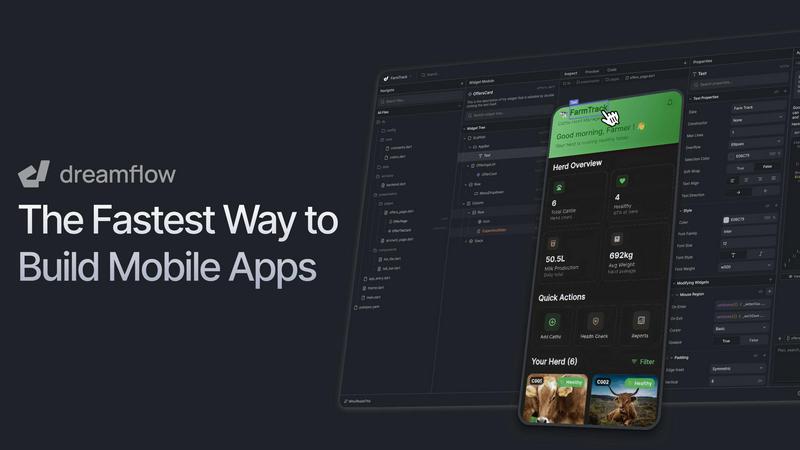
Dreamflow is your AI copilot that builds real apps crazy fast using prompts, visuals, or code.
Last updated: March 1, 2026

PUNKU.AI
PUNKU.AI turns your everyday requests into smart AI automations, making life easier without any coding needed.
Last updated: February 28, 2026
Visual Comparison
Dreamflow
PUNKU.AI

Feature Comparison
Dreamflow
Tri-Surface Editing
This is the core magic. You can fluidly switch between chatting with the AI agent, dragging and dropping in the visual canvas, and writing raw Flutter code. Everything stays perfectly in sync in real-time. Make a change in the code? It updates the visual builder. Tweak a button visually? The code stays clean. It means you're never trapped in one mode and your work never gets lost in translation between a "prototype" and the real deal.
AI-Powered, Context-Aware Generation
This isn't your dumb, copy-paste AI. Dreamflow's AI understands app development patterns and best practices. When you describe your feature, it scaffolds it out the right way, thinking about state management, navigation, and structure. It's like having a senior dev partner who instantly whiteboards your idea into a solid, editable starting point, saving you hours of boilerplate setup.
Build & Deploy for Any Screen
Powered by Flutter, everything you build is automatically responsive and ready for any device size – phone, tablet, or web. When you're done, shipping isn't a nightmare. With literally a few clicks, you can deploy your app to the Apple App Store, Google Play Store, or as a live web app. It takes the terrifying "deployment" phase and turns it into a simple button press.
Backend Integrations Out of the Box
Dreamflow gets that real apps need data. It has first-class, one-click integration with Firebase and Supabase, so you can set up authentication, databases, and storage without ever leaving the platform. You can build a full-stack, scalable application from day one without juggling a dozen different services and config files.
PUNKU.AI
Natural Language Automation
Forget about coding! With PUNKU.AI, you can describe what you want to automate in plain English. Whether it's setting up a customer service chatbot or automating email responses, just tell PUNKU.AI what you need and watch it handle the technical details.
Visual Node Graphs
Get a clear visual representation of your automations with PUNKU.AI's easy-to-understand node graphs. You'll see exactly how your workflows connect and operate, making troubleshooting and optimization a breeze. It's like having a roadmap for your automation journey!
Seamless API Integrations
PUNKU.AI connects effortlessly with over 3,000 APIs. Whether you're working with Gmail, Slack, or any other major tool, you can easily integrate it into your workflows without breaking a sweat. This flexibility means you can work with your existing tools and boost productivity instantly.
Continuous Monitoring and Improvement
Once your automations are up and running, PUNKU.AI doesn’t just sit back. It actively monitors performance, detects errors, and provides suggestions for improvement based on your key performance indicators. This ensures your workflows are always running at peak efficiency.
Use Cases
Dreamflow
The Solo Founder's MVP Machine
You're a founder with a killer idea but no $50k for a dev agency. You hop on Dreamflow, describe your app concept to the AI, and within hours (not months) have a working, presentable prototype. You can tweak it visually, test it on real devices, and deploy it to gather user feedback and validate your business idea before writing a single line of code manually.
The Indie Dev's Speed Hack
You're a skilled developer who knows that writing every UI screen from scratch is a time-sink. You use Dreamflow to rapidly generate the UI and basic app flow with the AI and visual tools, then dive straight into the exported Flutter code to add complex, custom logic and features. It supercharges your workflow, letting you focus on the hard, interesting problems.
The Agency's Prototyping Power Tool
Your agency needs to quickly mock up client ideas for presentations and user testing. Instead of spending weeks on non-functional Figma mockups or expensive coded prototypes, your team uses Dreamflow to build fully interactive, high-fidelity app prototypes that look and feel real. You get client sign-off faster and have a massive head start if the project moves to full development.
The Pro Team's Bridge Builder
Your team has Flutter developers and product designers. Dreamflow acts as the perfect collaboration bridge. Designers can fine-tune the UI in the visual editor while developers simultaneously work on the business logic in the code view, with no merge conflicts or "it looked different in the design file" arguments. It keeps everyone perfectly synced.
PUNKU.AI
Customer Service Automation
Need a customer service chatbot? Just tell PUNKU.AI what you want, and it will create one that connects with your existing tools. It can handle inquiries 24/7, ensuring your customers are always taken care of.
Lead Generation
Set up a lead generation bot that captures and qualifies leads automatically. PUNKU.AI takes the hassle out of manual lead management, letting you focus on closing deals rather than chasing down prospects.
Meeting Coordination
Automate your meeting scheduling with PUNKU.AI. It can send confirmation emails, update calendars, and notify your team on Slack, making the whole process smooth and efficient.
Social Media Management
With PUNKU.AI, you can schedule and post social media content without lifting a finger. Automate your social media campaigns and keep your online presence strong while you handle more important tasks.
Overview
About Dreamflow
Alright, let's cut through the noise. Dreamflow is the visual AI builder that finally lets you ship production-ready mobile apps without wanting to yeet your laptop out a window. Built by the absolute legends behind FlutterFlow, it's designed to obliterate "prototype purgatory" – that awful place where your cool idea gets stuck in a tool that can't actually launch to the app stores. Dreamflow is your all-access backstage pass to building real software. You start by just vibing with an AI agent, literally telling it your app idea in plain English like you're explaining it to a friend. It doesn't just give you a generic skeleton; it scaffolds out features that actually make sense. Then, you've got options: hop into a slick, drag-and-drop visual editor to fine-tune every pixel, or go full god-mode and dive straight into the clean, full Flutter code. The secret sauce? The AI prompt, visual canvas, and raw code are all perfectly synced. No more spaghetti-code monsters or useless prototypes. It's the holy trinity of dev: AI speed, visual clarity, and code-level power, with zero lock-in. Build for any screen, connect to backends like Firebase or Supabase in a click, and deploy to the App Store, Google Play, or web instantly. This isn't a toy. It's for founders, indie devs, and pro teams who are done with the old ways and want to move at light speed without sacrificing quality or ownership of their work.
About PUNKU.AI
Yo, welcome to PUNKU.AI, the ultimate game-changer in the world of automation! If you're tired of wrestling with clunky tools like Zapier or Make, it's time to level up with PUNKU.AI. This bad boy is here to streamline your workflows using the power of natural language, making it super easy to get stuff done without needing a PhD in tech. Imagine having an experienced developer by your side, asking the right questions until every last detail is covered. That's PUNKU.AI for you! With the ability to connect to over 3,000 APIs like Gmail, Slack, Notion, Zoom, Twilio, and Google Workspace, integrating PUNKU.AI into your setup is a walk in the park. Once you deploy your automations, it doesn’t just sit there; it keeps an eye on everything, spotting errors and suggesting improvements based on your KPIs. Trusted by over 200 businesses worldwide, PUNKU.AI helps you eliminate repetitive tasks so you can focus on what really matters—kicking butt and taking names!
Frequently Asked Questions
Dreamflow FAQ
Is Dreamflow just another "walled garden" prototype tool?
Absolutely not. That's the whole point. While you can build and deploy entirely within Dreamflow, you have full code export at the Hobby tier and above. You own the clean, standard Flutter code it generates. You can take it, run it locally, edit it in VS Code, and host it yourself. No lock-in, no vendor prison.
How smart is the AI really? Can it build a full app?
It's scarily context-aware. It won't autonomously build the next TikTok, but it's incredibly powerful for scaffolding features, generating UI components, and setting up app structure based on your descriptions. You provide the vision and guidance, and it does the heavy lifting of turning "a login screen with email, Google sign-in, and a forgot password flow" into a working, editable feature.
Do I need to know Flutter or how to code?
Not at all to get started. You can go incredibly far just using the AI prompt and visual editor. However, knowing Flutter unlocks the full "god-mode" potential, letting you tweak and add anything you imagine. It's designed to be accessible for beginners but infinitely powerful for experts.
What's the catch with the "credits" system?
Credits are used for AI generation tasks (like asking the agent to build a new feature). The Free plan gives you a one-time starter pack to explore. Paid plans include monthly credits (100 for Hobby, 500 for Pro). It ensures the AI resources are used for active development. Visual editing, code editing, and deployment don't use credits.
PUNKU.AI FAQ
What makes PUNKU.AI different from other AI platforms?
PUNKU.AI stands out because it allows users to automate workflows using natural language. You don't need any technical skills; just describe your task, and PUNKU.AI will handle the setup. It's all about simplicity and efficiency!
Do I need technical knowledge to use PUNKU.AI?
Not at all! PUNKU.AI is designed for everyone, regardless of their tech expertise. Just tell it what you want in plain English, and it will take care of the rest, making automation accessible to all.
How long does it take to get started?
Getting started with PUNKU.AI is super quick! You can set it up in just minutes. With pre-built templates and straightforward instructions, you'll be automating tasks in no time.
How secure is my data on PUNKU.AI?
Your data security is a top priority at PUNKU.AI. The platform uses advanced encryption and security measures to ensure that your information remains safe and confidential while automating your workflows.
Alternatives
Dreamflow Alternatives
Dreamflow is the visual AI builder for production-ready mobile apps, letting you switch between AI prompts, drag-and-drop design, and clean Flutter code. It's for devs and founders who want to ship real apps fast without getting stuck in prototype mode or wrestling with janky generated code. People hunt for alternatives for all sorts of reasons. Maybe the pricing doesn't fit their startup budget, or they need to build for a specific platform like web-only. Some folks might crave deeper control in a different programming language, or just want to test the waters with a simpler, more basic tool before going all-in. When you're scouting for other options, think about your non-negotiables. Do you need true production-ready code, or is a clickable prototype enough? How important is AI assistance versus pure visual editing? Check if the tool locks you into its own ecosystem or lets you own and export your code. The goal is to find your perfect fit without sacrificing speed or quality.
PUNKU.AI Alternatives
PUNKU.AI is a next-level automation tool that lets you transform plain English requests into smart AI-driven workflows without needing to write a single line of code. It falls under the no-code and low-code category, making it super accessible for everyone, whether you're a tech novice or a seasoned pro. Users often seek alternatives for various reasons, including pricing concerns, feature sets that may not fully align with their needs, or platform compatibility issues. When hunting for an alternative, it's essential to consider factors like ease of use, the range of integrations available, and the quality of support. You want a tool that not only meets your current requirements but also scales with you as your needs evolve. Look for options that provide a balance of simplicity and power to ensure you're still able to create effective automations without a headache.