
Fallom vs Lovalingo
Side-by-side comparison to help you choose the right AI tool.

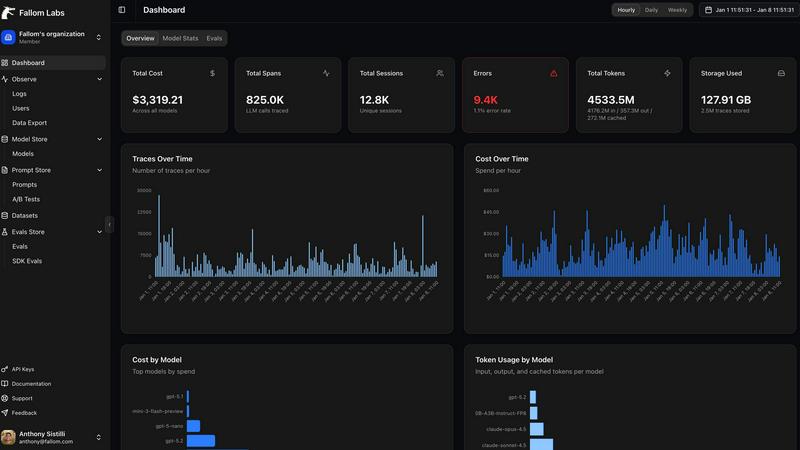
Fallom is your AI's sidekick, giving you real-time visibility into every LLM call and cost.
Last updated: February 28, 2026

Lovalingo
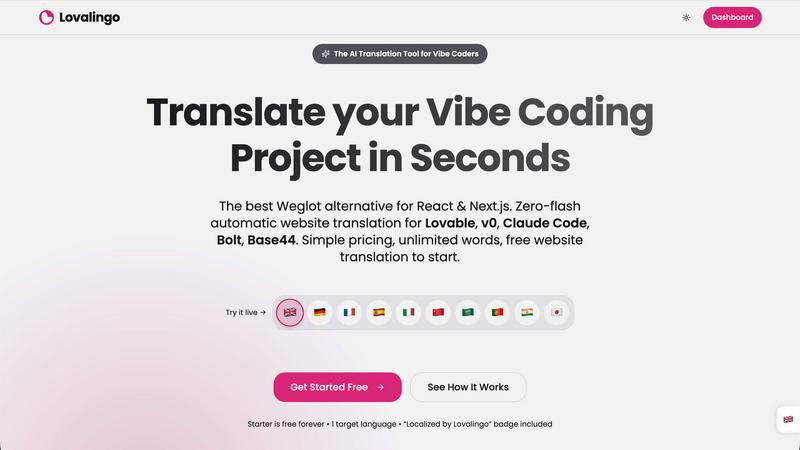
Instantly translate your React app in one prompt, no JSON files or flash.
Last updated: February 28, 2026
Visual Comparison
Fallom
Lovalingo
Feature Comparison
Fallom
End-to-End LLM Call Tracing
Get the full, unedited story of every interaction. Fallom captures the complete lifecycle of each LLM call, showing you the exact prompt that went in, the response that came out, any tool or function calls the agent made (with arguments and results), token counts, latency at every step, and the calculated cost. It's like having a DVR for your AI, so you can replay any moment to see what really happened when that customer got a bizarre answer.
Real-Time Cost Attribution & Dashboards
Stop the budget panic. Fallom breaks down your AI spending in real-time, showing you costs per model, per user, per team, or per customer. The live dashboard gives you an at-a-glance view of usage and spend, so you can spot a runaway agent or an unexpectedly expensive model before your CFO spots it on the bill. Allocate costs, set up chargebacks, and optimize for efficiency without the spreadsheet nightmares.
Enterprise Compliance & Privacy Controls
Built for the real world where rules matter. Fallom comes packed with features to keep you compliant and secure. That includes full, immutable audit trails for every LLM interaction, detailed input/output logging, model version tracking, and user consent records. Need to handle sensitive data? Flip on Privacy Mode to redact content or log only metadata, keeping your telemetry without capturing confidential info.
Session & User-Level Context Grouping
Debug with the full picture, not just isolated errors. Fallom automatically groups traces by user, session, or customer. This means you can see everything a specific user did in one flow—from their initial question through all the agent's tool calls and LLM hops—making it infinitely easier to understand complex issues and reproduce bugs. It turns a pile of random traces into a coherent user story.
Lovalingo
Zero-Flash, Render-Native Translation
Forget those janky script-based tools like Weglot that hack your DOM after the page loads, causing ugly flickers and layout shifts. That's amateur hour. Lovalingo integrates directly into your React render cycle. The translation happens before the page paints, meaning your users see the correct language instantly with a perfectly stable layout. It's smooth, native, and performs like it's part of your own codebase. No flash, no jump, just pure, clean multilingual vibes.
One-Prompt AI Setup
Configuring traditional i18n is a vibe-killer. Lovalingo respects your flow. You copy a single, clean prompt, paste it into Lovable, Claude, or your AI tool of choice, and you're done. Your AI assistant will install the NPM package and wrap your app. In 60 seconds flat, you go from mono-lingual to multilingual. It's the setup experience you deserve - no dashboard labyrinths, no confusing configs, just instant global readiness.
Automatic Translation & Zero Maintenance
The dream: no translation files. Ever. Lovalingo makes it real. We auto-detect the text in your app and translate it on the fly. You add a new feature or page? We handle it. No more maintaining 3,500 JSON string entries for 5 languages. It's all automatic, running in the background while you focus on building. This is zero-maintenance i18n for the AI era.
Built-In Multilingual SEO
Going global isn't just about UI text; you need to be found. Lovalingo handles the heavy SEO lifting automatically. We generate multilingual sitemaps and inject the correct hreflang tags and meta descriptions for you. This means search engines can index your Spanish, French, and Japanese versions correctly from day one, driving real organic traffic to your global sites without you lifting a finger.
Use Cases
Fallom
Debugging Complex AI Agent Workflows
When your multi-step agent gets stuck or gives a nonsense answer, finding the root cause is a needle-in-a-haystack problem. With Fallom's timing waterfall and tool call visibility, you can instantly see which step in the chain (e.g., an LLM call, a database query, a function) failed or was too slow. You get the full context to squash bugs fast and keep your users happy.
Controlling and Optimizing AI Spend
AI costs can spiral faster than a meme coin. Teams use Fallom to get crystal-clear visibility into which features, models, or customers are driving their API bills. By tracking cost per model and per team, you can make data-driven decisions to optimize prompts, switch models for certain tasks, or implement usage quotas, directly protecting your bottom line.
Ensuring Compliance for Regulated Industries
If you're in finance, healthcare, or any field with strict regulations, deploying AI can be scary. Fallom acts as your compliance co-pilot, automatically generating the detailed audit trails, consent records, and model lineage reports you need to prove adherence to standards like SOC 2, GDPR, or the EU AI Act during audits.
Monitoring Production Performance & Reliability
You can't improve what you can't measure. Fallom's real-time dashboard and live tracing let you monitor the health and performance of your AI features in production. Spot latency spikes, track accuracy metrics with built-in evals, and perform safe A/B tests on new models or prompts—all to ensure a smooth, reliable experience for your end-users.
Lovalingo
SaaS Founders Scaling Internationally
You've got product-market fit at home and are ready to conquer new territories. The last thing you need is a months-long i18n project slowing your roll. With Lovalingo, you can launch your MVP in multiple new markets over a weekend. Get immediate user feedback from Germany, Spain, or Japan without the traditional dev tax, and iterate fast on a truly global scale.
Agencies Building Client Projects on Lovable
Speed and quality are everything for your agency. When a client needs a site that works in three languages, you can't bill for weeks of manual translation work. Integrate Lovalingo into your standard Lovable workflow. Deliver stunning, fully localized sites to your clients in record time, making your proposals unbeatable and your profit margins much, much happier.
Indie Hackers & Solopreneurs
You're a one-person army wearing every hat. Managing translations manually is simply not an option. Lovalingo acts as your automated i18n co-founder. It handles the entire complexity of going global, letting you compete with bigger players from your couch. Launch globally from the start, capture international demand, and grow your user base without the overhead.
Devs Who Hate Manual i18n Workflows
Let's be real: managing JSON files and string keys is tedious, error-prone, and just not fun. If you have a visceral hatred for that t('button.submit') life, Lovalingo is your liberation. It abstracts all that nonsense away. You just build your UI with plain text, and we make it multilingual. Reclaim your joy for development and spend time on the interesting problems.
Overview
About Fallom
Alright, let's break it down. Fallom is like the ultimate control room for your AI chaos. If you're building with LLMs or AI agents, you know the vibe: stuff works in dev, then you ship to production and suddenly it's a black box of mystery calls, weird latencies, and surprise bills from OpenAI. Fallom fixes that. It's an AI-native observability platform built from the ground up to give you X-ray vision into every single LLM call happening in your apps. We're talking full end-to-end tracing that shows you the prompts, the outputs, the tool calls, the tokens, the latency, and even the exact per-call cost. It's designed for devs, product managers, and data science teams who are tired of flying blind and need a single source of truth for their AI ops. With a slick dashboard that serves up context by session, user, or customer, you can debug weird agent behavior in seconds, monitor live usage, and see exactly who or what is burning through your API budget. Plus, it's built on OpenTelemetry, so you can instrument your stack in, like, five minutes flat. And for the enterprise crowd sweating compliance? Fallom's got your back with audit trails, logging, model versioning, and consent tracking to keep you chill with regulations like GDPR and the EU AI Act. In short, it's your wingman for building reliable, cost-controlled, and high-performance AI applications.
About Lovalingo
Alright, vibe coders, listen up. You're crushing it with Lovable, v0, Claude Code, and the rest of the AI dev squad, shipping features at lightspeed. But the second you think about going global, you hit the i18n wall. Manual JSON files? Broken layouts? SEO nightmares? That's the old world. Lovalingo is your eject button. We're the AI-native translation layer that eliminates all that maintenance BS. Think of us as the automatic transmission for your app's global drive. You paste one prompt, and boom - your React or Next.js app speaks 20+ languages, with zero flicker, zero manual string management, and native SEO baked right in. It's built specifically for the vibe-coding workflow, so you can scale to international markets without slowing down your legendary shipping speed. For SaaS founders, agencies, and devs who'd rather build cool stuff than manage translation spreadsheets, Lovalingo is your new best friend.
Frequently Asked Questions
Fallom FAQ
How difficult is it to integrate Fallom into my existing app?
It's stupid easy. Fallom is built on the OpenTelemetry standard, so you just install one lightweight SDK. The website boasts you can get "OTEL Tracing in Under 5 Minutes." You add a few lines of code, and it automatically starts capturing traces from your LLM calls, regardless of whether you use OpenAI, Anthropic, Google, or others. No major refactoring needed.
Does Fallom store all my prompt and response data?
You have control. Fallom is designed to capture the full telemetry for observability. However, for sensitive applications, you can enable "Privacy Mode." This lets you redact specific data or run in a metadata-only logging configuration, where you still get all the timing, cost, and structural info without storing the actual content of prompts and responses.
Can I use Fallom to compare different LLM models?
Absolutely! Fallom is built for this. The platform lets you run A/B tests by splitting traffic between different models (like GPT-4o and Claude 3.5). You can then compare their performance side-by-side in the dashboard—looking at cost, latency, and even custom evaluation scores—to make informed decisions about which model to use for each task.
What if my team is small and just starting with AI?
Fallom is for you, too. The platform offers a free tier to get started, which is perfect for small teams or projects. You can start tracing your agents, see costs, and debug issues without an upfront commitment. It scales with you, so as your AI usage grows into enterprise-level, the compliance and advanced features are already there.
Lovalingo FAQ
How is this different from Weglot or Google Translate?
Weglot is an external script that manipulates your DOM after load (causing flicker), locks you into their dashboard, and charges per word. Lovalingo is a native React library—no DOM hacking, just clean integration. It's built for developers, with unlimited words (fair use) and per-project pricing. It's like comparing a custom engine part to duct tape on your bumper.
Does it work with my static site (Next.js, Vercel, etc.)?
Absolutely! That's where we shine. Whether you're using Next.js App Router, Pages Router, or any React-based static site generator, Lovalingo's render-native approach works seamlessly. We support both path-based (/es/about) and query-based (?locale=es) routing, giving you full control for optimal SEO and user experience on any hosting platform.
What about my existing i18n JSON files? Do I have to start over?
Nope, you can keep your legacy! Lovalingo can be integrated incrementally. You can use it for all new features and pages you build with your vibe-coding tools, leaving your old, manually-translated sections as-is. This lets you modernize your workflow without a scary, all-or-nothing migration.
Can I edit the auto-generated translations?
Yes, you have full control. While the auto-translation is great for getting 95% of the way there instantly, you might want to tweak brand voice or specific terms. Lovalingo provides a simple interface to review, edit, and override any translation, ensuring your app's personality shines through in every language.
Alternatives
Fallom Alternatives
So you're vibing with Fallom, the AI observability platform that's basically a crystal ball for your LLMs and agents. It's the go-to dev tool for teams who need to track every API call, debug weird outputs, and stop their cloud bill from going absolutely viral. It's a whole mood for managing AI ops. But let's keep it a buck, sometimes the fit isn't perfect. Maybe the pricing feels a bit extra for your startup grind, or you're locked into a specific cloud ecosystem and need a native tool. Other times, you might just crave a different UI flavor or need a hyper-specific feature that's not in the current stack. It's all about finding your app's soulmate. When you're scrolling through options, don't just look at the shiny features. Peep the integration game—how easy is it to actually plug and play? Check the transparency on pricing (no one likes surprise invoices). And most importantly, see if it scales with your vibe, from your solo developer era to a full enterprise glow-up. The goal is to keep your AI smooth, monitored, and budget-friendly.
Lovalingo Alternatives
So you've heard the hype about Lovalingo, the slick new tool that auto-translates your React app without the usual i18n nightmare. It's basically your SEO and localization wingman, handling everything from sitemaps to zero-flash translations so you can vibe code on platforms like Lovable without breaking a sweat. But let's be real, you're probably shopping around. Maybe the pricing isn't your vibe, or you need something that plays nice with a different tech stack. Perhaps you're just doing your due diligence before pulling the trigger. It's smart to peek at the other options on the menu. When you're scoping out the competition, keep your eyes peeled for a few key things. You want something that doesn't make your UI flicker like a bad neon sign, actually helps you get found on Google in other languages, and doesn't shackle you to managing a million JSON files. The dream is a setup that just works and gets out of your way.