
LLMWise vs URL to Any
Side-by-side comparison to help you choose the right AI tool.

LLMWise
LLMWise gives you one API to access 62 models like GPT and Claude, only pay for what you use, no subscriptions needed.
Last updated: February 28, 2026

URL to Any
Transform any webpage into shareable content in seconds with URL to Any's free and easy conversion tools.
Last updated: March 1, 2026
Visual Comparison
LLMWise

URL to Any
Feature Comparison
LLMWise
Smart Routing
LLMWise’s smart routing feature automatically directs your prompts to the most suitable model based on the task you need. If you’re looking to generate code, it’ll route to GPT. For creative writing, Claude gets the nod, and for translations, Gemini takes over. This means you’re always using the right tool for the job, optimizing the quality of your outputs without any extra effort.
Compare & Blend
With LLMWise, you can run prompts across multiple models side-by-side. This unique compare feature allows you to see which model delivers the best response, while the blend function combines outputs into a single, stronger answer. No more guesswork—just clear, concise results that leverage the strengths of different models.
Always Resilient
Worried about downtime? LLMWise has your back with its circuit-breaker failover feature. If one provider goes offline, your requests are rerouted to backup models seamlessly. This ensures that your applications stay up and running without interruption, giving you peace of mind and reliability in your AI operations.
Test & Optimize
LLMWise offers a comprehensive suite of benchmarking tools to test and optimize your AI responses. You can run batch tests, set optimization policies for speed or cost, and even conduct automated regression checks. This means you can continuously refine your use of AI models to ensure you’re getting the best performance possible.
URL to Any
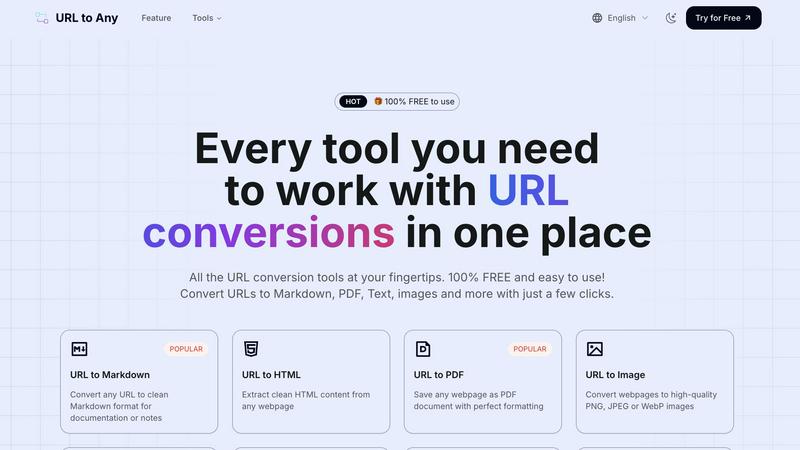
URL to Markdown
Need your web content in Markdown format? This feature does the trick, turning any webpage into clean, structured Markdown that’s perfect for documentation, notes, or even blog posts. Just paste your URL, and voilà, your content is ready to go.
URL to PDF
Say goodbye to print screens and messy screenshots. With the URL to PDF feature, you can save any webpage as a beautifully formatted PDF document. It’s perfect for archiving important articles or sharing resources without losing any formatting.
URL to Image
Want to capture that sweet webpage design? Use the URL to Image feature to convert any site into high-quality images like PNG, JPEG, or WebP. Whether it’s for presentations or social media, you’re covered with stunning visuals.
URL to JSON
For developers and data enthusiasts, the URL to JSON feature transforms webpage content into structured JSON format, making it easy to work with data in your apps or projects. Just input the URL and get your data organized in a snap.
Use Cases
LLMWise
Efficient Development Workflows
Imagine being able to streamline your development process by sending the same prompt to multiple models and instantly comparing their outputs. With LLMWise, developers can quickly determine which model handles edge cases best, saving hours of debugging and enhancing productivity.
Cost-Effective AI Integration
Startups and small businesses often face budget constraints when it comes to AI tools. LLMWise allows teams to bring their own API keys or utilize its pay-per-use model, significantly cutting costs compared to multiple subscription services. This flexibility makes high-quality AI accessible to everyone.
Enhanced Creative Projects
For writers and marketers who need high-quality content, LLMWise’s blend feature is a game-changer. By combining the strengths of different models, creators can produce captivating narratives, slogans, or marketing copy that resonates well with audiences, all while saving time.
Robust Data Analysis
Data scientists can leverage LLMWise to analyze and interpret large datasets quickly. By using models optimized for language processing alongside those focused on numerical analysis, teams can achieve deeper insights and more accurate results without the hassle of switching between different platforms.
URL to Any
Saving Articles for Later
Ever stumble upon a must-read article but don’t have time to engage? Use URL to Any to convert it into a PDF or Markdown to save for later. You can read it anytime, anywhere, without the original webpage's distractions.
Quick Data Extraction
If you’re a developer needing to extract and manipulate data, URL to JSON or URL to XML are lifesavers. Quickly convert webpage content into manageable data formats for your coding projects, saving you tons of time.
Sharing Content Effortlessly
Need to share a webpage with friends or colleagues without sending them the clutter? Generate a clean PDF or an image of the page using URL to Image or URL to PDF, making sharing super convenient and professional.
Extracting Meta Tags for SEO
For those in the digital marketing world, the new URL Meta Tags Extractor lets you analyze meta tags from any URL. This is essential for checking SEO, Open Graph, and Twitter Cards, helping you optimize your web presence effortlessly.
Overview
About LLMWise
LLMWise is your ultimate solution for managing AI models without the hassle of juggling multiple providers. Imagine having access to the best large language models (LLMs) like OpenAI, Anthropic, Google, Meta, xAI, and DeepSeek all through one sleek API. This tool is crafted for developers who crave efficiency and flexibility, allowing them to route prompts intelligently to the ideal model for the task at hand. Whether it's coding, creative writing, or translation, LLMWise ensures you tap into the most effective AI model available. No more paying hefty subscriptions for multiple services; this platform lets you compare and blend responses from different models, ensuring you always get the best output. With smart routing, failover capabilities, and a pay-as-you-go pricing model, LLMWise is perfect for anyone looking to level up their AI game without breaking the bank.
About URL to Any
Alright, folks, let’s dive into the magic that is URL to Any. This nifty tool is your go-to buddy for transforming any boring ol' webpage into a bunch of cool formats, making it super easy to save and share content without all that clutter. Whether you’re a casual web surfer looking to grab a recipe sans the annoying sidebar ads or a developer needing to scrape content, URL to Any has got your back. Picture this: you find an epic article or a dope tutorial, and with just a few clicks, you can convert it into a sleek PDF, a clean Markdown file for your notes, or even a stripped-down text file. No sign-ups, no annoying premium trials, and best of all, it's completely free! With tools designed for everyone—from content creators drowning in open tabs to students needing concise notes—URL to Any turns chaotic web content into exactly what you need, instantly. It’s all about simplifying your digital life, so you can focus on what really matters.
Frequently Asked Questions
LLMWise FAQ
What kind of models can I access with LLMWise?
LLMWise provides access to 62+ models from 20 different providers, including major players like OpenAI, Anthropic, Google, and Meta. This extensive library ensures you can always find the right model for your needs.
How does the pricing work for LLMWise?
LLMWise operates on a pay-as-you-go model, allowing you to start for free with 20 credits that never expire. You can use up to 30 models at no cost and only pay for premium models as needed, making it a budget-friendly option.
Can I use my existing API keys with LLMWise?
Absolutely! One of the standout features of LLMWise is its "Bring Your Own Keys" (BYOK) capability, allowing you to integrate your existing API keys while still benefiting from LLMWise's intelligent routing and failover features.
How quickly can I get started with LLMWise?
Getting up and running with LLMWise is a breeze. Simply sign up, generate your API key, and you're ready to start making requests in just a couple of minutes. There's no need for complex setup processes—just dive right into using the power of AI!
URL to Any FAQ
How do I convert a URL?
It’s a breeze! Just copy the webpage URL you want to convert, paste it into the URL to Any tool, choose your preferred format, and hit convert. Your content will be ready in seconds.
Is URL to Any really free?
Absolutely! URL to Any is 100% free to use. No hidden fees, no sign-ups, just straightforward conversion tools at your fingertips.
What formats can I convert to?
You can convert URLs to a variety of formats including Markdown, PDF, Text, images, JSON, XML, and even MP3. It’s a one-stop shop for all your conversion needs.
Is my data safe?
You bet! Your data is processed securely and is never stored on our servers. Privacy is a top priority, so you can use URL to Any with peace of mind.
Alternatives
LLMWise Alternatives
LLMWise is like your one-stop shop for all things AI, giving you access to a bunch of powerful models like GPT, Claude, and Gemini through just one API. It's all about simplifying your life and making sure you get the right model for the right job without juggling a bunch of different providers. Users often seek alternatives to LLMWise because they want to explore different pricing structures, specific features, or platforms that better fit their workflow. When hunting for an alternative, keep an eye out for smart routing capabilities, flexibility in payment options, and the ability to easily test and optimize your AI tasks.
URL to Any Alternatives
Ever stumbled upon a killer webpage and thought how great it would be to snag that content in a different format? That's where URL to Any comes in, acting like your personal content wizard, turning any URL into whatever suits your needs. This tool falls under the AI Assistants category, making it a go-to for those looking to reshape online content without the hassle. But let's be real, users often seek alternatives for a bunch of reasons. Maybe they're searching for a tool that fits better with their workflow, offers more output options, or doesn't come with hidden fees. When hunting for an alternative, consider factors like ease of use, the variety of formats available, and whether you can access it without the pesky sign-up process. After all, nobody wants to jump through hoops just to convert a webpage into a PDF.