
Marauder Bot vs Prompt Builder
Side-by-side comparison to help you choose the right AI tool.
Marauder Bot
Marauder Bot is your stealthy sidekick for nailing tech interviews with instant solutions and zero stress.
Last updated: March 1, 2026

Prompt Builder
Generate, optimize, test, and manage AI prompts in one place. Turn an idea into a ready-to-use prompt in seconds.
Visual Comparison
Marauder Bot
Prompt Builder
Overview
About Marauder Bot
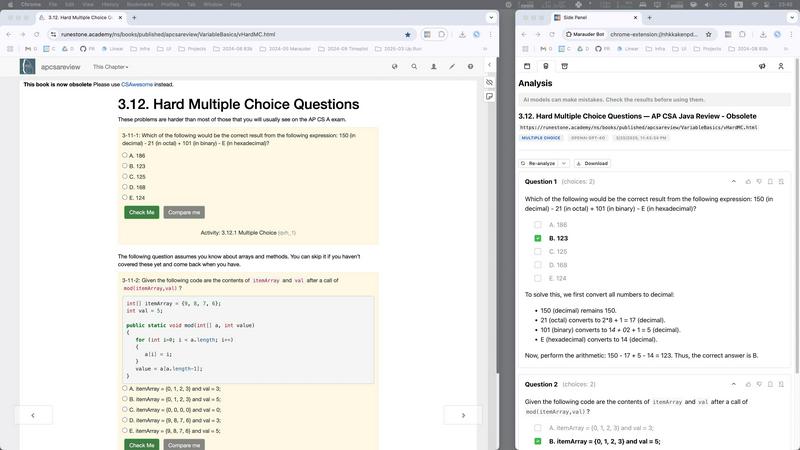
Marauder Bot is your go-to sidekick for crushing those technical interview questions right from your Chrome browser. Picture this: you've got a solid coding foundation, but when it comes to those tricky algorithm problems or multiple-choice quizzes, you feel the pressure. Enter Marauder Bot, your AI-powered buddy that’s always in your corner. Designed for everyone from coding rookies to seasoned pros, this stealthy Chrome extension pops up as a slick side panel, ready to assist you without breaking a sweat. It scans all your open web pages, ensuring you have the right support at your fingertips, no matter how many tabs you've got open. With advanced AI models at its core, Marauder Bot breaks down complex questions into bite-sized solutions, letting you keep your focus where it matters most: acing those technical assessments. Save time, boost your confidence, and prep like a pro with this essential tool in your coding toolkit.
About Prompt Builder
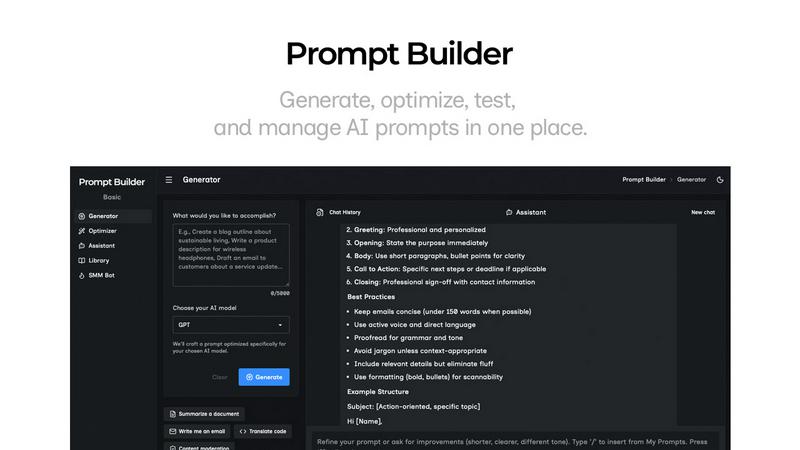
Prompt Builder is a prompt engineering workspace for writing, testing, and saving prompts. Describe the task in plain English, and it helps you create a prompt that matches the model you choose. Start with a draft, refine it in chat, save or pin versions, then run them when you are ready. It works with GPT, Claude, Gemini, Llama, Mistral, DeepSeek, Grok, Perplexity, and more. You also get an Optimizer, an assistant for quick tests, and a library of reusable prompts and templates from the community. Turn an idea into a ready-to-use prompt in seconds. Refine it in chat, save it to your Library, and run it anytime.