
Appkittie vs Master Metrics
Side-by-side comparison to help you choose the right AI tool.

Appkittie
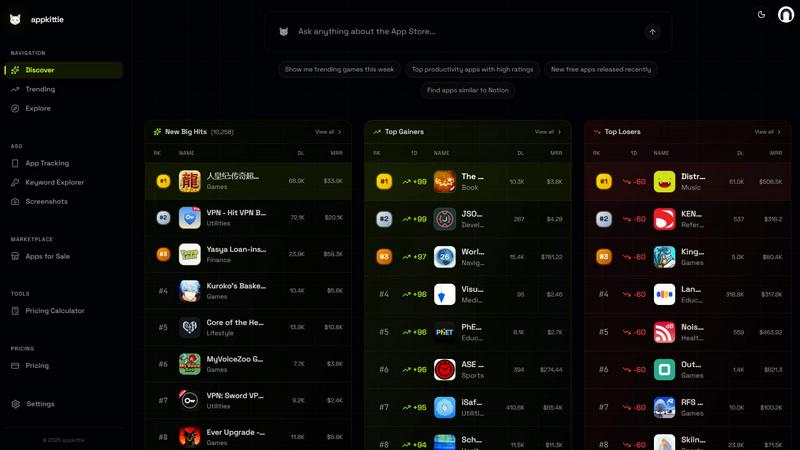
Stop guessing and start building apps that actually win by spying on their downloads, ads, and secret growth hacks.
Last updated: March 18, 2026

Master Metrics
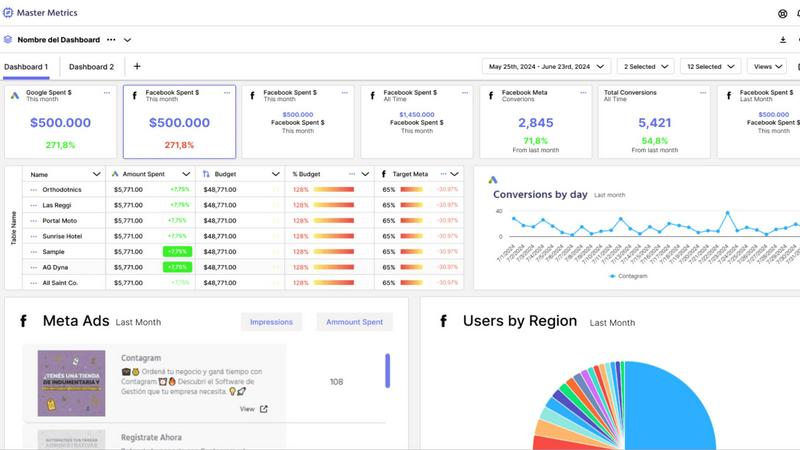
Stop drowning in data and start crushing goals with AI-powered dashboards and alerts.
Last updated: February 28, 2026
Visual Comparison
Appkittie
Master Metrics
Feature Comparison
Appkittie
App Discovery & Filtering Engine
This is your main hunting ground. Dive into a massive database of apps and use crazy-specific filters to find exactly what you're looking for. Want to see all puzzle games in the US making over $10k a month? Done. Looking for productivity apps with low competition but high downloads? You got it. It lets you slice and dice the market to uncover hidden gems and proven winners without wasting hours scrolling aimlessly.
Winning Ads Spy Tool
Say goodbye to blowing your ad budget on creatives that don't work. This feature lets you visually spy on the exact Meta ads any successful app is running right now. See their winning video hooks, their killer copy, and their landing pages. It's like having a direct feed to the marketing brains of top apps, so you can invest in ads knowing you're copying what already converts.
Creator & Influencer Tracker
Viral growth isn't magic—it's often powered by specific creators. This tool shows you the exact UGC (User-Generated Content) creators and influencers who are promoting an app. Discover their campaigns, see what content is working, and identify the real people driving installs. This is your shortcut to finding the right partners for your own influencer campaigns instead of shooting in the dark.
Keyword & ASO Intelligence
Ranking on the App Store is a battle, and this is your intel report. Find high-traffic, low-competition keywords you never knew existed. Get personalized suggestions to optimize your app's metadata (title, subtitle, keywords) so you can actually outrank your competitors. It turns ASO from a confusing chore into a strategic weapon to get more organic installs.
Master Metrics
All-in-One Mission Control Dashboard
Forget juggling ten different tabs. Master Metrics is your single source of truth, pulling data from all your ads, social platforms, e-commerce stores, and more into one unified, clean dashboard. See everything that matters at a glance, customize your view, and finally understand what's actually working without the mental gymnastics. It's like having a 24/7 command center for your marketing performance.
AI-Powered Google Slides & Sheets Magic
Stop manually building reports and presentations. This feature is a total game-changer. Choose your data, pick a slick template, and let Master Metrics' AI generate a fully editable, client-ready Google Slides presentation in just a few clicks. Plus, it automatically pushes fresh, live data directly into your Google Sheets and Looker Studio. Your data is always current, and you never have to copy-paste again. Pure wizardry.
Smart, Proactive Alerts on Your Terms
Don't just watch your metrics; make them work for you. Set up custom alerts for anything: a campaign tanking, sales dipping, or a goal being smashed. Get notified via email, Slack, or WhatsApp the moment something important happens. You can even control your ad spend automatically with budget alerts. It's like having a hyper-vigilant guard dog for your KPIs, so you can focus on strategy, not spreadsheets.
Custom Metrics & Formula Builder
Got a unique business question that standard metrics can't answer? No problem. Master Metrics lets you build your own custom metrics and formulas by blending data from different sources. Want to see your cost-per-lead from Facebook Ads combined with close rates from your CRM? You can build that. It gives you the power to answer any "what if" and get insights tailored exactly to your business.
Use Cases
Appkittie
Finding Your Next Startup Idea
Stuck in "idea limbo"? Instead of brainstorming in a vacuum, use Appkittie to discover apps that are already generating real cash and downloads in other markets. Spot a trending fitness app killing it in Japan? Replicate and adapt it for your region. You're not copying; you're validating demand before you write a single line of code, saving you months of wasted effort.
Validating a Niche Before You Build
Got a hunch about a specific app category? Don't just build it and hope. Use Appkittie to investigate. Check if similar apps exist, how much revenue they're pulling, and how crowded the space is. This due diligence helps you avoid entering a saturated market or, worse, building something nobody is searching for or willing to pay for.
Deconstructing Competitor Strategy
Want to know how your rival got to #1? Appkittie lets you reverse-engineer their entire playbook. Analyze their download trends, see their current winning ads, find out which influencers they're using, and dissect their keyword strategy. This isn't espionage; it's smart market research that lets you learn from their wins (and losses) to inform your own growth tactics.
Boosting Your App's Store Presence (ASO)
If your app is buried on page 10 of search results, you're leaving installs on the table. Use the ASO tools to find untapped keywords with good traffic. Get suggestions to improve your app's listing with better screenshots and metadata. It's a direct way to improve your conversion rate and get more free, organic users from the App Store itself.
Master Metrics
For Agencies Managing Multiple Clients
Juggling data for 10, 20, or 50 different clients is a nightmare. Master Metrics lets you clone dashboard templates with one click for new accounts, keep everything in a centralized Overview Control Panel, and automate reporting for each client. You look incredibly organized and data-driven, while saving hours of manual work. It's the secret weapon for scaling your agency without losing your mind.
For Marketing Teams Needing Real-Time Insights
When you need to know now if a campaign is flopping or a viral post is blowing up, waiting for a weekly report is useless. With live dashboards and instant alerts sent to your team's Slack channel, everyone stays in the loop in real-time. Make pivots faster, double down on what's working, and keep the entire team aligned with up-to-the-minute data.
For Automating Client Reporting & Presentations
The dreaded monthly report grind is over. Use Master Metrics to automatically pull the latest data, generate a beautiful Google Slides deck with AI, and schedule it to be emailed directly to your clients. You deliver consistent, professional, and insightful presentations every time, freeing up your evenings and impressing your clients with your efficiency.
For Controlling Ad Spend & Campaign Budgets
Worried about blowing your monthly ad budget in the first week? Set up daily budget alerts in Master Metrics. It will calculate the daily spend needed to hit your target and notify you instantly if you're over or under. This gives you proactive control, prevents costly overspends, and ensures you're pacing perfectly toward your goals all month long.
Pricing Comparison
Appkittie
Appkittie keeps it simple with two straightforward plans, both including a full-featured 3-day free trial. You can choose flexible monthly billing or save a huge chunk with a yearly commit.
Monthly Plan: $49 per month. Perfect if you want to stay flexible with no long-term commitment. Start with the 3-day trial and pay monthly after.
Yearly Plan: $169 per year (which breaks down to about $14.08 per month). This is the Best Value, saving you a massive 71% compared to paying month-to-month. Both plans give you full access to all Pro features: unlimited searches, ad spy, creator tracking, ASO tools, the screenshot generator, data exports, and the ability to invite up to 5 team members.
Master Metrics
Master Metrics offers a range of plans to fit different business sizes, all with a 7-day free trial. Plans start at $30 USD/month for the Freelancer plan (15 accounts, basic features) and scale up to $439 USD/month for the Pro Plus 2 plan (250 accounts, all features). Key features like the Looker Studio connector, Google Sheets connector, Alerts, and the Overview Control Panel are included in most paid plans. The AI Slides feature and implementation support are available on the higher-tier plans. You can choose based on the number of client accounts you need to manage and the advanced tools you require.
Overview
About Appkittie
Stop building apps that flop. Appkittie is your secret weapon, your cheat code, your backstage pass to the app store's biggest hits. It's an app intelligence platform that cuts through the guesswork and shows you exactly what's already winning. Think of it as your personal spy satellite for the mobile app universe. For founders, indie hackers, and marketers tired of throwing ideas at the wall, Appkittie serves up a massive database of real apps, letting you peek at their actual revenue and download numbers. No more building in the dark. But it doesn't stop at the "what"—it shows you the "how." Discover the exact Meta ads that are crushing it, find the TikTok creators who are making apps go viral, and uncover the Apple Search Ads campaigns that are driving installs. It's about replicating proven success, not reinventing the wheel. Whether you're hunting for your next million-dollar idea, validating a niche, or trying to outsmart your competitors, Appkittie gives you the raw, unfiltered intel to build apps people actually want and download. Stop playing the guessing game and start playing on easy mode.
About Master Metrics
Alright, let's get real. If you're running an agency or a marketing team, you're probably drowning in a sea of tabs, spreadsheets, and data points from a zillion different places. It's chaos, and trying to make sense of it all is a full-time job that nobody signed up for. Enter Master Metrics, your new analytics sidekick built by marketers who've been in the trenches and know the daily grind. This ain't just another dashboard tool; it's your mission control for all things marketing data. It pulls everything from your ad campaigns and social stats to e-commerce and CRM data into one gloriously clean spot. The main vibe? Simplifying the absolute chaos. You get smart dashboards, killer alerts that ping you on Slack or WhatsApp the second something goes sideways (or when you're absolutely crushing it), and it automates all that tedious reporting nonsense. The real big-brain move? Its AI can whip up client-ready Google Slides presentations and push live data straight into your Google Sheets. No more 2 AM copy-paste marathons. It's for teams who want to look like absolute data wizards without needing a PhD in spreadsheet sorcery. Maximize your results, minimize your headaches.
Frequently Asked Questions
Appkittie FAQ
What can I actually do with Appkittie?
You can do a ton! Mainly, you can discover profitable apps to get ideas, spy on their successful ads and influencer campaigns, find killer keywords to rank higher on the App Store, generate pro-level screenshots, and track apps across different global markets. It's your all-in-one toolkit for researching, validating, and growing mobile apps with data, not guesses.
Who is Appkittie built for?
It's built for anyone in the app game who's tired of failing. That includes indie hackers and solo founders looking for their next hit, startup teams trying to validate ideas fast, app marketers who need competitor intel and ad inspiration, and developers who want to improve their app's visibility with smart ASO. If you want to build or grow apps that win, this is for you.
Is there a free trial, and can I cancel anytime?
Absolutely! You can start a Pro free trial for 3 days with no charge upfront. You get full access to all the premium features to test drive everything. If you love it, you do nothing and your chosen plan starts after the trial. If it's not for you, you can cancel anytime with just a few clicks—no shady tactics, no hidden fees, no hassle.
Can I export data or share access with my team?
Yes and yes! You can export your search results and app data to CSV or JSON files for your own analysis offline. Plus, on both pricing plans, you can invite up to 5 team members to collaborate. This means your whole squad can research, share finds, and build strategies together on the same platform.
Master Metrics FAQ
What data sources can I connect to Master Metrics?
You can connect all the major players you're already using! This includes platforms like Google Ads, Meta Ads, various social media channels, e-commerce platforms (like Shopify), and CRM systems. They're also constantly adding new integrations (with several "coming soon" on the list), so your toolkit keeps growing. It brings all that scattered data into one unified dashboard.
How does the AI presentation creator actually work?
It's shockingly simple. You just select the client account, choose the key metrics and goals you want to highlight, and pick a design template you like. Then, Master Metrics' AI does its thing: it analyzes the data, writes the insights in plain English, and builds a fully formatted, editable presentation in Google Slides for you. You get a professional deck in minutes, not hours.
Can I really get alerts on WhatsApp or Slack?
Absolutely, yes! This isn't just email alerts. You can configure your alerts to ping you directly in the tools your team lives in. Set a threshold for a metric (like "cost per conversion over $50"), and get an instant message in your Slack channel or a WhatsApp notification when it's triggered. It's perfect for staying on top of critical issues without constantly checking a dashboard.
Is there a limit to how many dashboards or alerts I can create?
This depends on your pricing plan. The entry-level "Freelancer" plan has limits on dashboards and doesn't include the Overview feature or AI Slides. As you move up through the "Basic," "Pro," and "Pro Plus" plans, you get access to more accounts, unlimited dashboards, alerts, and all the premium features. Check the pricing table to see which plan fits your scale.
Alternatives
Appkittie Alternatives
So you've heard about Appkittie, the app intelligence platform that's basically a crystal ball for mobile app founders and marketers. It's in the app analytics and market research game, helping you skip the guesswork and find apps that are already making bank. But maybe you're looking around because the price tag isn't vibing with your budget, or you need features it doesn't have, or you just wanna see what else is cookin' in the space before you commit. When you're on the hunt for a different tool, you gotta know what's non-negotiable for your grind. Is it all about that ad spy feature to see the winning TikTok creatives? Do you need deeper download and revenue sleuthing than what's on the table? Maybe platform focus is key—are you an iOS purist or an Android ace? Getting clear on your non-starters will save you from a major case of buyer's remorse later. At the end of the day, you want a tool that doesn't just dump data on you but gives you the real tea on how apps are winning. Look for something that helps you spot proven opportunities and unpack the marketing playbooks, so you can stop building in the dark and start creating stuff people actually want to download.
Master Metrics Alternatives
So you've heard the buzz about Master Metrics, the AI-powered dashboard tool that's basically a cheat code for marketing agencies drowning in data. It's the all-in-one analytics sidekick designed to pull your client data from ads, social, and e-commerce into one clean mission control center, automating reports and sending smart alerts so you can stop the 2 AM spreadsheet grind. But let's be real, sometimes the perfect tool for one squad isn't the right fit for yours. Maybe the pricing feels a bit steep for a bootstrapped team, or you're locked into a specific tech stack it doesn't play nice with. Perhaps you need a feature it just doesn't have yet, or your workflow is so unique you need something hyper-customizable. It's all good—the hunt for the right tool is part of the game. When you're scoping out other options, keep your non-negotiables front and center. Think about your budget, the specific platforms you must connect to, and how your team actually works day-to-day. Do you need insane customization, or just something that works out of the box? Nail down what "simplifying the chaos" really means for your crew before you dive into the endless list of contenders.