
Master Metrics vs quickseo.ai
Side-by-side comparison to help you choose the right AI tool.

Master Metrics
Stop drowning in data and start crushing goals with AI-powered dashboards and alerts.
Last updated: February 28, 2026

Stop flying blind and see how your brand ranks on Google and AI chatbots like ChatGPT, all in one dashboard.
Last updated: March 11, 2026
Visual Comparison
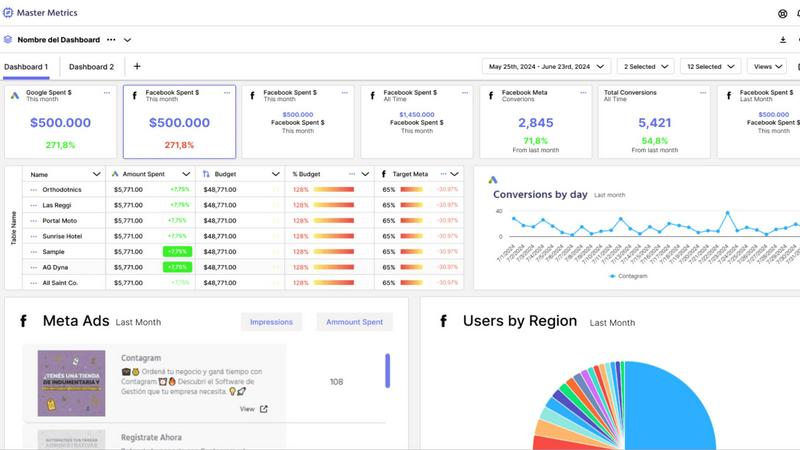
Master Metrics
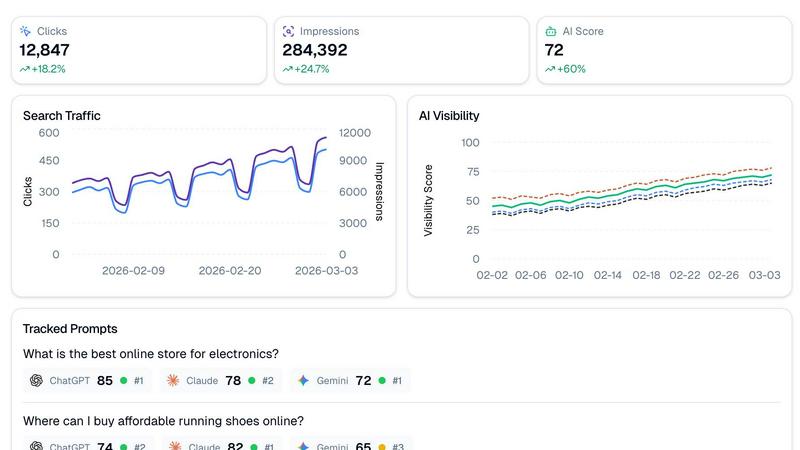
quickseo.ai
Feature Comparison
Master Metrics
All-in-One Mission Control Dashboard
Forget juggling ten different tabs. Master Metrics is your single source of truth, pulling data from all your ads, social platforms, e-commerce stores, and more into one unified, clean dashboard. See everything that matters at a glance, customize your view, and finally understand what's actually working without the mental gymnastics. It's like having a 24/7 command center for your marketing performance.
AI-Powered Google Slides & Sheets Magic
Stop manually building reports and presentations. This feature is a total game-changer. Choose your data, pick a slick template, and let Master Metrics' AI generate a fully editable, client-ready Google Slides presentation in just a few clicks. Plus, it automatically pushes fresh, live data directly into your Google Sheets and Looker Studio. Your data is always current, and you never have to copy-paste again. Pure wizardry.
Smart, Proactive Alerts on Your Terms
Don't just watch your metrics; make them work for you. Set up custom alerts for anything: a campaign tanking, sales dipping, or a goal being smashed. Get notified via email, Slack, or WhatsApp the moment something important happens. You can even control your ad spend automatically with budget alerts. It's like having a hyper-vigilant guard dog for your KPIs, so you can focus on strategy, not spreadsheets.
Custom Metrics & Formula Builder
Got a unique business question that standard metrics can't answer? No problem. Master Metrics lets you build your own custom metrics and formulas by blending data from different sources. Want to see your cost-per-lead from Facebook Ads combined with close rates from your CRM? You can build that. It gives you the power to answer any "what if" and get insights tailored exactly to your business.
quickseo.ai
AI Visibility Scoring & Tracking
This is the main event. QuickSEO.ai gives you a daily visibility score across ChatGPT, Claude, and Gemini, so you can see at a glance if your AI clout is going up or down. It tracks specific prompts (like "best running shoes") and shows you exactly where you rank in the AI's response. It's like having a spy in every major AI chatroom, reporting back on whether your brand gets a shoutout or gets totally ignored.
Unified Google & AI Dashboard
Stop juggling a million tabs. This feature pulls your Google Search Console data (clicks, impressions, CTR, the whole shebang) right next to your AI performance stats. One dashboard to rule them all. See how your traditional search traffic trends alongside your AI visibility, so you can connect the dots and understand your full online performance picture without losing your mind.
Tracked Prompts & Sentiment Analysis
You get to define the battlefield. Input the exact questions your customers are asking AI bots. QuickSEO.ai then monitors those prompts 24/7 and shows you your ranking position for each one. Plus, it doesn't just stop at ranking—it analyzes the sentiment of the AI's mention. Find out if the bots are talking about you like you're the coolest thing ever, or if they're giving you side-eye.
Competitor Intel & Cited Pages
This feature is the ultimate sneak peek. It automatically extracts which competitor brands are showing up in the AI answers to your tracked prompts, so you know who you're really up against. Even better, it shows you which of YOUR specific pages (blog posts, product pages) the AI chatbots are using as sources. This tells you exactly what content is making you an authority in the AI's eyes.
Use Cases
Master Metrics
For Agencies Managing Multiple Clients
Juggling data for 10, 20, or 50 different clients is a nightmare. Master Metrics lets you clone dashboard templates with one click for new accounts, keep everything in a centralized Overview Control Panel, and automate reporting for each client. You look incredibly organized and data-driven, while saving hours of manual work. It's the secret weapon for scaling your agency without losing your mind.
For Marketing Teams Needing Real-Time Insights
When you need to know now if a campaign is flopping or a viral post is blowing up, waiting for a weekly report is useless. With live dashboards and instant alerts sent to your team's Slack channel, everyone stays in the loop in real-time. Make pivots faster, double down on what's working, and keep the entire team aligned with up-to-the-minute data.
For Automating Client Reporting & Presentations
The dreaded monthly report grind is over. Use Master Metrics to automatically pull the latest data, generate a beautiful Google Slides deck with AI, and schedule it to be emailed directly to your clients. You deliver consistent, professional, and insightful presentations every time, freeing up your evenings and impressing your clients with your efficiency.
For Controlling Ad Spend & Campaign Budgets
Worried about blowing your monthly ad budget in the first week? Set up daily budget alerts in Master Metrics. It will calculate the daily spend needed to hit your target and notify you instantly if you're over or under. This gives you proactive control, prevents costly overspends, and ensures you're pacing perfectly toward your goals all month long.
quickseo.ai
For E-commerce Brands Trying to Win AI Recommendations
If you sell products online, you need to be the answer when someone asks "Where can I buy [your product]?" QuickSEO lets you track those exact shopping queries, see if you're the #1 recommended store in ChatGPT, and understand which product pages the AI trusts enough to cite. This is how you capture direct AI-driven sales traffic before your competitors do.
For Content Teams to Prove AI ROI
Bloggers and content creators can use quickseo.ai to see which of their articles are being sourced by AI chatbots. This is massive for proving the value of your content beyond just Google traffic. You can show that your guides and tutorials are becoming foundational resources that even AIs reference, which is a huge authority flex.
For SEO Agencies to Offer a Cutting-Edge Service
Agencies can use this tool to offer a next-level service to clients: full-spectrum visibility reporting. Go beyond the standard Google ranking report and show clients their performance across the entire AI landscape. Track branded vs. non-branded performance and identify new competitor threats emerging in AI responses, making your agency look like absolute visionaries.
For SaaS Companies Monitoring Brand Health
SaaS businesses can track prompts related to their category (like "best SEO analytics tool"). QuickSEO.ai shows you where you rank, what sentiment surrounds your brand mentions, and which competitors are also getting recommended. This is crucial for protecting your brand reputation and market position in the fast-moving AI conversation.
Overview
About Master Metrics
Alright, let's get real. If you're running an agency or a marketing team, you're probably drowning in a sea of tabs, spreadsheets, and data points from a zillion different places. It's chaos, and trying to make sense of it all is a full-time job that nobody signed up for. Enter Master Metrics, your new analytics sidekick built by marketers who've been in the trenches and know the daily grind. This ain't just another dashboard tool; it's your mission control for all things marketing data. It pulls everything from your ad campaigns and social stats to e-commerce and CRM data into one gloriously clean spot. The main vibe? Simplifying the absolute chaos. You get smart dashboards, killer alerts that ping you on Slack or WhatsApp the second something goes sideways (or when you're absolutely crushing it), and it automates all that tedious reporting nonsense. The real big-brain move? Its AI can whip up client-ready Google Slides presentations and push live data straight into your Google Sheets. No more 2 AM copy-paste marathons. It's for teams who want to look like absolute data wizards without needing a PhD in spreadsheet sorcery. Maximize your results, minimize your headaches.
About quickseo.ai
Alright, listen up. The game has changed. Google isn't the only player in town anymore. Your customers are straight-up asking ChatGPT, Claude, and Gemini where to find the best stuff, and if you're not in those answers, you're basically invisible to a huge chunk of your audience. That's where quickseo.ai comes in. It's your all-in-one command center that finally smashes together your Google Search Console data with hardcore AI visibility tracking. Think of it as SEO analytics, but for the AI-powered internet. It tells you exactly where your brand pops up when someone asks an AI chatbot a question, gives you a daily score on your AI rep, and shows you all your classic Google metrics. It's built for marketers, SEO pros, and business owners who are tired of flying blind and ready to capture the traffic that's now flowing through AI. No more guessing if you're winning or losing in the AI search arena.
Frequently Asked Questions
Master Metrics FAQ
What data sources can I connect to Master Metrics?
You can connect all the major players you're already using! This includes platforms like Google Ads, Meta Ads, various social media channels, e-commerce platforms (like Shopify), and CRM systems. They're also constantly adding new integrations (with several "coming soon" on the list), so your toolkit keeps growing. It brings all that scattered data into one unified dashboard.
How does the AI presentation creator actually work?
It's shockingly simple. You just select the client account, choose the key metrics and goals you want to highlight, and pick a design template you like. Then, Master Metrics' AI does its thing: it analyzes the data, writes the insights in plain English, and builds a fully formatted, editable presentation in Google Slides for you. You get a professional deck in minutes, not hours.
Can I really get alerts on WhatsApp or Slack?
Absolutely, yes! This isn't just email alerts. You can configure your alerts to ping you directly in the tools your team lives in. Set a threshold for a metric (like "cost per conversion over $50"), and get an instant message in your Slack channel or a WhatsApp notification when it's triggered. It's perfect for staying on top of critical issues without constantly checking a dashboard.
Is there a limit to how many dashboards or alerts I can create?
This depends on your pricing plan. The entry-level "Freelancer" plan has limits on dashboards and doesn't include the Overview feature or AI Slides. As you move up through the "Basic," "Pro," and "Pro Plus" plans, you get access to more accounts, unlimited dashboards, alerts, and all the premium features. Check the pricing table to see which plan fits your scale.
quickseo.ai FAQ
How does quickseo.ai track rankings in AI chatbots?
We don't just do a simple search. Our system uses advanced methods to simulate real user conversations with platforms like ChatGPT, Claude, and Gemini, asking the specific prompts you set up. We then analyze the responses to see if your brand is mentioned, where it ranks in the list, and with what tone. It's like having a bunch of bots working around the clock to ask questions about your industry.
Is my Google Search Console data safe?
Totally. We use secure, official API connections (OAuth) to pull your Google Search Console data. We never see your password, and we only access the data you explicitly grant permission for. Your data is encrypted and we don't sell it to third parties. It's just for making your dashboard go brrr.
What's the difference between branded and non-branded tracking?
Branded tracking is when someone searches for your company name directly (like "quickseo.ai reviews"). Non-branded is when they search for a general topic you want to rank for (like "AI visibility tool"). QuickSEO.ai lets you filter all your data by these segments, so you can see how much traffic comes from people who already know you vs. people discovering you for the first time.
Can I track my competitors automatically?
Yep, that's the beauty of it. Once you set up a tracked prompt (e.g., "best CRM software"), our system doesn't just look for you. It automatically identifies and extracts the other brands that the AI chatbots mention in their answers. You get a live list of who's showing up alongside you, so you always know who you're competing with for AI recommendations.
Alternatives
Master Metrics Alternatives
So you've heard the buzz about Master Metrics, the AI-powered dashboard tool that's basically a cheat code for marketing agencies drowning in data. It's the all-in-one analytics sidekick designed to pull your client data from ads, social, and e-commerce into one clean mission control center, automating reports and sending smart alerts so you can stop the 2 AM spreadsheet grind. But let's be real, sometimes the perfect tool for one squad isn't the right fit for yours. Maybe the pricing feels a bit steep for a bootstrapped team, or you're locked into a specific tech stack it doesn't play nice with. Perhaps you need a feature it just doesn't have yet, or your workflow is so unique you need something hyper-customizable. It's all good—the hunt for the right tool is part of the game. When you're scoping out other options, keep your non-negotiables front and center. Think about your budget, the specific platforms you must connect to, and how your team actually works day-to-day. Do you need insane customization, or just something that works out of the box? Nail down what "simplifying the chaos" really means for your crew before you dive into the endless list of contenders.
quickseo.ai Alternatives
So you're vibing with what quickseo.ai is putting down—tracking your brand's drip across Google and the big AI chatbots like ChatGPT and Claude—but you're still window shopping. That's totally fair. Maybe the price tag isn't hitting right, or you need a feature they don't serve, or you just wanna see what else is cookin' in the AI SEO analytics space before you commit. When you're on the hunt for a different tool, you gotta know what's on your wishlist. Is it all about that AI visibility score, or do you need deeper Google Search Console juice? Think about your budget, which specific AI platforms you need to stalk (are you a Gemini house or a Claude crew?), and if you need extras like hardcore competitor intel or organizing content into squads. At the end of the day, you want a tool that doesn't just give you data but serves it up in a way you can actually use to snag that sweet, sweet AI traffic. Look for something that makes you feel like you've got the cheat codes to ranking in the chatbots, not just another dashboard to stare at.