
Fallom vs OpenMark AI
Side-by-side comparison to help you choose the right AI tool.

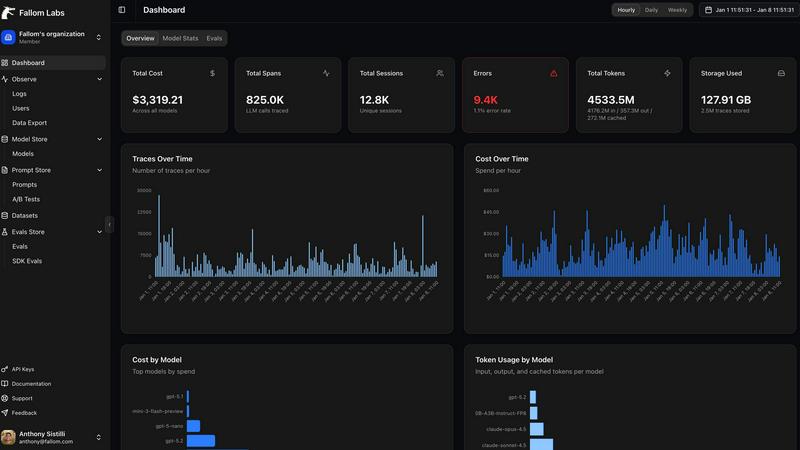
Fallom is your AI's sidekick, giving you real-time visibility into every LLM call and cost.
Last updated: February 28, 2026

Stop guessing which AI model slaps for your task, just describe it and we'll benchmark 100+ models for you in minutes, no API keys needed.
Last updated: March 26, 2026
Visual Comparison
Fallom
OpenMark AI
Feature Comparison
Fallom
End-to-End LLM Call Tracing
Get the full, unedited story of every interaction. Fallom captures the complete lifecycle of each LLM call, showing you the exact prompt that went in, the response that came out, any tool or function calls the agent made (with arguments and results), token counts, latency at every step, and the calculated cost. It's like having a DVR for your AI, so you can replay any moment to see what really happened when that customer got a bizarre answer.
Real-Time Cost Attribution & Dashboards
Stop the budget panic. Fallom breaks down your AI spending in real-time, showing you costs per model, per user, per team, or per customer. The live dashboard gives you an at-a-glance view of usage and spend, so you can spot a runaway agent or an unexpectedly expensive model before your CFO spots it on the bill. Allocate costs, set up chargebacks, and optimize for efficiency without the spreadsheet nightmares.
Enterprise Compliance & Privacy Controls
Built for the real world where rules matter. Fallom comes packed with features to keep you compliant and secure. That includes full, immutable audit trails for every LLM interaction, detailed input/output logging, model version tracking, and user consent records. Need to handle sensitive data? Flip on Privacy Mode to redact content or log only metadata, keeping your telemetry without capturing confidential info.
Session & User-Level Context Grouping
Debug with the full picture, not just isolated errors. Fallom automatically groups traces by user, session, or customer. This means you can see everything a specific user did in one flow—from their initial question through all the agent's tool calls and LLM hops—making it infinitely easier to understand complex issues and reproduce bugs. It turns a pile of random traces into a coherent user story.
OpenMark AI
Plain Language Task Wizard
Forget writing complex code or JSON configs. You just type out what you want the AI to do, like "extract the invoice total and due date from this messy email" or "write a chill marketing tweet for this new feature." OpenMark's wizard takes your vibe and builds the benchmark. It's the ultimate "explain it to me like I'm five" but for setting up professional-grade LLM tests. No PhD in prompt engineering required.
Real API Cost & Latency Showdown
This ain't about theoretical token prices on a spec sheet. OpenMark makes real API calls to every model and shows you the actual receipt—how much that specific request cost and how long it actually took to come back. You can instantly spot the models that give you 95% of the quality for 50% of the price, or the ones that are weirdly slow. It's all about cost efficiency, not just raw cheapness.
Variance & Consistency Scoring
Any model can have a one-hit-wonder output. OpenMark runs your task multiple times for each model to see the variance. You get to see if Model A nails it 9 times out of 10, or if Model B is a complete wildcard that gives you genius one minute and gibberish the next. This stability check is crucial for shipping something you can actually trust in production, not just a cool demo.
Hosted Benchmarking (No Key Drama)
The biggest flex? You don't need to set up individual API keys for OpenAI, Anthropic, Google, etc., just to compare them. You buy OpenMark credits and it handles all the backend API calls across its massive model catalog. It removes the setup hell and lets you focus purely on the results. It's like having a universal remote for every AI model out there.
Use Cases
Fallom
Debugging Complex AI Agent Workflows
When your multi-step agent gets stuck or gives a nonsense answer, finding the root cause is a needle-in-a-haystack problem. With Fallom's timing waterfall and tool call visibility, you can instantly see which step in the chain (e.g., an LLM call, a database query, a function) failed or was too slow. You get the full context to squash bugs fast and keep your users happy.
Controlling and Optimizing AI Spend
AI costs can spiral faster than a meme coin. Teams use Fallom to get crystal-clear visibility into which features, models, or customers are driving their API bills. By tracking cost per model and per team, you can make data-driven decisions to optimize prompts, switch models for certain tasks, or implement usage quotas, directly protecting your bottom line.
Ensuring Compliance for Regulated Industries
If you're in finance, healthcare, or any field with strict regulations, deploying AI can be scary. Fallom acts as your compliance co-pilot, automatically generating the detailed audit trails, consent records, and model lineage reports you need to prove adherence to standards like SOC 2, GDPR, or the EU AI Act during audits.
Monitoring Production Performance & Reliability
You can't improve what you can't measure. Fallom's real-time dashboard and live tracing let you monitor the health and performance of your AI features in production. Spot latency spikes, track accuracy metrics with built-in evals, and perform safe A/B tests on new models or prompts—all to ensure a smooth, reliable experience for your end-users.
OpenMark AI
Pre-Launch Model Selection
You're about to bake an LLM into your app's new support chatbot. Do you go with GPT-4o, Claude 3.5 Sonnet, or a fine-tuned Llama? Instead of debating in Slack, create a benchmark with real user query examples. Run it. In minutes, you'll have data on which model understands your domain best, responds fastest, and keeps your API bill from being absolutely unhinged.
Validating Cost-Efficiency for a Workflow
Your data extraction pipeline uses an expensive top-tier model for every single document. Is that overkill? Use OpenMark to test your extraction prompts against cheaper, smaller models. You might find one that's just as accurate for simple forms, letting you save the big guns for only the complex cases and slashing your monthly costs dramatically.
Checking Output Consistency for Agents
Building a multi-agent system? You need to know if your "reasoning" agent is consistently logical, not just occasionally brilliant. Benchmark the same reasoning task 20 times. OpenMark's variance charts will show you if the agent's output is stable or all over the place, preventing a production nightmare where your agent randomly decides 2+2=5.
Comparing New Model Releases
A new model drops every Tuesday. Does it live up to the marketing for your tasks? Don't just read the blog post. Quickly clone an existing benchmark task in OpenMark, add the new hotness to the lineup, and run a head-to-head. See if it's actually worth switching your integration over to, based on your own real-world criteria.
Overview
About Fallom
Alright, let's break it down. Fallom is like the ultimate control room for your AI chaos. If you're building with LLMs or AI agents, you know the vibe: stuff works in dev, then you ship to production and suddenly it's a black box of mystery calls, weird latencies, and surprise bills from OpenAI. Fallom fixes that. It's an AI-native observability platform built from the ground up to give you X-ray vision into every single LLM call happening in your apps. We're talking full end-to-end tracing that shows you the prompts, the outputs, the tool calls, the tokens, the latency, and even the exact per-call cost. It's designed for devs, product managers, and data science teams who are tired of flying blind and need a single source of truth for their AI ops. With a slick dashboard that serves up context by session, user, or customer, you can debug weird agent behavior in seconds, monitor live usage, and see exactly who or what is burning through your API budget. Plus, it's built on OpenTelemetry, so you can instrument your stack in, like, five minutes flat. And for the enterprise crowd sweating compliance? Fallom's got your back with audit trails, logging, model versioning, and consent tracking to keep you chill with regulations like GDPR and the EU AI Act. In short, it's your wingman for building reliable, cost-controlled, and high-performance AI applications.
About OpenMark AI
Alright, let's cut through the AI hype. You're building something cool, you need a brainy LLM to power it, and you're staring down a list of 100+ models like it's a Netflix menu with nothing good. Which one actually works for your thing? Which won't cost an arm and a leg? And will it flake out on you after one good response? That's the chaos OpenMark AI fixes. It's your personal AI model testing arena. You just describe your task in plain English (or any language, really), hit go, and it runs that exact prompt against a ton of different models—GPTs, Claude, Gemini, open-source stuff, you name it—all at once. No juggling a million API keys, no coding a bespoke testing suite. You get back a side-by-side breakdown of who's the real MVP, based on actual cost per API call, speed, scored quality, and—this is the kicker—consistency across multiple runs. So you see if a model is reliably smart or just got lucky once. It's built for devs and product teams who are done guessing and need hard data before they ship. Think of it as due diligence for your AI feature, so you don't end up picking the flashy model that totally bombs on your specific use case.
Frequently Asked Questions
Fallom FAQ
How difficult is it to integrate Fallom into my existing app?
It's stupid easy. Fallom is built on the OpenTelemetry standard, so you just install one lightweight SDK. The website boasts you can get "OTEL Tracing in Under 5 Minutes." You add a few lines of code, and it automatically starts capturing traces from your LLM calls, regardless of whether you use OpenAI, Anthropic, Google, or others. No major refactoring needed.
Does Fallom store all my prompt and response data?
You have control. Fallom is designed to capture the full telemetry for observability. However, for sensitive applications, you can enable "Privacy Mode." This lets you redact specific data or run in a metadata-only logging configuration, where you still get all the timing, cost, and structural info without storing the actual content of prompts and responses.
Can I use Fallom to compare different LLM models?
Absolutely! Fallom is built for this. The platform lets you run A/B tests by splitting traffic between different models (like GPT-4o and Claude 3.5). You can then compare their performance side-by-side in the dashboard—looking at cost, latency, and even custom evaluation scores—to make informed decisions about which model to use for each task.
What if my team is small and just starting with AI?
Fallom is for you, too. The platform offers a free tier to get started, which is perfect for small teams or projects. You can start tracing your agents, see costs, and debug issues without an upfront commitment. It scales with you, so as your AI usage grows into enterprise-level, the compliance and advanced features are already there.
OpenMark AI FAQ
Do I need my own API keys to use OpenMark?
Nope, that's the whole vibe! You use OpenMark credits. We handle all the API calls to the different model providers (OpenAI, Anthropic, Google, etc.) on our backend. You just describe your task, pick models from our catalog, and run the benchmark. No key management, no separate bills, no setup friction.
How is this different from reading benchmark leaderboards?
Those public leaderboards test models on generic tasks like trivia or math. OpenMark is for your specific, unique task. It's the difference between reading a car's top speed and actually test-driving it on your commute route. You get results based on your actual prompts, your data, and your definition of "good."
What kind of tasks can I benchmark?
Pretty much anything you'd use an LLM for! Common ones are classification, translation, data extraction, Q&A, summarization, creative writing, code generation, and testing RAG pipelines. If you can describe it, you can probably benchmark it. The platform is built for real-world, task-level testing.
How does the scoring and "variance" thing work?
When you run a benchmark, we execute your prompt multiple times for each model (configurable). We then score each output based on your task's goal. The results show you the average score, but more importantly, they show the spread—like a distribution chart. A tight cluster means the model is consistent. A wide spread means it's unpredictable, which is a huge red flag for production use.
Alternatives
Fallom Alternatives
So you're vibing with Fallom, the AI observability platform that's basically a crystal ball for your LLMs and agents. It's the go-to dev tool for teams who need to track every API call, debug weird outputs, and stop their cloud bill from going absolutely viral. It's a whole mood for managing AI ops. But let's keep it a buck, sometimes the fit isn't perfect. Maybe the pricing feels a bit extra for your startup grind, or you're locked into a specific cloud ecosystem and need a native tool. Other times, you might just crave a different UI flavor or need a hyper-specific feature that's not in the current stack. It's all about finding your app's soulmate. When you're scrolling through options, don't just look at the shiny features. Peep the integration game—how easy is it to actually plug and play? Check the transparency on pricing (no one likes surprise invoices). And most importantly, see if it scales with your vibe, from your solo developer era to a full enterprise glow-up. The goal is to keep your AI smooth, monitored, and budget-friendly.
OpenMark AI Alternatives
So you're checking out OpenMark AI, the slick web app that lets you pit a hundred-plus LLMs against your specific task to see who's actually worth the API call. It's a dev tool built for the crucial pre-launch hustle, giving you the real tea on cost, speed, quality, and consistency before you commit code. People scope out alternatives for all the usual reasons. Maybe the pricing model doesn't vibe with your current workflow, or you need a feature that's still on the roadmap. Sometimes you just prefer a different interface or need it to play nicer with your existing tech stack. When you're shopping around, keep your eyes on the prize. You want something that gives you actual, unfiltered results from real API calls, not marketing fluff. The whole point is to nail down the best bang-for-your-buck model for your exact use case, so prioritize tools that deliver transparent, actionable data on performance and stability.