
Playwriter vs Tailride
Side-by-side comparison to help you choose the right AI tool.

Playwriter
Take full control of your Chrome with Playwriter, the CLI and extension that lets agents browse with all your logins and tools intact.
Last updated: March 18, 2026

Tailride
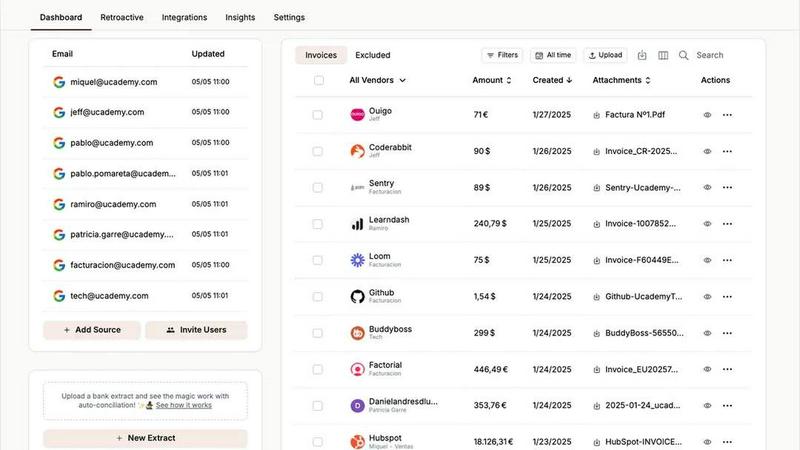
Tailride automates your invoice and receipt chaos straight from your inbox, saving you hours of manual work.
Last updated: February 28, 2026
Visual Comparison
Playwriter

Tailride
Feature Comparison
Playwriter
Real Browser Access
Playwriter lets your agents use your actual browser, meaning they can access all your saved logins, cookies, and extensions. No more fresh Chrome instances or limited tools—just pure functionality right where you need it.
Full Automation API
With Playwriter, you get the full Playwright API through a single execute tool. This means you can run any Playwright code without dealing with wrappers or additional complexities, making it easy to integrate into your workflow.
Collaborative Browsing
Collaboration is a breeze with Playwriter. You can see everything your agent does in real-time, so when it hits a snag, you’re there to jump in and help. It's like tag-teaming a project, where the agent handles the boring stuff and you tackle the tricky bits.
Debugger and Live Editing
Playwriter comes with an integrated debugger that allows you to set breakpoints and edit code on the fly. This means you can tweak your scripts in real time, making it easier to troubleshoot and improve your automation efforts.
Tailride
Inbox Scanning
Tailride's inbox scanning feature is a game-changer. It scours your inbox for invoices, regardless of whether they're in PDF format, images, or embedded in emails. With this feature, you can find any invoice in seconds—no more digging through countless emails. It's like having a personal assistant dedicated to keeping your financial documents organized.
Online Portals
With Tailride, you can extract invoices from any website, making it super easy for business owners who have to juggle tons of tasks. Forget about the hassle of collecting invoices manually; Tailride does it for you. This feature ensures that you never miss an invoice, providing a seamless experience that frees up your time for more important things.
AI Processing
Tailride leverages cutting-edge AI to intelligently recognize and process documents. This means you can customize AI rules for automatic categorization, ensuring that everything is sorted the way you want it. The AI processing feature works tirelessly in the background, making sure your invoices and receipts are always up-to-date and accurately categorized.
Reconciliation
Tailride takes the stress out of bank reconciliation. It matches your transactions with the corresponding invoices, helping you quickly identify any missing documents. This feature is crucial for maintaining financial accuracy and ensures that your accounting records are always in check, making your accountant's job way easier.
Use Cases
Playwriter
Streamlined Testing
If you're a developer or tester, Playwriter can automate your testing process by controlling your browser and running tests on your web applications in real-time, ensuring everything works as it should.
Data Extraction
Need to scrape data from websites? Playwriter makes it easy to automate that process without the hassle of logging in or dealing with bot detection, saving you time and effort in gathering information.
Captcha Solving
When your agent hits a captcha, you can step in and solve it right there. This collaborative approach means you won't get stuck, and your automation can continue smoothly after you've handled the hiccup.
Real-Time Monitoring
Set up Playwriter to monitor web activity and gather insights as it happens. You can keep an eye on changes, performance, and user interactions in real-time, making it a powerful tool for data-driven decisions.
Tailride
For Busy Professionals
If you're a busy professional juggling multiple tasks, Tailride is your best friend. It automatically scans your inbox for invoices, saving you the headache of manually sorting through emails. Now, you can focus on what really matters while Tailride handles the boring stuff.
For Accountants with Multiple Clients
Tailride is a lifesaver for accountants managing over ten clients. With its ability to connect to multiple inboxes and extract invoices from various sources, accountants can streamline their workflows and provide faster service to their clients. Less time on paperwork means more time for strategic planning.
For Small Business Owners
Small business owners can leverage Tailride to keep their finances organized without breaking the bank. With the ability to extract invoices from online portals and scan emails, Tailride helps you maintain an accurate financial overview, so you can make informed business decisions without the stress of manual data entry.
For Teams Collaborating on Finances
Tailride is perfect for teams working together on financial management. You can invite colleagues to connect their inboxes, ensuring that everyone stays in the loop regarding incoming invoices. This collaborative feature eliminates the chaos of missed documents and improves overall workflow efficiency.
Overview
About Playwriter
Playwriter is your new best friend in the world of automation and browser control. Forget the days of clunky bots that can’t navigate the web properly. With Playwriter, you can give your AI agents access to your actual browser session, complete with all your logins, extensions, and cookies. It's like getting a VIP pass to the web for your agents, allowing them to interact with sites just like you would. The standout feature? A Chrome extension that connects seamlessly, paired with a powerful CLI that lets you run Playwright code directly in your existing browser. It's perfect for developers, testers, or anyone looking to streamline their web interactions. Plus, it's open-source and MIT licensed, so you can tweak it to fit your needs. Say goodbye to the limitations of headless browsing and hello to a more efficient way to automate your web tasks.
About Tailride
Tailride is the ultimate AI-powered accounting automation platform that takes the hassle out of managing invoices and receipts. Imagine connecting directly to your email inbox and letting smart tech do the heavy lifting for you. Tailride automatically detects, extracts, and processes invoices and receipts from your emails and attachments, making tedious bookkeeping a thing of the past. Perfect for busy professionals and accountants juggling multiple clients, Tailride not only saves you time but also minimizes the risk of missing crucial documents. With its Chrome extension, you can extract invoices from over 20 platforms like Amazon and Meta Ads with just a click. Tailride's customizable AI rules ensure that your transactions are automatically categorized, while seamless integrations with QuickBooks, Xero, and Google Drive keep your financial data organized and accessible. Plus, its powerful bank reconciliation features let you match transactions to invoices effortlessly. Say goodbye to manual data entry and hello to hundreds of hours saved every month!
Frequently Asked Questions
Playwriter FAQ
How does Playwriter connect to my browser?
Playwriter connects through a Chrome extension that establishes a WebSocket to a local relay, allowing your agents to communicate directly with your existing browser session.
Is Playwriter secure to use?
Yes! Your data never leaves your machine, and all connections are local. You don’t need to worry about remote servers or accounts, ensuring your browsing sessions remain private and secure.
Can I use Playwriter with other tools?
Absolutely! Playwriter works with any MCP client like Cursor, Claude, or VS Code, giving you flexibility in how you integrate it into your existing workflow.
Is Playwriter really open source?
Yes! Playwriter is open source and MIT licensed, meaning you can check out the code, modify it, and contribute to its development if you want to.
Tailride FAQ
How does Tailride protect my email data?
Tailride maintains strict privacy protocols. Your emails never leave your inbox, ensuring that your sensitive financial information is secure while still allowing the platform to extract necessary data.
Can I use Tailride with different email clients?
Absolutely! Tailride is compatible with all email clients, including Gmail, Outlook, and any service using IMAP. No matter your email setup, Tailride has got you covered.
How quickly can I start using Tailride?
Getting started is a breeze! You can connect your email and begin extracting invoices in under 40 seconds. Tailride streamlines the onboarding process so you can dive right into automating your accounting.
What if I have physical receipts that I need to process?
Not an issue! Tailride allows you to take pictures of your physical receipts and send them to their Telegram or WhatsApp bot. These receipts will be processed and added to your dashboard, keeping everything organized and in one place.
Alternatives
Playwriter Alternatives
Playwriter is a rad automation tool that lets you control Chrome with AI through a Command Line Interface (CLI) or a more user-friendly Model Control Protocol (MCP). It's all about giving your AI agents a real browser experience, so they can work with your actual logged-in sessions, extensions, and all that good stuff. This means better performance and fewer headaches when it comes to bot detection. Users often start searching for alternatives because they might be looking for better pricing, specific features that fit their workflow, or compatibility with their favorite platforms. When diving into the world of alternatives, it's crucial to consider factors like ease of use, the range of features offered, support for your preferred environment, and of course, the price tag. Finding the right fit can make all the difference in your automation journey!
Tailride Alternatives
Tailride is this super slick AI-powered platform that automates your invoice and receipt game, pulling them straight from your email inbox and web portals. Think of it as your personal finance assistant that works its magic using intelligent document recognition. It’s perfect for those who want to ditch the manual data entry grind and streamline their accounting process, all while integrating seamlessly with tools like QuickBooks and Xero. But hey, not everyone vibes with the same tool, right? Users often search for alternatives to Tailride because they might be looking for something that fits their budget better or has a feature set that aligns more closely with their unique needs. When hunting for that perfect replacement, keep an eye out for pricing, ease of use, integration capabilities, and whether it offers the specific features you can’t live without.