
Prompt Builder vs Quitlo
Side-by-side comparison to help you choose the right AI tool.

Prompt Builder
Stop wasting hours and tokens rewriting prompts for different AIs, just build, test, and reuse them in one place.
Last updated: April 13, 2026

Quitlo's AI calls canceled customers to get the real churn story, not just a survey checkbox.
Last updated: March 4, 2026
Visual Comparison
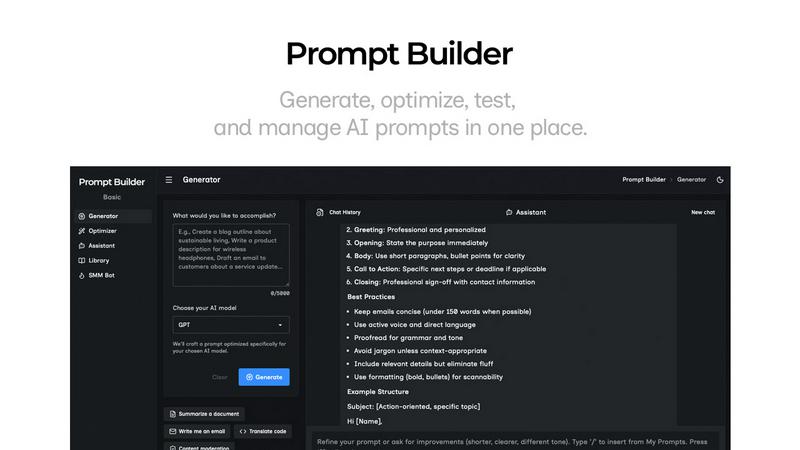
Prompt Builder
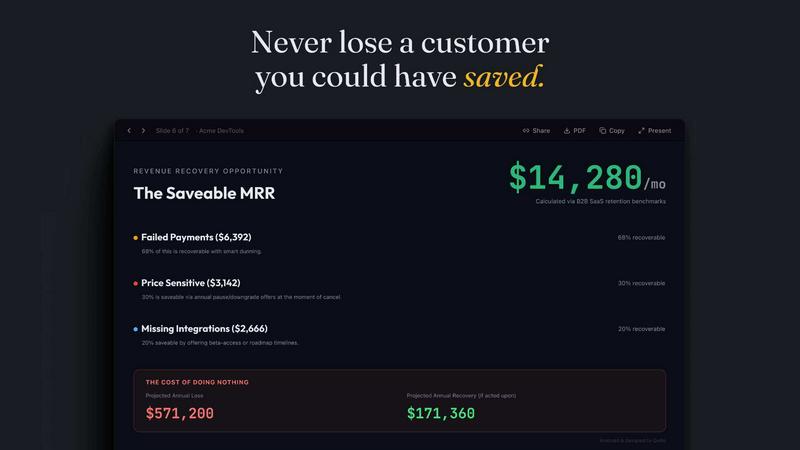
Quitlo
Feature Comparison
Prompt Builder
Prompt Generator
This is your main squeeze. You just describe your task in normal human words, pick which AI model you're targeting (like Gemini, Claude, or GPT), and bam—it gives you a solid, structured first draft of a prompt that actually speaks that model's language. It's like having a cheat code. You can then jump straight into the chat to tweak it, save the best versions, and never start from scratch again. It's the fastest way to go from a half-baked idea to a ready-to-run prompt.
Prompt Assistant
Stop tab-hopping like a maniac. The Assistant lets you run and test your prompts right inside Prompt Builder. Got a prompt from the Generator or your Library? Fire it up here. You can have full conversations, iterate with follow-ups, and keep everything organized in a clean chat thread. It supports a bunch of models (Grok, DeepSeek, etc.) so you can test cross-platform. All your best chat results can be pinned and saved, so your genius isn't lost in the void.
Prompt Optimizer
Got a prompt that's kinda mid? Paste it in here (or grab one from your Library), and the Optimizer will remix it into a better version. It focuses on adding clarity, nailing down constraints, fixing the output format, and throwing in examples. You get a history of all your optimizations and can pin your favorites. One click lets you send the upgraded prompt straight to the Assistant to see if it slaps. It's like a prompt editor on steroids.
Prompt Library & Community
This is your personal hall of fame for prompts. Every prompt you generate, optimize, or save from a chat lives here, searchable and filterable. But it's also a treasure trove of Community Prompts—pre-made templates from other users that you can snag and adapt for your own projects. Find a banger for writing LinkedIn carousels? Save it to your Library and run it anytime. It turns your random prompt wins into a reusable, scalable asset.
Quitlo
Live AI Churn Conversations
This isn't your grandma's survey form. Quitlo's AI engages customers in real, adaptive 2-minute conversations, either by voice or text. It listens and asks intelligent follow-up questions on the fly, turning a grumpy "pricing" into a full story like "pricing because my boss forced us onto HubSpot." It's the difference between a shrug and a strategy, capturing nuance and context that static forms completely miss.
Automated Signal Detection
Quitlo is always on watch. It automatically detects key customer signals across their entire lifecycle without you lifting a finger. This includes when someone hits cancel, submits a low NPS/CSAT score, has a payment fail, or goes radio silent after onboarding. It catches these moments of truth and instantly triggers the right conversation, so you never miss a chance to understand or intervene.
Structured, Actionable Intelligence
No more deciphering cryptic feedback. After every conversation, Quitlo's AI analyzes the dialogue and delivers a structured summary straight to your tools like Slack or Jira. This isn't a raw transcript; it's a digested intel report highlighting the exact churn reason, customer sentiment, competitor mentions, a clear save opportunity rating, and a suggested next step. It turns conversation into immediate, actionable insight.
Five Integrated Entry Points
Quitlo isn't a one-trick pony. The same powerful AI conversation engine plugs into five critical moments: Cancel Flows, Surveys (like NPS), Payment Recovery, post-onboarding Check-Ins, and even Win-Back campaigns 90 days after churn. This means you get consistent, deep intelligence whether a customer is leaving, struggling, or has already left, all from one unified platform.
Use Cases
Prompt Builder
Content Creation & Social Media
Drowning in content calendars? Use the SMM Bot feature. Feed it a brief, tell it the platform (like TikTok or LinkedIn), and get platform-ready posts, hooks, and hashtags. Refine the tone in chat, save your winning formula to your Library, and never stare at a blank "What should I post?" screen again. It's a cheat code for social managers and creators.
Rapid Prototyping & Ideation
Need to brainstorm 10 startup names, outline a blog post, or draft product specs? Jot down your messy idea in the Generator, get a structured prompt, and use the Assistant to rapidly iterate. You can cycle through different AI models to get varied perspectives, save every interesting output, and build a library of creative starters. Perfect for entrepreneurs and product folks.
Technical Prompt Engineering
For devs and power users who need precise, reliable outputs for coding, data analysis, or system prompts. Use the Optimizer to tighten up your technical instructions, add strict constraints and output formats, then test them rigorously in the Assistant. Save your perfected, model-specific prompts in the Library to ensure your AI tools perform consistently every single time.
Learning & Skill Development
Trying to get better at prompt engineering itself? Prompt Builder is the ultimate training wheel. See how a simple idea gets transformed into a model-tuned prompt. Use the Community Library to reverse-engineer successful prompts from others. Test the same task across different models in the Assistant to learn their quirks. It's a hands-on lab to level up your AI communication skills fast.
Quitlo
Replacing Traditional Exit Surveys
Tired of 8% response rates and useless "pricing" answers? Embed Quitlo's AI conversation into your cancellation flow. Instead of a dead-end form, customers get a chance to have a quick, human-like chat. You'll uncover the real, often salvageable reasons behind cancellations, like feature gaps or internal politics, turning a loss into a save opportunity.
Investigating Low NPS/CSAT Scores
When a detractor score comes in, you usually have zero context. Quitlo automatically reaches out to these customers for a quick check-in conversation. The AI gently probes to understand the root of their frustration, giving your team the detailed feedback needed to fix issues before they lead to churn, directly from the source.
Recovering Failed Payments
A failed payment is a major churn red flag, but automated dunning emails are impersonal and often ignored. Quitlo initiates a friendly, conversational follow-up via text or voice to understand if it's a simple card update, a budgeting issue, or a sign of deeper dissatisfaction, helping you recover revenue and the relationship.
Winning Back Lost Customers
The story doesn't end at churn. Quitlo can automatically reach out to customers who left 90 days ago for a win-back conversation. This isn't a spammy email; it's a genuine check-in to see if their situation has changed (e.g., "Is that new enterprise platform working out?"), uncovering opportunities to re-engage and win back lost revenue.
Overview
About Prompt Builder
Alright, let's cut the fluff. You know that feeling when you're trying to get an AI to do something cool, but your prompts are whack and you're just burning tokens on garbage outputs? Yeah, we've all been there. Prompt Builder is your new digital bestie that fixes all that. It's basically a full-stack prompt engineering playground. You start by just vibing in plain English—like, "yo, write a sick email to get more beta testers"—and it instantly crafts a pro-level prompt tuned specifically for the AI model you're using, whether that's GPT, Claude, Gemini, or like a dozen others. No more copy-pasting and rewriting the same thing for different bots.
But it's not just a one-trick generator. This is your all-in-one workspace. You get a built-in chat (the "Assistant") to test and refine your prompts in real-time, an "Optimizer" to level up your existing prompts, and a "Library" to save all your greatest hits so you're not losing that golden version in a messy chat history. It's for anyone who's tired of the prompt struggle—content creators, developers, marketers, students—anyone who wants to stop guessing and start getting consistent, fire results from their AI. Stop spending hours crafting; start shipping in seconds.
About Quitlo
Quitlo is the ultimate sidekick for B2B SaaS teams who are tired of watching customers ghost them without a word. It's the first Churn Intelligence Platform that actually gets the full story. Forget those sad, one-word answers from exit surveys that tell you nothing. Quitlo replaces that broken system with real, empathetic AI conversations that happen over voice or text. It automatically spots when a customer is about to bounce—like when they cancel, give a low score, or a payment fails—and jumps into action. Its AI doesn't just ask one question; it has a genuine, two-minute chat, asking smart follow-ups to dig out the real reason behind the drama. Within minutes, you get a crystal-clear summary in your Slack or Jira, breaking down the churn reason, the customer's vibe, if a competitor was name-dropped, and exactly how you might save the deal. For teams losing revenue and sleep over customers they don't understand, Quitlo turns a confusing data point into a concrete playbook for retention. It's like having a super-sleuth on your team, 24/7. Plus, if you're freaking out about Delighted shutting down, Quitlo is your panic button—it does everything Delighted did, but adds AI voice convos to the mix.
Frequently Asked Questions
Prompt Builder FAQ
What AI models does Prompt Builder work with?
It works with basically all the big players and then some. We're talking GPT (OpenAI), Claude (Anthropic), Gemini (Google), Llama (Meta), Mistral, DeepSeek, Grok (xAI), Perplexity, and Cohere. The Generator tailors prompts for each one, and the Assistant lets you run chats with many of them directly. So you're covered.
Is there a free plan?
Heck yes! You can start for free with 25 Assistant requests per month, no credit card needed. This lets you try the Prompt Generator, test drives in the Assistant, and explore the Library. It's a solid way to see if it vibes with your workflow before you commit to a paid plan.
How is this better than just using ChatGPT or Claude directly?
Great question. Using a raw AI chat is like freehand drawing. Prompt Builder gives you the stencils, rulers, and undo button. It structures your chaos into effective prompts from the start, saves every version so you don't lose work, and lets you test across models without juggling 10 tabs. It's about consistency, reuse, and saving you hours of "uh, how do I word this?" frustration.
Can I use it with my team?
While the provided context focuses on individual use, features like the shareable Prompt Library are a gateway to team use. Saving optimized, model-specific prompts to a shared library means your whole squad can use the same high-quality prompts, ensuring consistent output quality and saving everyone from reinventing the wheel. It's a force multiplier.
Quitlo FAQ
How is Quitlo different from a survey tool like Delighted?
Survey tools like Delighted (RIP) are great for collecting scores and simple feedback, but they stop there. You get a "what" (a low score) but rarely the "why." Quitlo is the missing layer. It uses the score as a trigger to start an AI-powered conversation that uncovers the full, contextual story. Plus, it adds AI voice follow-ups, which surveys simply can't do.
Is the AI conversation really just a robot voice?
Nope, it's way more sophisticated than that. It's an adaptive, empathetic AI agent designed to have a natural, two-way dialogue. It listens to the customer's response and asks relevant follow-up questions in real-time to dig deeper. The goal is to mimic a thoughtful human conversation, not sound like a cold, robotic IVR system.
What if a customer doesn't want to talk?
Totally fine! The invitation to chat is always optional. Quitlo is about creating a better, more human alternative to boring forms. Some customers will prefer to just type or select a reason, and that's okay. The platform is designed to engage those who are willing to share more, capturing deep insights you'd otherwise never get.
Where does the conversation intelligence go?
Immediately after the chat, a structured summary is sent to the tools your team lives in, like Slack, Microsoft Teams, or Jira. This summary distills the key intel: churn reason, sentiment, competitor info, and a save opportunity score with a suggested action. This means the right person can act on it within minutes, not days.
Alternatives
Prompt Builder Alternatives
So you're looking for something like Prompt Builder, huh? That's the vibe. It's basically your all-in-one prompt engineering sidekick, a digital workshop where you can cook up, tweak, test, and stash AI prompts for all the big models. It's for anyone trying to get their AI to stop giving mid responses and actually spit out fire. People hunt for other options for all sorts of reasons. Maybe the price tag doesn't fit your budget, or you need it to play nice with a specific app you live in. Some folks just want a simpler, bare-bones tool, while others are chasing that one killer feature they heard about somewhere else. It's all about finding what clicks for your specific workflow and wallet. When you're scrolling through alternatives, keep your eyes peeled for a few key things. Check what AI models it supports—you don't want to be locked out of your favorite. See how easy it is to actually test and iterate on your prompts. And definitely scope out how it lets you organize and reuse your prompt gems. The goal is to save you time, not create more busywork.
Quitlo Alternatives
Quitlo is basically your AI-powered churn detective for B2B SaaS. It's in the AI assistant and customer support tech space, using real conversations to figure out why customers bounce instead of relying on those useless, ignored surveys. People hunt for alternatives for all the usual reasons. Maybe the budget's tight, or they need a tool that plugs into a super niche tech stack. Sometimes a team just vibes better with a pure text-based bot or wants a totally different set of bells and whistles. When you're shopping around, don't just look at the price tag. Peep how it actually gets the info—is it another boring form, or does it have a convo? Check what apps it plays nice with and if it gives you the real, actionable tea fast enough for your team to actually do something about it.