
BarBrain vs ScanNerd
Side-by-side comparison to help you choose the right AI tool.

BarBrain
BarBrain slashes your inventory time in half, giving you accurate counts and more time to chill and focus on what really matters.
Last updated: April 4, 2026

ScanNerd turns your PDFs and images into high-quality scanned copies for free, all without any hardware hassle.
Last updated: March 1, 2026
Visual Comparison
BarBrain

ScanNerd
Feature Comparison
BarBrain
Parallel Counting on Multiple Devices
With BarBrain, you can count inventory on several iOS and Android devices at the same time. This feature is a total time-saver, allowing you to knock out your inventory checks quicker than ever, making sure your staff can focus on what they do best—serving customers.
Extensive Product Catalog
BarBrain boasts a product catalog with over 30,000 items ranging from spirits, soft drinks, and wines to food and various consumables. You can count everything seamlessly, and the BarBrain team is ready to help you set up your own product catalog to ensure nothing is overlooked.
Automated Inventory Reports
Forget about the hassle of manual entry and double-checking numbers. With BarBrain, you get an automatically generated inventory report after each count. This means you can wave goodbye to tedious post-count tasks and get straight to making informed business decisions based on reliable data.
User-Friendly Food and Beverage Entry
Entering food and beverage items has never been easier with BarBrain's filling level slider. Just a tap is all it takes to record both opened and unopened items, making inventory checks a breeze when it comes to tracking your kitchen and bar stock.
ScanNerd
Instant Conversion
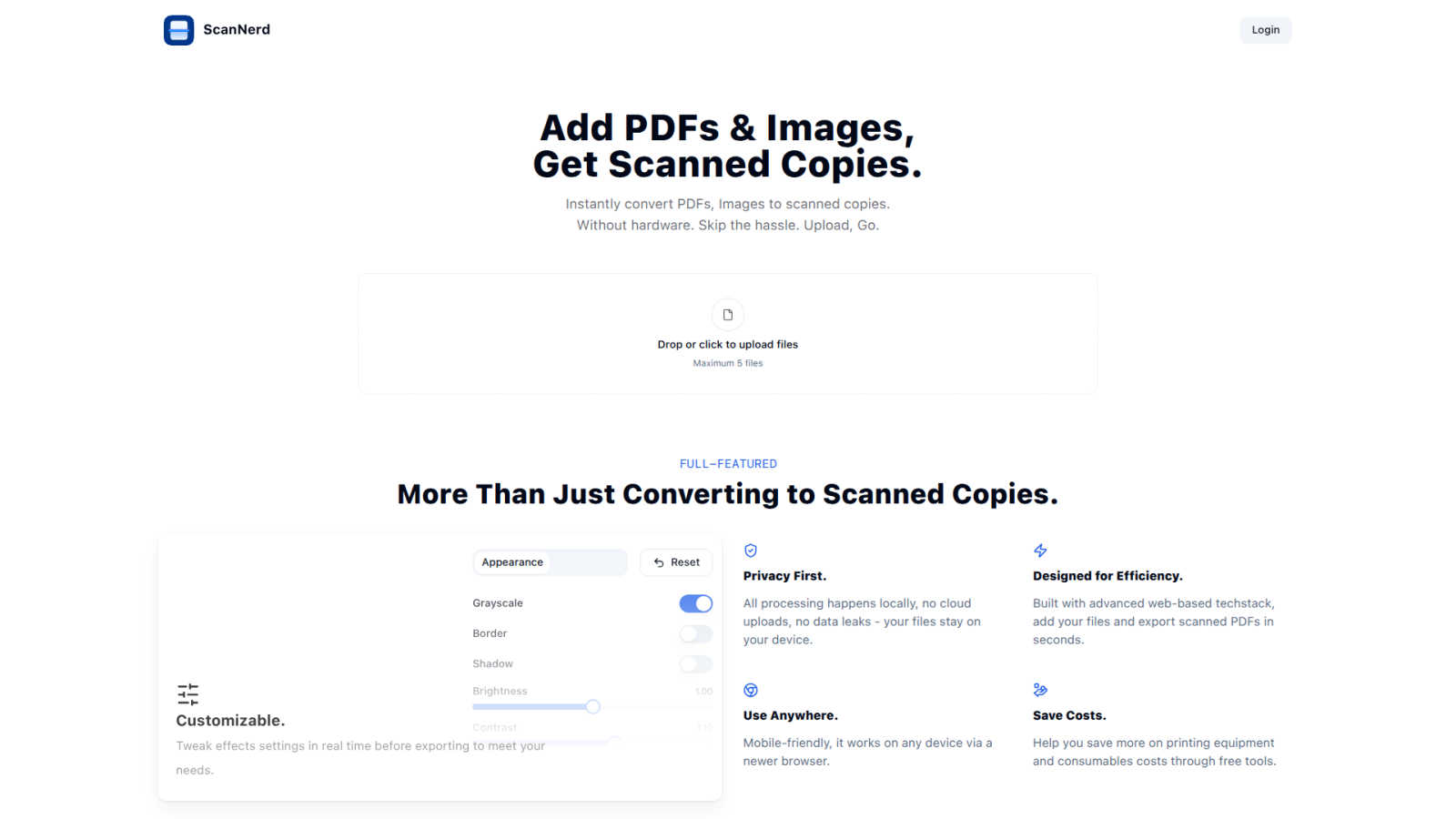
With ScanNerd, you can toss in up to 5 PDFs or images and watch the magic happen! The tool converts them into stylish scanned copies in just seconds. No waiting around, just instant results, making it perfect for those last-minute projects or reports.
Customizable Effects
Why settle for a basic scan when you can customize? Tweak settings like brightness, contrast, and even add a bit of blur or noise to achieve that perfect retro feel. Preview your adjustments in real-time so you can see exactly how your scans will turn out before you hit export.
Privacy First
ScanNerd takes your privacy seriously. All processing is done locally on your device, meaning no cloud uploads or data leaks. Your files are yours, and they stay on your device, safe from prying eyes.
Mobile-Friendly Design
No matter where you are, ScanNerd has got you covered. It works seamlessly on any device with a modern browser, so you can convert your documents on the go. Whether you’re on your phone or tablet, creating high-quality scanned copies is just a few taps away.
Use Cases
BarBrain
Single Venue Operations
For owners of single bars or restaurants, BarBrain simplifies inventory management, ensuring that you can track stock efficiently and save on labor costs. This means more time for you to focus on creating amazing customer experiences.
Multi-Location Management
Managing several venues? BarBrain provides a consistent inventory process across all locations, giving you a holistic view of your inventory usage. This unified approach helps you optimize operations and reduce waste across the board.
Hotel Food & Beverage Inventory
In hotels, managing inventory can get complicated with various food and beverage outlets. BarBrain streamlines the process, allowing you to handle inventory for multiple locations easily and maintain accurate records for all your offerings.
Cost Reduction and Margin Protection
By utilizing BarBrain, businesses can significantly reduce errors in inventory counts and financial reporting. This accuracy directly translates to better margin protection, ensuring that every dollar spent on inventory is accounted for and working towards your bottom line.
ScanNerd
Student Projects
Students can easily convert their essays, research papers, and presentations into scanned documents that look polished and professional. Impress your professors with that sleek, high-end scanner vibe without the hassle.
Professional Reports
For professionals needing to send out documents that stand out, ScanNerd makes it easy to convert reports into stylish scanned PDFs. Make your files look crisp and sharp, helping you maintain that professional image.
Retro Vibe for Social Media
Want to give your photos or designs a vintage touch for your social media? Use ScanNerd to convert your images into scanned copies that add a unique flair to your posts. Stand out from the crowd with that nostalgic look!
Quick Document Sharing
Need to send a quick document but want it to look legit? Scan your PDFs or images using ScanNerd, and share them instantly. It’s fast, easy, and ensures your files look their best, no matter the context.
Overview
About BarBrain
BarBrain is a game-changer in the world of inventory management for bars and restaurants, designed specifically for the hospitality industry. Say goodbye to the tedious hours spent counting bottles and cross-referencing spreadsheets that never seem to add up. BarBrain's intuitive platform understands the unique needs of hospitality operators, streamlining the inventory process like never before. With BarBrain, you can count stock in minutes, accurately calculate the cost per drink or dish, and keep an eye on waste and shrinkage in real time. This magic happens without the need for extensive training or dealing with complicated features that generic software throws your way. Whether you own a cozy cocktail bar or manage a bustling multi-location restaurant chain, BarBrain equips you with the precise numbers you need to protect your margins and ensure you're not leaving money on the table. Join the 1,000+ satisfied customers who have transformed their inventory management with BarBrain and take back control of your time and profits.
About ScanNerd
ScanNerd is your ultimate sidekick for giving your digital documents that oh-so-classic scanned look without the need for any fancy hardware. Imagine converting your PDFs and images into scans that look like they came straight from a high-end scanner, all while chilling on your device. No uploads, no sign-ups, and definitely no annoying interruptions. Whether you're a student trying to jazz up a project, a professional sending out reports, or just someone who wants to add a retro vibe to their digital files, ScanNerd is here to save the day. It's designed for efficiency, working its magic in mere seconds while keeping your documents safe and sound on your device. Plus, it’s a total game-changer for anyone looking to save money on printing costs, making it a must-have tool in your digital arsenal. Say goodbye to the old-school scanning hassles and hello to the future of document conversion with ScanNerd!
Frequently Asked Questions
BarBrain FAQ
How does BarBrain reduce inventory time?
BarBrain cuts your inventory time by over 75%, allowing you to complete counts in minutes rather than hours. This efficiency not only saves time but also lowers labor costs associated with inventory management.
Can BarBrain be used on multiple devices?
Absolutely! BarBrain supports counting on multiple iOS and Android devices simultaneously, making it easier for your team to get accurate counts faster.
What kind of products can I track with BarBrain?
You can track a vast range of products with BarBrain, including alcoholic beverages, soft drinks, food items, and even housekeeping supplies. The extensive catalog ensures you're covered across all categories.
Is there any training required to use BarBrain?
Nope! BarBrain is designed to be intuitive and user-friendly, meaning you can start using it effectively without the need for lengthy training sessions or complicated manuals.
ScanNerd FAQ
What's the difference from printing and scanning?
Scanning using ScanNerd creates a digital copy that mimics the look of a printed scan, while printing physically outputs a document on paper. ScanNerd keeps everything digital and stylish, no paper mess involved.
Is it free?
Absolutely! ScanNerd is a free tool, making it accessible for everyone who needs to convert their documents without shelling out cash for expensive hardware.
Which files can be scanned?
ScanNerd supports a variety of file types, mainly focusing on PDFs and images. You can easily upload these formats and convert them into beautifully styled scanned copies.
Is there a file size limit?
Yes, when using ScanNerd, you can upload a maximum of 5 files at a time. However, there are no specific limitations mentioned regarding the size of individual files, making it flexible for your needs.
Alternatives
BarBrain Alternatives
BarBrain is the ultimate sidekick for bar and restaurant owners, tackling the tedious task of inventory management with style. Designed specifically for the hospitality scene, it helps you count bottles and manage stock in a flash, making the dreaded inventory count a breeze. Users often find themselves on the hunt for alternatives when they feel pinned down by pricing, lack of essential features, or if their platform just doesn’t vibe with their needs. When searching for a suitable alternative, think about what features matter most to you—like ease of use, real-time data tracking, and integration with existing systems. Remember, you want something that fits your unique operations, so keep an eye out for tools that simplify your processes and don’t come with a bunch of unnecessary fluff.
ScanNerd Alternatives
ScanNerd is a nifty tool that fits snugly in the design tools category, helping users effortlessly convert their PDFs and images into high-quality scanned copies. It’s like having a scanner in your pocket, minus the bulky hardware. Users often seek alternatives for various reasons such as wanting different features, needing specific platform compatibility, or simply searching for budget-friendly options. When you’re on the hunt for an alternative, consider what features matter most to you, the ease of use, and whether it meets your privacy and security standards. Choosing the right alternative means looking for user-friendliness, local processing capabilities, and a solid reputation for security. After all, nobody wants to compromise on their private files. So, whether you’re a student needing quick document conversion or a professional looking to enhance your presentations, finding a tool that ticks all your boxes will make your life a whole lot easier.