
Nano Banana vs ScanNerd
Side-by-side comparison to help you choose the right AI tool.

Nano Banana
Chat with AI to create and edit absolutely fire images, no skills needed.
Last updated: March 19, 2026

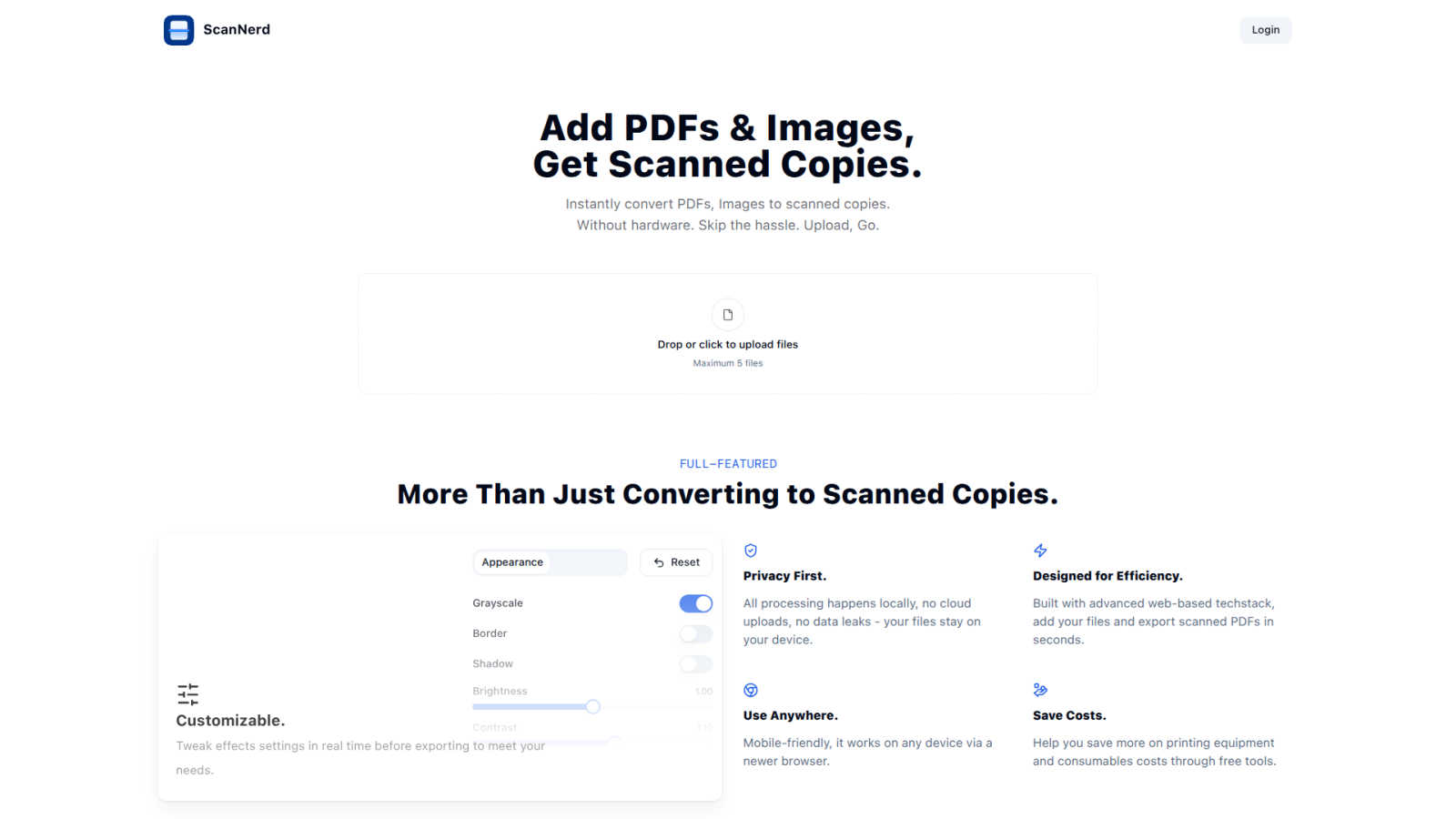
ScanNerd turns your PDFs and images into high-quality scanned copies for free, all without any hardware hassle.
Last updated: March 1, 2026
Visual Comparison
Nano Banana

ScanNerd
Feature Comparison
Nano Banana
Nano Banana Pro (The Big Guns)
This is the flagship model, formerly known as Nano Banana 2, and it's built to flex. It goes beyond basic image gen with powerhouse capabilities like consistent character editing (so your OC looks the same in every scene) and insane scene preservation. It delivers perfect text rendering for posters and mockups, supports up to 4K ultra-resolution for print-quality work, and uses real-world knowledge from models like Gemini to nail details. Basically, if you need pro-level results for commercial work or just want the absolute best output, you roll with Pro.
AI Image Upscaler & Background Remover
Nano Banana isn't just about making new stuff; it's about fixing and enhancing your existing stuff too. The AI Image Upscaler uses smart algorithms to boost your image resolution without making it look like a blurry mess. The AI Background Remover is exactly what it sounds like - a one-click magic wand that zaps backgrounds into oblivion instantly. These specialized tools mean you don't need a separate app for every little task.
Text-to-Image & Advanced Image Edit
The main event! The Text-to-Image feature is where you type your wildest dreams and watch them become reality. But it's not just generation. The platform's advanced editing lets you use text prompts to edit existing images. Want to change the lighting, swap the background, add an object, or alter the style? Just describe the change. It's like having a conversation with your picture to make it better.
Browser Extension & Creative Workflow
For maximum convenience, Nano Banana packs its powers into a Browser Extension, letting you generate and edit images directly from your web browser without switching tabs. Plus, the whole platform is designed as a smooth AI Creation Workbench, giving you control over models, aspect ratios, resolution, and reference images to fine-tune your creations into exactly what you envisioned.
ScanNerd
Instant Conversion
With ScanNerd, you can toss in up to 5 PDFs or images and watch the magic happen! The tool converts them into stylish scanned copies in just seconds. No waiting around, just instant results, making it perfect for those last-minute projects or reports.
Customizable Effects
Why settle for a basic scan when you can customize? Tweak settings like brightness, contrast, and even add a bit of blur or noise to achieve that perfect retro feel. Preview your adjustments in real-time so you can see exactly how your scans will turn out before you hit export.
Privacy First
ScanNerd takes your privacy seriously. All processing is done locally on your device, meaning no cloud uploads or data leaks. Your files are yours, and they stay on your device, safe from prying eyes.
Mobile-Friendly Design
No matter where you are, ScanNerd has got you covered. It works seamlessly on any device with a modern browser, so you can convert your documents on the go. Whether you’re on your phone or tablet, creating high-quality scanned copies is just a few taps away.
Use Cases
Nano Banana
Social Media & Content Creation Grind
You need fire content daily for Instagram, TikTok, or your blog, but you're fresh out of ideas and time. Nano Banana is your secret weapon. Generate unique graphics, design eye-catching posters with perfect text, or create those trendy "3D pop-out" Instagram mockup shots in minutes. Keep your feed looking fresh without a design team.
Marketing & Advertising Mockups
Need to pitch a client or visualize an ad concept ASAP? Nano Banana lets marketers and small biz owners create professional-grade ad mockups, product visuals, and branding materials with simple text prompts. Test different concepts rapidly without waiting for a designer or spending a ton on stock photos.
Design Inspiration & Prototyping
For professional designers and artists, Nano Banana is the ultimate brainstorming buddy. Use it to rapidly generate mood boards, explore different artistic styles (like oil painting or watercolor with perfect style transfer), or create detailed prototypes and wireframes. It breaks creative block and speeds up the initial concept phase.
Personal Projects & Photo Enhancement
Not a pro? No problem! Use Nano Banana to restore old family photos with the AI Upscaler, remove photobombers or ugly backgrounds from your pics, create custom artwork for your home, or generate illustrations for your D&D campaign. It turns personal creativity into something tangible and awesome, just for fun.
ScanNerd
Student Projects
Students can easily convert their essays, research papers, and presentations into scanned documents that look polished and professional. Impress your professors with that sleek, high-end scanner vibe without the hassle.
Professional Reports
For professionals needing to send out documents that stand out, ScanNerd makes it easy to convert reports into stylish scanned PDFs. Make your files look crisp and sharp, helping you maintain that professional image.
Retro Vibe for Social Media
Want to give your photos or designs a vintage touch for your social media? Use ScanNerd to convert your images into scanned copies that add a unique flair to your posts. Stand out from the crowd with that nostalgic look!
Quick Document Sharing
Need to send a quick document but want it to look legit? Scan your PDFs or images using ScanNerd, and share them instantly. It’s fast, easy, and ensures your files look their best, no matter the context.
Overview
About Nano Banana
Alright, let's break it down. Nano Banana is that AI image genie you've been low-key wishing for, but way more powerful than just three wishes. It's a full-blown creative suite that takes your wildest, most random text prompts and turns them into legit professional-grade images and edits. Think of it as having a Photoshop wizard, a graphic designer, and an infinite inspiration board all rolled into one, and you just have to tell it what to do in plain English (or whatever language you dream in). Whether you're a total newbie who can't draw a stick figure or a pro designer looking to speedrun your workflow, Nano Banana is your new bestie. Its core vibe is all about deleting the complexity. Instead of spending hours learning confusing software, you just describe your vision - like "a cyberpunk cat wearing a leather jacket on a neon-lit rainy street" - and boom, the AI handles all the technical gobbledygook. It's perfect for creating ad mockups in seconds, generating unique blog graphics, cooking up social media content, editing photos, or just bringing your daydreams to life. With its advanced model, Nano Banana Pro, you're getting next-level stuff like keeping characters consistent across images, generating razor-sharp 4K pics, and even getting the AI to write clear, crisp text on your images. It's basically your all-access pass to the future of visual creation, no fancy degree required.
About ScanNerd
ScanNerd is your ultimate sidekick for giving your digital documents that oh-so-classic scanned look without the need for any fancy hardware. Imagine converting your PDFs and images into scans that look like they came straight from a high-end scanner, all while chilling on your device. No uploads, no sign-ups, and definitely no annoying interruptions. Whether you're a student trying to jazz up a project, a professional sending out reports, or just someone who wants to add a retro vibe to their digital files, ScanNerd is here to save the day. It's designed for efficiency, working its magic in mere seconds while keeping your documents safe and sound on your device. Plus, it’s a total game-changer for anyone looking to save money on printing costs, making it a must-have tool in your digital arsenal. Say goodbye to the old-school scanning hassles and hello to the future of document conversion with ScanNerd!
Frequently Asked Questions
Nano Banana FAQ
What's the deal with Nano Banana Pro?
Nano Banana Pro is the advanced, goated model in the suite. It's the upgrade that gives you superior results, especially for tricky stuff like keeping a character's look consistent across multiple images, generating super sharp 4K resolution images, and rendering clear, legible text within your pictures. It's designed for when you need top-tier, professional-quality output for commercial projects or just want the best of the best.
Is there a free way to try this?
Heck yes! You can sign up and get started with free credits to test the waters. They often offer a batch of free credits (like 20 to start) so you can play with the tools and even try the Pro model features without needing to whip out your credit card. It's the perfect way to see if the AI vibes with your creativity.
Can I really edit images just by describing the changes?
For real! This isn't just a basic filter app. With Nano Banana's advanced image edit features, you can upload a picture and then use text prompts to instruct the AI on what to change. Think "make the background a sunset," "change his jacket to leather," or "add a spaceship in the sky." The AI interprets your command and executes the edit, which is pretty mind-blowing.
What are "Banana Prompts"?
Banana Prompts is like the community cookbook for awesome AI images. It's a gallery of killer, proven text prompts that other users have created. If you're stuck for ideas or want to see what's possible, you can browse this library, find a prompt you like, and one-click copy it to use in your own creation. It's a huge time-saver and a great way to learn prompt-crafting skills.
ScanNerd FAQ
What's the difference from printing and scanning?
Scanning using ScanNerd creates a digital copy that mimics the look of a printed scan, while printing physically outputs a document on paper. ScanNerd keeps everything digital and stylish, no paper mess involved.
Is it free?
Absolutely! ScanNerd is a free tool, making it accessible for everyone who needs to convert their documents without shelling out cash for expensive hardware.
Which files can be scanned?
ScanNerd supports a variety of file types, mainly focusing on PDFs and images. You can easily upload these formats and convert them into beautifully styled scanned copies.
Is there a file size limit?
Yes, when using ScanNerd, you can upload a maximum of 5 files at a time. However, there are no specific limitations mentioned regarding the size of individual files, making it flexible for your needs.
Alternatives
Nano Banana Alternatives
So, you've heard the buzz about Nano Banana, that slick AI tool that lets you cook up and tweak images just by chatting with it. It's the go-to for anyone wanting to make pro-looking visuals without needing a degree in Photoshop. It's squarely in the AI image generator and editor category, basically your creative sidekick for anything visual. But hey, maybe you're browsing for something else. Totally get it. Maybe the subscription price isn't your vibe, or you need a specific feature it doesn't have. Perhaps you're all about that open-source life, or you just want to see what else is poppin' in the wild world of AI art. It's smart to shop around. When you're on the hunt for a different tool, think about what matters to you. Is it raw power for crazy-detailed images, or is it a dead-simple, no-fuss interface? Do you need it to nail a specific style, or work seamlessly with other apps you use? Getting clear on your non-negotiables will help you find your perfect match.
ScanNerd Alternatives
ScanNerd is a nifty tool that fits snugly in the design tools category, helping users effortlessly convert their PDFs and images into high-quality scanned copies. It’s like having a scanner in your pocket, minus the bulky hardware. Users often seek alternatives for various reasons such as wanting different features, needing specific platform compatibility, or simply searching for budget-friendly options. When you’re on the hunt for an alternative, consider what features matter most to you, the ease of use, and whether it meets your privacy and security standards. Choosing the right alternative means looking for user-friendliness, local processing capabilities, and a solid reputation for security. After all, nobody wants to compromise on their private files. So, whether you’re a student needing quick document conversion or a professional looking to enhance your presentations, finding a tool that ticks all your boxes will make your life a whole lot easier.