
Proofapp vs ScanNerd
Side-by-side comparison to help you choose the right AI tool.

Proofapp
Proofapp lets you drop visual feedback right on your website, speeding up design reviews and cutting out email chaos.
Last updated: March 4, 2026

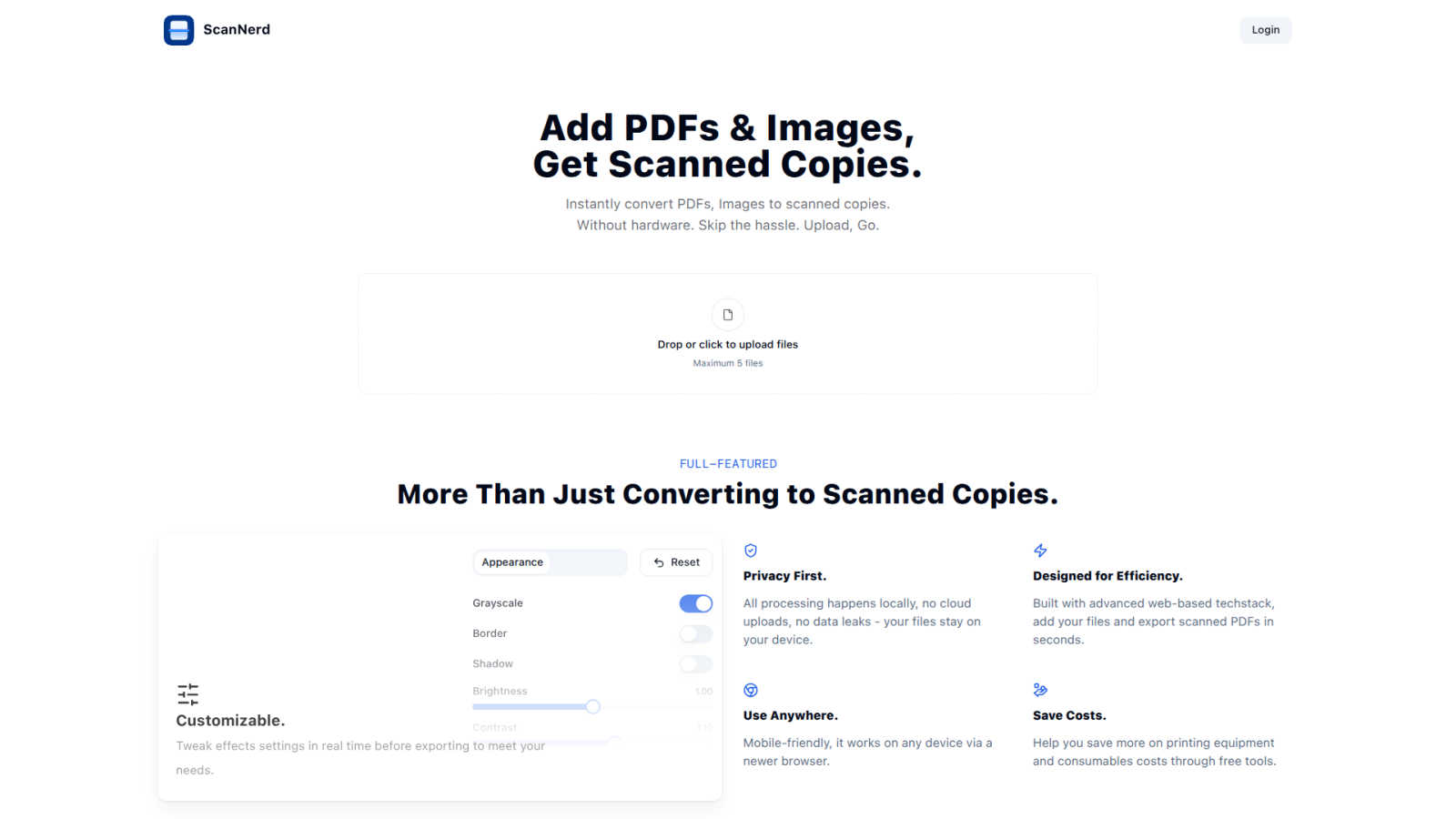
ScanNerd turns your PDFs and images into high-quality scanned copies for free, all without any hardware hassle.
Last updated: March 1, 2026
Visual Comparison
Proofapp

ScanNerd
Feature Comparison
Proofapp
Visual Commenting
With Proofapp, feedback has never been easier. Click anywhere on your website to leave contextual comments right on the screenshot. No more vague descriptions like "top left, under the nav." Just pin your thoughts exactly where they belong, and watch clarity reign supreme.
Multi-Breakpoint Testing
Capture the full experience of your website at both desktop and mobile breakpoints effortlessly. Proofapp automatically generates screenshots across devices, so you can ensure your designs look flawless everywhere, without the hassle of manual checks.
Secure Share Links
Need to share your project with clients? No problem! Generate secure, expirable links that keep your work safe while allowing clients to view and comment. They don’t even need an account to give you their input, making it super easy for everyone involved.
Real-time Collaboration
Say goodbye to waiting around for feedback. With Proofapp, you can see comments from your team in real-time. This allows for quick replies, easy resolutions, and a seamless tracking of progress, making collaboration feel like a breeze rather than a chore.
ScanNerd
Instant Conversion
With ScanNerd, you can toss in up to 5 PDFs or images and watch the magic happen! The tool converts them into stylish scanned copies in just seconds. No waiting around, just instant results, making it perfect for those last-minute projects or reports.
Customizable Effects
Why settle for a basic scan when you can customize? Tweak settings like brightness, contrast, and even add a bit of blur or noise to achieve that perfect retro feel. Preview your adjustments in real-time so you can see exactly how your scans will turn out before you hit export.
Privacy First
ScanNerd takes your privacy seriously. All processing is done locally on your device, meaning no cloud uploads or data leaks. Your files are yours, and they stay on your device, safe from prying eyes.
Mobile-Friendly Design
No matter where you are, ScanNerd has got you covered. It works seamlessly on any device with a modern browser, so you can convert your documents on the go. Whether you’re on your phone or tablet, creating high-quality scanned copies is just a few taps away.
Use Cases
Proofapp
Freelancers
Freelancers can leverage Proofapp to collect client feedback efficiently without breaking the bank. With visual comments and organized feedback, they can save hours on every project, presenting a polished image to clients while keeping revisions to a minimum.
Small Dev Teams
Small development teams will find Proofapp to be a game-changer for streamlining client approvals. It eliminates enterprise-level pricing while offering the tools needed to manage projects effectively, ensuring everyone is on the same page.
Design Teams
Design teams can benefit massively from Proofapp's visual feedback system. By pinning precise comments directly on designs, they can eliminate confusion and foster a more productive review process, ultimately delivering better results faster.
Marketing Teams
Marketing teams can utilize Proofapp to review landing pages and campaigns visually with their entire crew. This allows for quick iterations and collaborative input, ensuring that campaigns are not only visually appealing but also aligned with the overall strategy.
ScanNerd
Student Projects
Students can easily convert their essays, research papers, and presentations into scanned documents that look polished and professional. Impress your professors with that sleek, high-end scanner vibe without the hassle.
Professional Reports
For professionals needing to send out documents that stand out, ScanNerd makes it easy to convert reports into stylish scanned PDFs. Make your files look crisp and sharp, helping you maintain that professional image.
Retro Vibe for Social Media
Want to give your photos or designs a vintage touch for your social media? Use ScanNerd to convert your images into scanned copies that add a unique flair to your posts. Stand out from the crowd with that nostalgic look!
Quick Document Sharing
Need to send a quick document but want it to look legit? Scan your PDFs or images using ScanNerd, and share them instantly. It’s fast, easy, and ensures your files look their best, no matter the context.
Overview
About Proofapp
Proofapp is the ultimate visual feedback and website review platform that makes collaborating on design projects as easy as pie. Whether you’re a designer, developer, or a client trying to make sense of things, Proofapp has got your back. Just toss in any website URL, and poof! Proofapp captures slick desktop and mobile screenshots, ready for your input. Say goodbye to those endless email chains that make you want to pull your hair out. With Proofapp, you can pin comments directly onto your designs, reply in threads, attach files, and resolve feedback without needing an account. This means that everyone stays in sync, and no one’s left scratching their heads over vague feedback. Plus, features like real-time notifications, Slack integration, and multi-page support ensure that you’re not just organized but also working smart. With a generous free tier to boot, Proofapp is perfect for freelancers, agencies, and anyone who needs to streamline their feedback process. It’s all about keeping things visual, organized, and actionable, so you can focus on what really matters—getting your projects shipped.
About ScanNerd
ScanNerd is your ultimate sidekick for giving your digital documents that oh-so-classic scanned look without the need for any fancy hardware. Imagine converting your PDFs and images into scans that look like they came straight from a high-end scanner, all while chilling on your device. No uploads, no sign-ups, and definitely no annoying interruptions. Whether you're a student trying to jazz up a project, a professional sending out reports, or just someone who wants to add a retro vibe to their digital files, ScanNerd is here to save the day. It's designed for efficiency, working its magic in mere seconds while keeping your documents safe and sound on your device. Plus, it’s a total game-changer for anyone looking to save money on printing costs, making it a must-have tool in your digital arsenal. Say goodbye to the old-school scanning hassles and hello to the future of document conversion with ScanNerd!
Frequently Asked Questions
Proofapp FAQ
How does Proofapp improve my feedback process?
Proofapp revolutionizes feedback by making it visual and contextual. Instead of going back and forth through emails, you can pin comments directly on your designs, which saves time and reduces misunderstandings.
Is there a free trial available?
Absolutely! Proofapp offers a generous 2-month free trial with full access, and you don't even need to whip out your credit card. It's the perfect way to see how it can transform your workflow.
Do clients need an account to leave feedback?
Nope! Clients can leave feedback without creating an account. You can simply share a secure link with them, and they can add their comments directly on the site, making it super convenient.
What kind of security does Proofapp offer?
Proofapp takes security seriously. It offers role-based permissions, audit logs, and secure data handling to ensure that your project remains safe and confidential, giving you peace of mind while you collaborate.
ScanNerd FAQ
What's the difference from printing and scanning?
Scanning using ScanNerd creates a digital copy that mimics the look of a printed scan, while printing physically outputs a document on paper. ScanNerd keeps everything digital and stylish, no paper mess involved.
Is it free?
Absolutely! ScanNerd is a free tool, making it accessible for everyone who needs to convert their documents without shelling out cash for expensive hardware.
Which files can be scanned?
ScanNerd supports a variety of file types, mainly focusing on PDFs and images. You can easily upload these formats and convert them into beautifully styled scanned copies.
Is there a file size limit?
Yes, when using ScanNerd, you can upload a maximum of 5 files at a time. However, there are no specific limitations mentioned regarding the size of individual files, making it flexible for your needs.
Alternatives
Proofapp Alternatives
Proofapp is a dope visual feedback and website review platform designed to make life easier for designers, developers, and clients. It's all about that smooth collaboration vibe, letting you upload website URLs and snag instant screenshots—both desktop and mobile. This tool lives in the design realm, helping you keep feedback tidy and actionable while ditching the chaos of scattered emails. So why are folks on the hunt for alternatives? Maybe it’s about finding a better price point, more features that fit their unique workflow, or simply a platform that jives better with their team’s needs. When shopping around for the right alternative, keep your eyes peeled for user-friendly interfaces, solid integrations, and features that cater to your specific design processes. You want something that not only gets the job done but also fits seamlessly into your creative hustle.
ScanNerd Alternatives
ScanNerd is a nifty tool that fits snugly in the design tools category, helping users effortlessly convert their PDFs and images into high-quality scanned copies. It’s like having a scanner in your pocket, minus the bulky hardware. Users often seek alternatives for various reasons such as wanting different features, needing specific platform compatibility, or simply searching for budget-friendly options. When you’re on the hunt for an alternative, consider what features matter most to you, the ease of use, and whether it meets your privacy and security standards. Choosing the right alternative means looking for user-friendliness, local processing capabilities, and a solid reputation for security. After all, nobody wants to compromise on their private files. So, whether you’re a student needing quick document conversion or a professional looking to enhance your presentations, finding a tool that ticks all your boxes will make your life a whole lot easier.