
Outbid vs SubtitlesFast
Side-by-side comparison to help you choose the right AI tool.

Outbid sends you Upwork jobs in under 60 seconds with AI proposals so you can apply first and win more gigs.
Last updated: March 19, 2026

SubtitlesFast
Burn stylish subtitles into your videos in under five minutes, no cap.
Last updated: March 1, 2026
Visual Comparison
Outbid

SubtitlesFast
Feature Comparison
Outbid
Lightning-Fast Telegram Alerts
This is the core magic. Outbid's bots are glued to Upwork, scanning for new gigs every 60 seconds. The moment a job that fits your filters goes live, you get a direct message in your Telegram app. No email to check, no app to open. It's in your pocket, instantly. While everyone else is waiting for their hourly email digest, you're already pasting your proposal. It's the ultimate speed hack for a platform where being early is half the battle won.
AI-Powered Proposal Drafts
No more staring at a blank screen trying to sound clever. For every single job alert, Outbid's AI cooks up a personalized proposal draft on the spot. It reads the job description, checks out your skills and bio, and writes a relevant intro that actually makes sense. It's not some generic copy-paste trash. You get a solid starting point that you can copy, add your personal flair to, and submit in like one minute flat. It turns proposal writing from a chore into a quick edit.
Smart & Sassy Job Filtering
You won't get spammed with garbage. Outbid lets you set up smart filters so you only see the jobs that are actually worth your time. Filter by your specific skills, minimum budget you'll accept, client history, and even experience level required. The best part? You can set "Quiet Hours" so you don't get pinged at 3 AM. It's like having a super-efficient assistant who only bothers you with the premium opportunities.
War Room Strategy Mode
For the high-stakes, super-competitive gigs where you need to bring your A-game, activate War Room mode. This lets you give the AI custom instructions, like "sound more authoritative" or "highlight my Shopify experience," and regenerate the proposal until it's perfect. It's your tactical advantage for standing out in a sea of 50+ applications. Think of it as your secret strategy session before you launch your winning pitch.
SubtitlesFast
AI-Powered Auto-Transcription
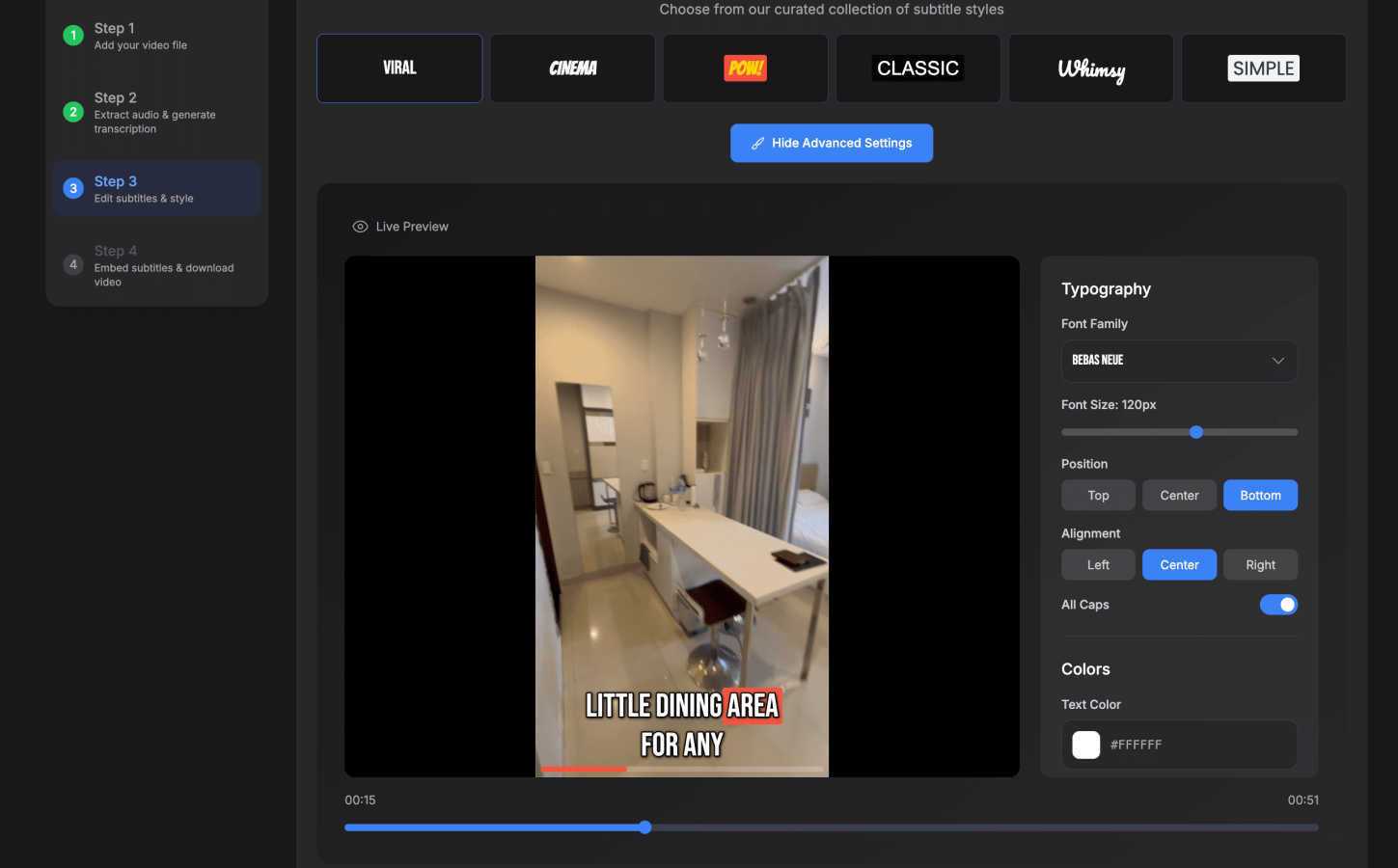
This is the magic sauce. Dump your video file into SubtitlesFast, and its AI gets to work instantly, transcribing your speech into text with scary accuracy. It handles over 50 languages, so whether you're speaking English, Spanish, or something else, you're covered. It even does word-level highlighting, making your subs pop in time with the audio. Forget manual typing; this feature alone saves creators like an hour per video.
30+ Animated Subtitle Styles
Boring, static subtitles are for boomers. SubtitlesFast lets you cook with style. Choose from a library of 30+ animated styles to make your text bounce, fade, or typewriter onto the screen. You can fully customize the fonts, colors, and positioning to match your brand's aesthetic perfectly. It's what makes your content look pro and keeps viewers' eyes glued to the screen.
One-Click, Watermark-Free Export
The grand finale. Once your subs are styled and perfect, you hit one button. SubtitlesFast burns the subtitles directly into your video file, rendering a final MP4 that's primed for any platform—TikTok, YouTube, Instagram Reels, you name it. The best part? Even the free trial lets you export without any gross watermarks plastered all over your hard work. It's the ultimate "no-fuss" finish.
Simple, Built-In Video Editor
Need to do more than just subs? No sweat. SubtitlesFast comes with a clean, intuitive editor that lets you trim your clips, add background music, and throw in extra text or images right on the timeline. It's designed with zero learning curve, so you're not wasting time figuring out a complicated interface. It's everything you need, nothing you don't.
Use Cases
Outbid
The Busy Pro Who Can't Babysit Job Feeds
You're already killing it with current clients, but you want to line up your next project smoothly. You don't have hours to spend scrolling and refreshing. Set up Outbid, forget about it, and let it DM you only when a high-value, perfectly-matched job appears. You can apply between meetings without ever disrupting your deep work flow. It's proactive business development on autopilot.
The Upwork Newbie Struggling to Get That First Client
Starting out is tough. You might have the skills, but writing proposals that convert is a whole other skill. Outbid solves that. It gets you in front of clients first, which massively boosts your visibility, and hands you a well-written draft that shows you understand the job. It removes the two biggest barriers for newcomers: speed and knowing what to say.
The Freelancer in a Super-Competitive Niche
If you're in web dev, design, or writing, you know the pain. Good jobs get 50+ proposals in the first hour. Your amazing proposal gets buried. Outbid ensures you're in that first batch of applicants, dramatically increasing your chance of being seen and read. Combine that with the strategic War Room proposals, and you've got a legit edge over the competition.
The Global Freelancer Chasing the Best Opportunities
Jobs get posted around the clock across different timezones. That perfect US-based client might post while you're sleeping. Outbid doesn't sleep. It monitors 24/7 and will wake you up (figuratively, via Telegram) if a dream job lands, ensuring you never miss a golden opportunity because of your location or timezone. The playing field is finally level.
SubtitlesFast
The Daily Vlogger / Short-Form Creator
If you're posting vlogs, day-in-the-life clips, or skits daily on TikTok/Instagram, speed is everything. SubtitlesFast is your bestie. Record a clip on your phone, upload it, burn in some stylish animated subs, and post—all in under 5 minutes, maybe even from your phone on the toilet (as one user famously noted). It turns content creation from a chore into a seamless, fast-paced workflow.
The Educator & Course Creator
Making tutorials, online courses, or explainer videos? Accessibility and clarity are key. SubtitlesFast ensures your lessons are accessible to everyone, including non-native speakers and viewers in sound-off environments. The accurate AI transcription and easy editing mean you can produce professional, accessible educational content without needing an audio engineering degree.
The Hustling Social Media Marketer
Promoting a brand or product on social? You need engagement, and subtitles deliver. Over 80% of videos are watched on mute. With SubtitlesFast, you can quickly add eye-catching, branded subtitles to your ads and promo videos, ensuring your message is seen and absorbed even without sound. It boosts retention and makes your content look legit.
The Privacy-Conscious Creator
Worried about uploading your raw, unedited videos to some random server? SubtitlesFast runs right in your browser, offering a much cleaner and more private experience than many cloud-based editors. You get fast, high-quality results without your content being processed through a bunch of external servers you don't trust.
Overview
About Outbid
Alright, freelancers, listen up. Tired of refreshing Upwork like it's your day job, only to apply to a gig and see 50+ proposals already there? Yeah, we feel you. That's the grind, and it's brutal. Enter Outbid – your secret weapon to absolutely dominate the Upwork hustle. Think of it as your 24/7 robotic sidekick that never sleeps, eats, or takes a coffee break. It's built by freelancers who got sick of losing jobs to people who were just... faster. Outbid's whole vibe is about speed and smarts. It scans Upwork every single minute, day and night, and the second a job matching your skills pops up, it DMs you on Telegram with the deets. We're talking under 60 seconds. But it doesn't just throw a link at you and dip. Each alert comes with a fire, AI-written proposal draft tailored to THAT specific job and YOUR profile. So you're not just first, you're first with a banger of an application ready to copy, tweak, and send. Whether you're a newbie struggling with what to say or a seasoned pro who's too busy doing actual client work to babysit job feeds, Outbid is your cheat code to win more jobs, save a stupid amount of time, and finally get that bag.
About SubtitlesFast
Yo, creators! Tired of subtitle hell? Spending hours transcribing, syncing, and styling just to get your vids ready for the 'Gram or TikTok? That's a major vibe kill. Enter SubtitlesFast, your new secret weapon for slapping fire, accurate subtitles on your content in, like, literal minutes. This ain't some clunky, overpriced software that needs a PhD to operate. It's a slick, browser-based app built for the daily grind—think vloggers, educators, marketers, and anyone who needs to pump out polished videos without the editing drama. The whole deal is stupidly simple: you upload your clip, the AI auto-transcribes it in over 50 languages, you customize the look with dope animated styles, and you export a ready-to-post video. No watermarks on the free trial, no app downloads, just pure, unadulterated speed. It's built by a dev who actually posts daily, so it cuts all the bloated features you don't need and focuses on what matters: getting your content seen, accessible, and engaging AF. Stop letting subtitles be your bottleneck.
Frequently Asked Questions
Outbid FAQ
How fast are the alerts, for real?
Stupid fast. We're talking under 60 seconds from the moment the job is posted on Upwork to the alert hitting your Telegram. Our bots scan every minute, so you're getting near real-time intel. You'll often be applying before most people even know the job exists.
Do I need to be some tech wizard to use this?
Not at all! If you can use Telegram (which is easier than WhatsApp), you can use Outbid. The whole setup is a 2-minute chat with a bot. You tell it your skills and a quick bio, set your filters, and you're done. No complicated dashboards, no apps to download. It's designed to be zero-friction.
Can I customize the AI proposals or are they generic?
You totally can! The base proposals are already tailored using the job description and your profile. But you're in full control. You can edit them as much as you want before sending. Plus, with the War Room mode (on Pro/Elite plans), you can give the AI specific commands to adjust the tone, focus, and style to match your personal brand.
Is this against Upwork's Terms of Service?
Nope! Outbid is a completely independent tool. It doesn't automate the actual application submission on Upwork for you. It just finds the jobs super fast and helps you write a great proposal. You still do the final step of copying, pasting, and hitting "Submit" on Upwork yourself. It's a productivity tool, not a bot that violates TOS.
SubtitlesFast FAQ
Is there really no watermark on the free trial?
For real, no cap. You can use SubtitlesFast for free and export your finished videos without any SubtitlesFast logo or watermark slapped on them. We want you to see the full value and create legit content from day one. The trial lets you test the entire workflow with zero strings attached.
How does it compare to tools like CapCut or VEED?
Straight up, it's built for speed and simplicity where those tools can be bloated. As users say, it's "faster, cleaner, better than CapCut" for subtitles. We focus on being the best at one thing: incredibly fast, stylish subtitles. We have a simpler UI, no mandatory app download, and a price that doesn't make you weep. Check the comparison table on the site—we stack up pretty well.
What video formats and platforms does it support?
You can upload common video files (like MP4, MOV) and export a final MP4 that's optimized for all the major platforms: TikTok, YouTube, Instagram Reels, X (Twitter), and more. The burned-in subtitles mean they'll play everywhere, no separate SRT file nonsense required.
Do I need to install any software?
Nope! Zero. Zilch. Nada. SubtitlesFast is a 100% browser-based application. You just go to the website, upload your video, and start editing. It works on your phone, tablet, or computer. No downloads, no updates, no eating up your storage space.
Alternatives
Outbid Alternatives
So you've heard about Outbid, the go-to sidekick for hustling freelancers on Upwork. It's basically your personal job-hunting bot, living in the productivity and management tool world. It scans Upwork 24/7 and shoots you instant Telegram alerts with AI-drafted proposals, so you can be first in line and stop missing those golden gigs. But hey, maybe it's not your exact vibe. People look for other options for all sorts of reasons. Maybe the price tag doesn't fit your current hustle, or you're looking for a different feature set. Perhaps you want alerts on a different platform, or you need something that works with more than just Upwork. It's all about finding the right tool for your specific grind. When you're scouting for something else, think about what really matters for your workflow. Do you need lightning-fast alerts? Is a killer AI proposal writer non-negotiable? How important is the platform it sends notifications to? Getting clear on your non-negotiables will help you cut through the noise and find the perfect match for your freelance empire.
SubtitlesFast Alternatives
Alright, so you've heard about SubtitlesFast, the go-to browser app for slapping slick, stylish subtitles on your videos in, like, five minutes flat. It's the MVP for creators, marketers, and anyone who needs to pump out content without getting bogged down in complicated editing software. It's all about speed, style, and getting your videos social-ready with zero drama. But hey, maybe you're browsing for other options. Totally get it. Sometimes you need a different vibe—maybe a different price point, a specific feature for your workflow, or you just wanna see what else is out there. It's smart to shop around before you commit. When you're checking out other tools, keep your eyes peeled for a few key things. Think about what you really need: Is it killer accuracy in auto-transcription? Total control over fonts and animations? Or maybe you need it to work directly inside another app you use? Knowing your non-negotiables will help you find your perfect subtitle sidekick.