
quickseo.ai vs SubtitlesFast
Side-by-side comparison to help you choose the right AI tool.

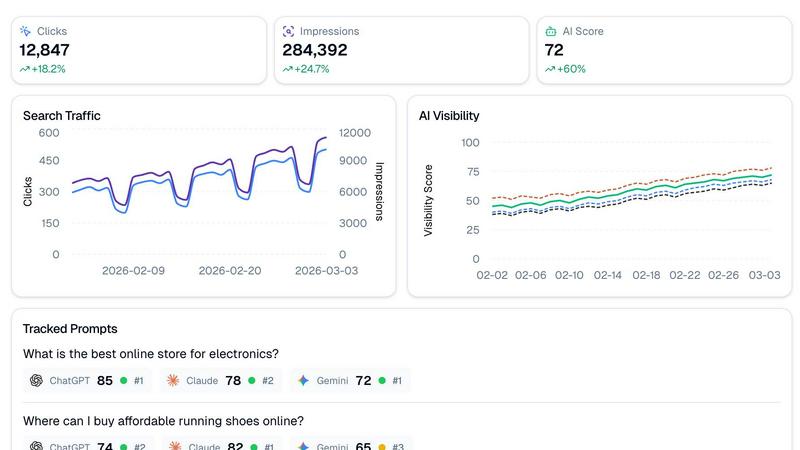
Stop flying blind and see how your brand ranks on Google and AI chatbots like ChatGPT, all in one dashboard.
Last updated: March 11, 2026

SubtitlesFast
Burn stylish subtitles into your videos in under five minutes, no cap.
Last updated: March 1, 2026
Visual Comparison
quickseo.ai
SubtitlesFast
Feature Comparison
quickseo.ai
AI Visibility Scoring & Tracking
This is the main event. QuickSEO.ai gives you a daily visibility score across ChatGPT, Claude, and Gemini, so you can see at a glance if your AI clout is going up or down. It tracks specific prompts (like "best running shoes") and shows you exactly where you rank in the AI's response. It's like having a spy in every major AI chatroom, reporting back on whether your brand gets a shoutout or gets totally ignored.
Unified Google & AI Dashboard
Stop juggling a million tabs. This feature pulls your Google Search Console data (clicks, impressions, CTR, the whole shebang) right next to your AI performance stats. One dashboard to rule them all. See how your traditional search traffic trends alongside your AI visibility, so you can connect the dots and understand your full online performance picture without losing your mind.
Tracked Prompts & Sentiment Analysis
You get to define the battlefield. Input the exact questions your customers are asking AI bots. QuickSEO.ai then monitors those prompts 24/7 and shows you your ranking position for each one. Plus, it doesn't just stop at ranking—it analyzes the sentiment of the AI's mention. Find out if the bots are talking about you like you're the coolest thing ever, or if they're giving you side-eye.
Competitor Intel & Cited Pages
This feature is the ultimate sneak peek. It automatically extracts which competitor brands are showing up in the AI answers to your tracked prompts, so you know who you're really up against. Even better, it shows you which of YOUR specific pages (blog posts, product pages) the AI chatbots are using as sources. This tells you exactly what content is making you an authority in the AI's eyes.
SubtitlesFast
AI-Powered Auto-Transcription
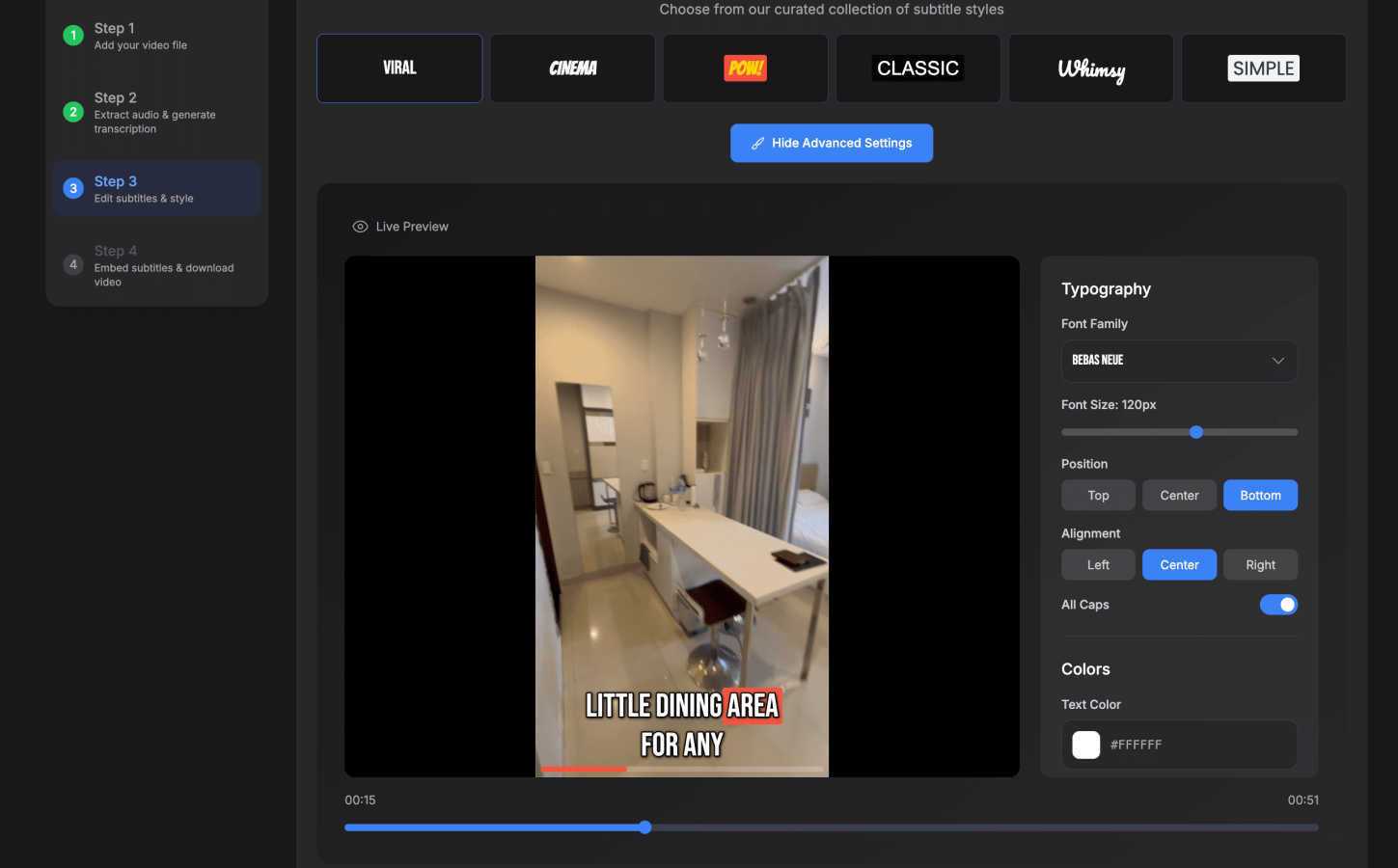
This is the magic sauce. Dump your video file into SubtitlesFast, and its AI gets to work instantly, transcribing your speech into text with scary accuracy. It handles over 50 languages, so whether you're speaking English, Spanish, or something else, you're covered. It even does word-level highlighting, making your subs pop in time with the audio. Forget manual typing; this feature alone saves creators like an hour per video.
30+ Animated Subtitle Styles
Boring, static subtitles are for boomers. SubtitlesFast lets you cook with style. Choose from a library of 30+ animated styles to make your text bounce, fade, or typewriter onto the screen. You can fully customize the fonts, colors, and positioning to match your brand's aesthetic perfectly. It's what makes your content look pro and keeps viewers' eyes glued to the screen.
One-Click, Watermark-Free Export
The grand finale. Once your subs are styled and perfect, you hit one button. SubtitlesFast burns the subtitles directly into your video file, rendering a final MP4 that's primed for any platform—TikTok, YouTube, Instagram Reels, you name it. The best part? Even the free trial lets you export without any gross watermarks plastered all over your hard work. It's the ultimate "no-fuss" finish.
Simple, Built-In Video Editor
Need to do more than just subs? No sweat. SubtitlesFast comes with a clean, intuitive editor that lets you trim your clips, add background music, and throw in extra text or images right on the timeline. It's designed with zero learning curve, so you're not wasting time figuring out a complicated interface. It's everything you need, nothing you don't.
Use Cases
quickseo.ai
For E-commerce Brands Trying to Win AI Recommendations
If you sell products online, you need to be the answer when someone asks "Where can I buy [your product]?" QuickSEO lets you track those exact shopping queries, see if you're the #1 recommended store in ChatGPT, and understand which product pages the AI trusts enough to cite. This is how you capture direct AI-driven sales traffic before your competitors do.
For Content Teams to Prove AI ROI
Bloggers and content creators can use quickseo.ai to see which of their articles are being sourced by AI chatbots. This is massive for proving the value of your content beyond just Google traffic. You can show that your guides and tutorials are becoming foundational resources that even AIs reference, which is a huge authority flex.
For SEO Agencies to Offer a Cutting-Edge Service
Agencies can use this tool to offer a next-level service to clients: full-spectrum visibility reporting. Go beyond the standard Google ranking report and show clients their performance across the entire AI landscape. Track branded vs. non-branded performance and identify new competitor threats emerging in AI responses, making your agency look like absolute visionaries.
For SaaS Companies Monitoring Brand Health
SaaS businesses can track prompts related to their category (like "best SEO analytics tool"). QuickSEO.ai shows you where you rank, what sentiment surrounds your brand mentions, and which competitors are also getting recommended. This is crucial for protecting your brand reputation and market position in the fast-moving AI conversation.
SubtitlesFast
The Daily Vlogger / Short-Form Creator
If you're posting vlogs, day-in-the-life clips, or skits daily on TikTok/Instagram, speed is everything. SubtitlesFast is your bestie. Record a clip on your phone, upload it, burn in some stylish animated subs, and post—all in under 5 minutes, maybe even from your phone on the toilet (as one user famously noted). It turns content creation from a chore into a seamless, fast-paced workflow.
The Educator & Course Creator
Making tutorials, online courses, or explainer videos? Accessibility and clarity are key. SubtitlesFast ensures your lessons are accessible to everyone, including non-native speakers and viewers in sound-off environments. The accurate AI transcription and easy editing mean you can produce professional, accessible educational content without needing an audio engineering degree.
The Hustling Social Media Marketer
Promoting a brand or product on social? You need engagement, and subtitles deliver. Over 80% of videos are watched on mute. With SubtitlesFast, you can quickly add eye-catching, branded subtitles to your ads and promo videos, ensuring your message is seen and absorbed even without sound. It boosts retention and makes your content look legit.
The Privacy-Conscious Creator
Worried about uploading your raw, unedited videos to some random server? SubtitlesFast runs right in your browser, offering a much cleaner and more private experience than many cloud-based editors. You get fast, high-quality results without your content being processed through a bunch of external servers you don't trust.
Overview
About quickseo.ai
Alright, listen up. The game has changed. Google isn't the only player in town anymore. Your customers are straight-up asking ChatGPT, Claude, and Gemini where to find the best stuff, and if you're not in those answers, you're basically invisible to a huge chunk of your audience. That's where quickseo.ai comes in. It's your all-in-one command center that finally smashes together your Google Search Console data with hardcore AI visibility tracking. Think of it as SEO analytics, but for the AI-powered internet. It tells you exactly where your brand pops up when someone asks an AI chatbot a question, gives you a daily score on your AI rep, and shows you all your classic Google metrics. It's built for marketers, SEO pros, and business owners who are tired of flying blind and ready to capture the traffic that's now flowing through AI. No more guessing if you're winning or losing in the AI search arena.
About SubtitlesFast
Yo, creators! Tired of subtitle hell? Spending hours transcribing, syncing, and styling just to get your vids ready for the 'Gram or TikTok? That's a major vibe kill. Enter SubtitlesFast, your new secret weapon for slapping fire, accurate subtitles on your content in, like, literal minutes. This ain't some clunky, overpriced software that needs a PhD to operate. It's a slick, browser-based app built for the daily grind—think vloggers, educators, marketers, and anyone who needs to pump out polished videos without the editing drama. The whole deal is stupidly simple: you upload your clip, the AI auto-transcribes it in over 50 languages, you customize the look with dope animated styles, and you export a ready-to-post video. No watermarks on the free trial, no app downloads, just pure, unadulterated speed. It's built by a dev who actually posts daily, so it cuts all the bloated features you don't need and focuses on what matters: getting your content seen, accessible, and engaging AF. Stop letting subtitles be your bottleneck.
Frequently Asked Questions
quickseo.ai FAQ
How does quickseo.ai track rankings in AI chatbots?
We don't just do a simple search. Our system uses advanced methods to simulate real user conversations with platforms like ChatGPT, Claude, and Gemini, asking the specific prompts you set up. We then analyze the responses to see if your brand is mentioned, where it ranks in the list, and with what tone. It's like having a bunch of bots working around the clock to ask questions about your industry.
Is my Google Search Console data safe?
Totally. We use secure, official API connections (OAuth) to pull your Google Search Console data. We never see your password, and we only access the data you explicitly grant permission for. Your data is encrypted and we don't sell it to third parties. It's just for making your dashboard go brrr.
What's the difference between branded and non-branded tracking?
Branded tracking is when someone searches for your company name directly (like "quickseo.ai reviews"). Non-branded is when they search for a general topic you want to rank for (like "AI visibility tool"). QuickSEO.ai lets you filter all your data by these segments, so you can see how much traffic comes from people who already know you vs. people discovering you for the first time.
Can I track my competitors automatically?
Yep, that's the beauty of it. Once you set up a tracked prompt (e.g., "best CRM software"), our system doesn't just look for you. It automatically identifies and extracts the other brands that the AI chatbots mention in their answers. You get a live list of who's showing up alongside you, so you always know who you're competing with for AI recommendations.
SubtitlesFast FAQ
Is there really no watermark on the free trial?
For real, no cap. You can use SubtitlesFast for free and export your finished videos without any SubtitlesFast logo or watermark slapped on them. We want you to see the full value and create legit content from day one. The trial lets you test the entire workflow with zero strings attached.
How does it compare to tools like CapCut or VEED?
Straight up, it's built for speed and simplicity where those tools can be bloated. As users say, it's "faster, cleaner, better than CapCut" for subtitles. We focus on being the best at one thing: incredibly fast, stylish subtitles. We have a simpler UI, no mandatory app download, and a price that doesn't make you weep. Check the comparison table on the site—we stack up pretty well.
What video formats and platforms does it support?
You can upload common video files (like MP4, MOV) and export a final MP4 that's optimized for all the major platforms: TikTok, YouTube, Instagram Reels, X (Twitter), and more. The burned-in subtitles mean they'll play everywhere, no separate SRT file nonsense required.
Do I need to install any software?
Nope! Zero. Zilch. Nada. SubtitlesFast is a 100% browser-based application. You just go to the website, upload your video, and start editing. It works on your phone, tablet, or computer. No downloads, no updates, no eating up your storage space.
Alternatives
quickseo.ai Alternatives
So you're vibing with what quickseo.ai is putting down—tracking your brand's drip across Google and the big AI chatbots like ChatGPT and Claude—but you're still window shopping. That's totally fair. Maybe the price tag isn't hitting right, or you need a feature they don't serve, or you just wanna see what else is cookin' in the AI SEO analytics space before you commit. When you're on the hunt for a different tool, you gotta know what's on your wishlist. Is it all about that AI visibility score, or do you need deeper Google Search Console juice? Think about your budget, which specific AI platforms you need to stalk (are you a Gemini house or a Claude crew?), and if you need extras like hardcore competitor intel or organizing content into squads. At the end of the day, you want a tool that doesn't just give you data but serves it up in a way you can actually use to snag that sweet, sweet AI traffic. Look for something that makes you feel like you've got the cheat codes to ranking in the chatbots, not just another dashboard to stare at.
SubtitlesFast Alternatives
Alright, so you've heard about SubtitlesFast, the go-to browser app for slapping slick, stylish subtitles on your videos in, like, five minutes flat. It's the MVP for creators, marketers, and anyone who needs to pump out content without getting bogged down in complicated editing software. It's all about speed, style, and getting your videos social-ready with zero drama. But hey, maybe you're browsing for other options. Totally get it. Sometimes you need a different vibe—maybe a different price point, a specific feature for your workflow, or you just wanna see what else is out there. It's smart to shop around before you commit. When you're checking out other tools, keep your eyes peeled for a few key things. Think about what you really need: Is it killer accuracy in auto-transcription? Total control over fonts and animations? Or maybe you need it to work directly inside another app you use? Knowing your non-negotiables will help you find your perfect subtitle sidekick.