
Fallom vs Image to Image AI
Side-by-side comparison to help you choose the right AI tool.

Fallom is your AI's sidekick, giving you real-time visibility into every LLM call and cost.
Last updated: February 28, 2026

Image to Image AI
Transform your images in a snap with AI magic, turning your ideas into stunning visuals effortlessly.
Last updated: February 28, 2026
Visual Comparison
Fallom
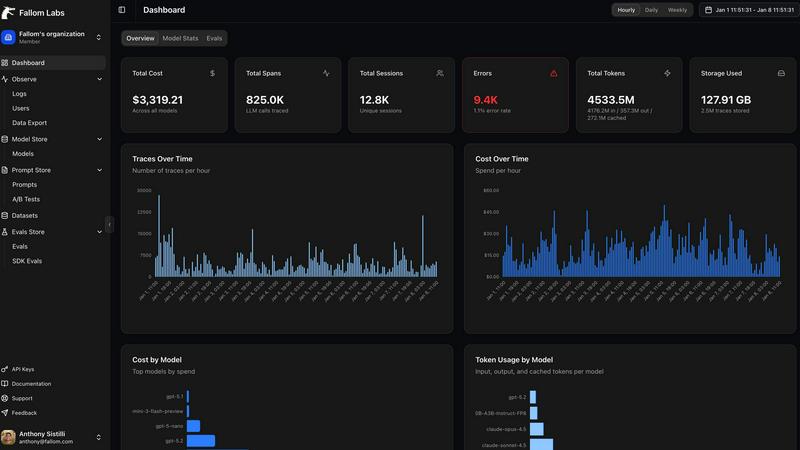
Image to Image AI
Feature Comparison
Fallom
End-to-End LLM Call Tracing
Get the full, unedited story of every interaction. Fallom captures the complete lifecycle of each LLM call, showing you the exact prompt that went in, the response that came out, any tool or function calls the agent made (with arguments and results), token counts, latency at every step, and the calculated cost. It's like having a DVR for your AI, so you can replay any moment to see what really happened when that customer got a bizarre answer.
Real-Time Cost Attribution & Dashboards
Stop the budget panic. Fallom breaks down your AI spending in real-time, showing you costs per model, per user, per team, or per customer. The live dashboard gives you an at-a-glance view of usage and spend, so you can spot a runaway agent or an unexpectedly expensive model before your CFO spots it on the bill. Allocate costs, set up chargebacks, and optimize for efficiency without the spreadsheet nightmares.
Enterprise Compliance & Privacy Controls
Built for the real world where rules matter. Fallom comes packed with features to keep you compliant and secure. That includes full, immutable audit trails for every LLM interaction, detailed input/output logging, model version tracking, and user consent records. Need to handle sensitive data? Flip on Privacy Mode to redact content or log only metadata, keeping your telemetry without capturing confidential info.
Session & User-Level Context Grouping
Debug with the full picture, not just isolated errors. Fallom automatically groups traces by user, session, or customer. This means you can see everything a specific user did in one flow—from their initial question through all the agent's tool calls and LLM hops—making it infinitely easier to understand complex issues and reproduce bugs. It turns a pile of random traces into a coherent user story.
Image to Image AI
Easy Image Upload
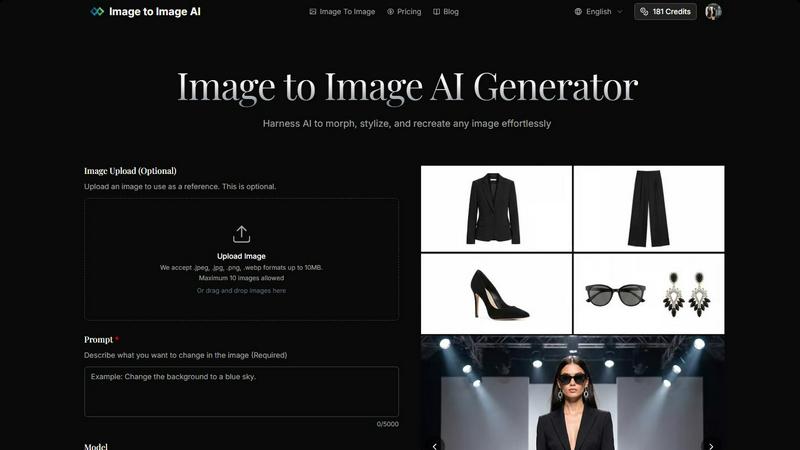
You can easily upload one or multiple images to use as references. It supports popular formats like .jpeg, .jpg, .png, and .webp, so you can get started without any hassle. Plus, with a max size limit of 10MB per image, you can work with just about anything.
Diverse Model Selection
Choose from a variety of AI models tailored for different image generation needs. Whether you need the fast and efficient Google model or the artistic flair of Nano Banana Pro, you have options. Each model brings its unique style, allowing you to pick one that fits your creative vision.
Custom Aspect Ratios and Resolutions
Image to Image AI doesn’t box you in with fixed sizes. You can select from multiple aspect ratios like 1:1, 16:9, or 9:16, and resolutions ranging from 1K to 4K. This flexibility ensures that your images are ready for any platform, be it social media, websites, or print.
Professional-Quality Outputs
No more mediocre visuals! The platform generates high-resolution images that are perfect for commercial use. Whether you’re creating product visuals or marketing materials, you can count on Image to Image AI to deliver stunning results that impress.
Use Cases
Fallom
Debugging Complex AI Agent Workflows
When your multi-step agent gets stuck or gives a nonsense answer, finding the root cause is a needle-in-a-haystack problem. With Fallom's timing waterfall and tool call visibility, you can instantly see which step in the chain (e.g., an LLM call, a database query, a function) failed or was too slow. You get the full context to squash bugs fast and keep your users happy.
Controlling and Optimizing AI Spend
AI costs can spiral faster than a meme coin. Teams use Fallom to get crystal-clear visibility into which features, models, or customers are driving their API bills. By tracking cost per model and per team, you can make data-driven decisions to optimize prompts, switch models for certain tasks, or implement usage quotas, directly protecting your bottom line.
Ensuring Compliance for Regulated Industries
If you're in finance, healthcare, or any field with strict regulations, deploying AI can be scary. Fallom acts as your compliance co-pilot, automatically generating the detailed audit trails, consent records, and model lineage reports you need to prove adherence to standards like SOC 2, GDPR, or the EU AI Act during audits.
Monitoring Production Performance & Reliability
You can't improve what you can't measure. Fallom's real-time dashboard and live tracing let you monitor the health and performance of your AI features in production. Spot latency spikes, track accuracy metrics with built-in evals, and perform safe A/B tests on new models or prompts—all to ensure a smooth, reliable experience for your end-users.
Image to Image AI
Social Media Content Creation
Looking to spice up your social media game? Use Image to Image AI to create unique visuals that stand out in feeds. Generate eye-catching images that reflect your brand’s personality and keep your audience engaged.
Concept Art Development
For artists and designers, this tool is ideal for developing concept art. Upload your sketches or initial ideas and let the AI help you visualize them in stunning detail, making your brainstorming sessions way more productive.
Product Visualization
Whether you’re launching a new product or refreshing an old one, Image to Image AI can help you create professional-quality product shots. Showcase your items with high-resolution images that can attract more customers and drive sales.
Marketing Campaigns
Marketers can leverage this tool to generate multiple variations of campaign assets. Create diverse visual content quickly, allowing you to test different designs and messages without breaking a sweat.
Overview
About Fallom
Alright, let's break it down. Fallom is like the ultimate control room for your AI chaos. If you're building with LLMs or AI agents, you know the vibe: stuff works in dev, then you ship to production and suddenly it's a black box of mystery calls, weird latencies, and surprise bills from OpenAI. Fallom fixes that. It's an AI-native observability platform built from the ground up to give you X-ray vision into every single LLM call happening in your apps. We're talking full end-to-end tracing that shows you the prompts, the outputs, the tool calls, the tokens, the latency, and even the exact per-call cost. It's designed for devs, product managers, and data science teams who are tired of flying blind and need a single source of truth for their AI ops. With a slick dashboard that serves up context by session, user, or customer, you can debug weird agent behavior in seconds, monitor live usage, and see exactly who or what is burning through your API budget. Plus, it's built on OpenTelemetry, so you can instrument your stack in, like, five minutes flat. And for the enterprise crowd sweating compliance? Fallom's got your back with audit trails, logging, model versioning, and consent tracking to keep you chill with regulations like GDPR and the EU AI Act. In short, it's your wingman for building reliable, cost-controlled, and high-performance AI applications.
About Image to Image AI
Image to Image AI is your go-to online platform for transforming images and generating fresh visuals with a sprinkle of creativity. Whether you’re a designer itching to bring concepts to life, a marketer hunting for eye-catching social media content, or just a creative soul ready to experiment, this tool has got your back. It allows you to upload your own images or simply describe what you want using text prompts. The AI then works its magic, producing high-quality images in various aspect ratios and resolutions. You can choose from 9+ models that cater to different styles and preferences, ensuring you get top-notch results every time. With capabilities to generate 2K and 4K imagery, this platform is perfect for anyone looking to elevate their visual content without needing advanced design skills. Plus, you can do all this straight from your browser—easy peasy!
Frequently Asked Questions
Fallom FAQ
How difficult is it to integrate Fallom into my existing app?
It's stupid easy. Fallom is built on the OpenTelemetry standard, so you just install one lightweight SDK. The website boasts you can get "OTEL Tracing in Under 5 Minutes." You add a few lines of code, and it automatically starts capturing traces from your LLM calls, regardless of whether you use OpenAI, Anthropic, Google, or others. No major refactoring needed.
Does Fallom store all my prompt and response data?
You have control. Fallom is designed to capture the full telemetry for observability. However, for sensitive applications, you can enable "Privacy Mode." This lets you redact specific data or run in a metadata-only logging configuration, where you still get all the timing, cost, and structural info without storing the actual content of prompts and responses.
Can I use Fallom to compare different LLM models?
Absolutely! Fallom is built for this. The platform lets you run A/B tests by splitting traffic between different models (like GPT-4o and Claude 3.5). You can then compare their performance side-by-side in the dashboard—looking at cost, latency, and even custom evaluation scores—to make informed decisions about which model to use for each task.
What if my team is small and just starting with AI?
Fallom is for you, too. The platform offers a free tier to get started, which is perfect for small teams or projects. You can start tracing your agents, see costs, and debug issues without an upfront commitment. It scales with you, so as your AI usage grows into enterprise-level, the compliance and advanced features are already there.
Image to Image AI FAQ
How does Image to Image differ from Text to Image generation?
Image to Image focuses on transforming existing images based on your prompts, while Text to Image generates visuals from scratch based on descriptive text. This means you can maintain the original structure while adding your creative flair.
What types of images work best with the transformation?
Clear images with good lighting and resolution tend to yield the best results. High-quality reference images help the AI understand what you're aiming for, leading to more accurate transformations.
How much control do I have over the transformation process?
You have significant control! You can specify the aspect ratio, choose from various models, and adjust transformation parameters to tailor the output to your liking, ensuring your vision comes to life.
How long does the transformation process take?
The transformation process is super quick! You can typically generate multiple variations in seconds, allowing you to explore different creative directions without the wait.
Alternatives
Fallom Alternatives
So you're vibing with Fallom, the AI observability platform that's basically a crystal ball for your LLMs and agents. It's the go-to dev tool for teams who need to track every API call, debug weird outputs, and stop their cloud bill from going absolutely viral. It's a whole mood for managing AI ops. But let's keep it a buck, sometimes the fit isn't perfect. Maybe the pricing feels a bit extra for your startup grind, or you're locked into a specific cloud ecosystem and need a native tool. Other times, you might just crave a different UI flavor or need a hyper-specific feature that's not in the current stack. It's all about finding your app's soulmate. When you're scrolling through options, don't just look at the shiny features. Peep the integration game—how easy is it to actually plug and play? Check the transparency on pricing (no one likes surprise invoices). And most importantly, see if it scales with your vibe, from your solo developer era to a full enterprise glow-up. The goal is to keep your AI smooth, monitored, and budget-friendly.
Image to Image AI Alternatives
Image to Image AI is a web-based platform that lets you flex your creative muscles by transforming reference images or generating fresh visuals straight from text. It's packed with over nine models, allowing for high-quality outputs in various aspect ratios and resolutions. This bad boy fits right into the AI Assistants and Analytics & Data categories, making it a go-to for anyone looking to step up their image game. But hey, we get it—sometimes the vibe just ain't right. Users often seek alternatives for reasons like pricing, specific features they crave, or the need for platform compatibility. When you’re on the hunt for a substitute, consider factors like ease of use, output quality, available models, and how well it fits your specific creative needs. The right tool can make all the difference in your workflow!